I noticed that at least one of the people are running the previous version of Windoze. Possibly updating to the Spring 2018 version will allow the PDF to export as it should.
@RLGL, Im on the latest version on both my systems. The error started 6+ months ago on one system and straight after the update to Windows 10 Pro version 1803 (08 June 18). For some others the error only started after the update…
Do you have any more news @Katya? I got an email 10 days ago from James but haven’t heard anything since…
Hi Sam, I pinged James about it, so hopefully he’ll reach out soon. I’m guessing that there hasn’t been an update on this issue yet, though. I know it’s set as a high priority to fix, but he’ll know more about it.
Easy, i have same problem and here are solution : Right click your scense an Explore all them. And you can Export them to PDF. Hope you like that.
Hi ntt2801, it sounds like you are exporting from Sketchup - the issue in this thread is with exporting PDF from Layout.
Any news Sketchup Team??? @Katya, are you making any progress with this? This issue has been present for me since November / December 2017…
Hi Samyell, I’m pinging James on this, maybe he can give you an update. I don’t think they’ve figured it out yet, though. I think it’s a Windows security settings issue, though, so until we can find out what Windows did, sending the Layout file to another computer to create the PDF is the only idea I can personally think of, and that’s not super practical.
Did we already explore trying different user profiles and checking admin permissions for User Profiles? I’ll ask James…
@JamesE is leading this case now, if anyone has more to add to it.
I have just been able to reproduce the error on a Win 10 machine. I created a non-admin user account then performed the export to pdf and I see the error message.
Please check to see if your user account settings have changed after the Windows update. Not sure why or how this would have happened, but take a look just the same.
Hi Trent, I’d started this thread in January 2018. The issue existed for me using an administrator account, and doing multiple installs with administrator rights and also specifically installing using “run as administrator”.
I’d tried to resurrect my SketchupPro support ticket a few times to try to get some result though in the end, now 18 months on, have cancelled my pro support subscription as the key functionality of the software for me was to be able to lay plans out and export them as PDF at the required layer and PDF resolution settings. I’m happy to provide you with the old support ticket number if you’re looking to get background on what has already been done in the trouble shooting process.
Hi Daniel, thank you, I will let you know if that is necessary.
Trent.
Trent or anyone, has any progress been made on this issue.
I am having the same issue and have been following this thread since it began, please tell me that sketchup has a fix.
After 9 months of waiting for a resolution I don’t think there will be a fix from SU. Looks like we will have to wait until there is a new issue of SU and hope that the problem is resolved when they issue the update.
I have to say that Pro support seems like its money for nothing to me!
Thanks Sam I wish google would have never sold SU.
There may still be installer files of SketchUp Version 8 out there, it would probably be the same if Google still owned SketchUp.
@adamj0112 - Trimble have moved SU on and I agree with @MikeWayzovski, if google still owned it it wouldn’t be as far forward as it is now.
This issue has been around for so long now that I’ve pretty much given up on the SU team providing a solution or any kind of update other than ‘its a high priority issue and we’ll keep you posted’…
1 Like
@samyell Our developers have been working on this but can’t seem to reproduce it now, although they could reproduce it in June. I just got a message about this this morning. They’re wondering if there was a recent Windows update that fixed the security permissions bug by itself. Can you try updating Windows and post if it’s still happening? A Windows Update triggered the issue, so… maybe another one will fix it? If not, we need to find out what that exact Windows Update was and why it’s still blocking permissions.
1 Like
Hi Katya,
I run two systems - the info for my office system is shown below. Both my PCs are set to automatically update. The last update on this PC looks like it took place on 8th June 2018 and reading back through this post the PDF export error started to occur on 11th June on this system.

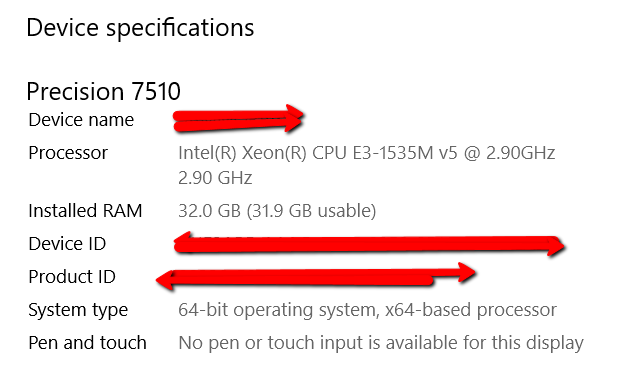
I have not had any notifications to update this PC - the notifications usually pop up on shutdown.
Thanks
Sam
Hi @samyell, you are right, Windows Version 1803 was released months ago (April, actually, but it rolls out gradually, and ther were 3 builds released in June). However, your current build of Version 1803, the OS Build 17134.288, was released August 14th, according to Windows 10 update history
Can you try exporting a PDF again and post the results? We’re wondering if the August 14th version that you have may have fixed it.
[quote=“dmyimcuk, post:7, topic:59813”]
The last successful export I can find was around 17th Nov 2017 - that was on Layout 2018.
Current windows on my computer is
10.0.17134 Build 17134
last updated on 15th Aug 2018