Thanks, @Royce! And since you created that shape in SketchUp for Web, you might want to try this method, also with native tools, on the Web. 
The idea comes from Box’s post.
Modeling a shell niche in SketchUp for Web

Thanks, @Royce! And since you created that shape in SketchUp for Web, you might want to try this method, also with native tools, on the Web.
The idea comes from Box’s post.
Modeling a shell niche in SketchUp for Web
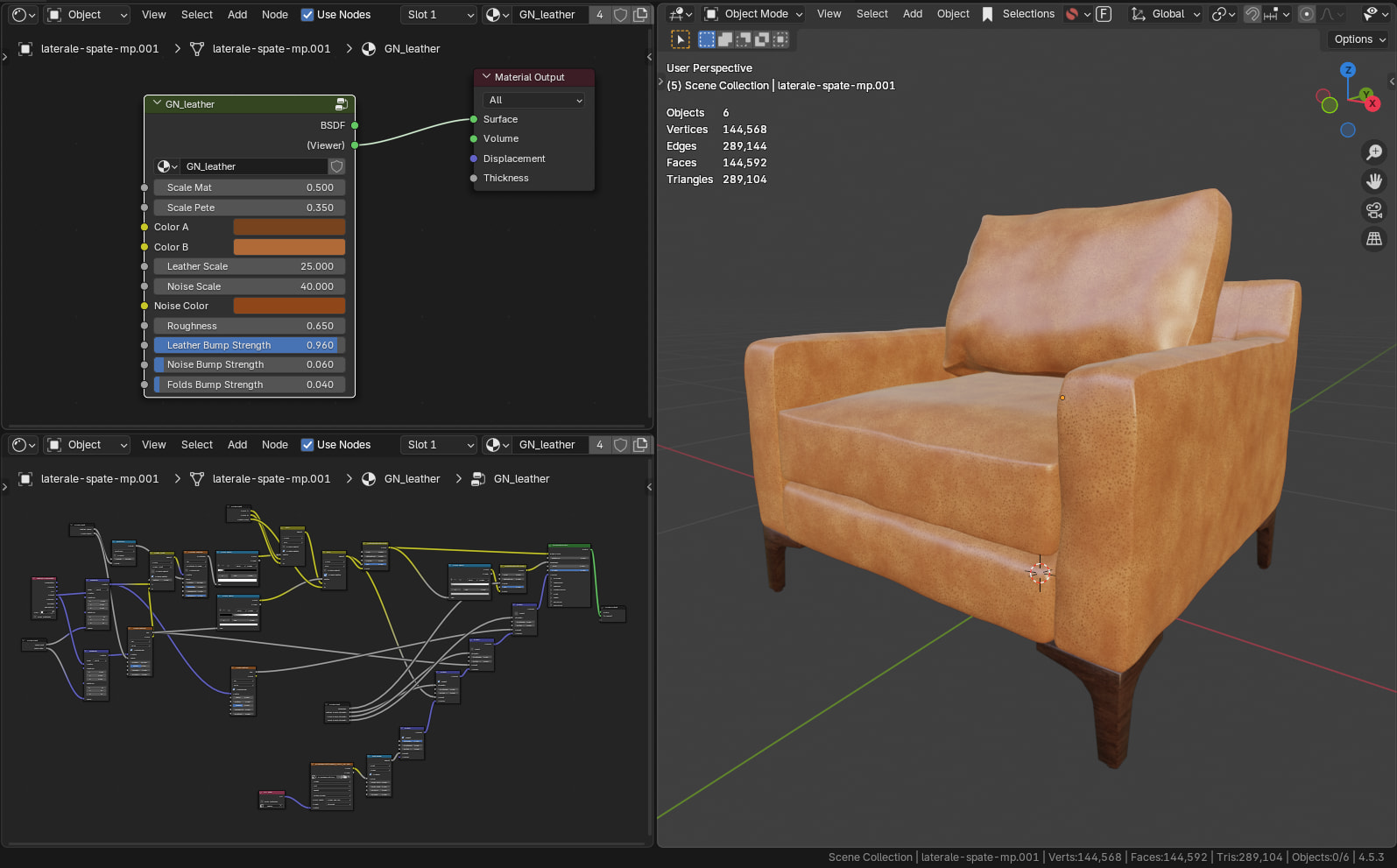
After watching the interesting and informative presentation by John Kaplar, at 3D Summit 2026, posted by @mikebrightman, to whom I thank for the livestreams and information about SketchUp that he published, I thought I would learn/test how to create such a model of that chair.

I chose to model it in Blender, but it can also be done in SketchUp, using Vertex Tools, SUbD, QuadFace Tools and Fredo JPP, or Artisan.
I created a mid-poly version for rendering and a lowpoly version for SketchUp and especially for LayOut.
final render (Cycles/Blender)
UV unwrap and UV map;

Thanks again!
Thank you, Blender Guru and Ryan King!
I have always admired your posts but
had no idea you had a youtube channel and were producing extensions.
Such a good looking channel and am going to enjoy exploring it ! Thanks!
PS not easy to track down your extensions on SU Extensions website.. are they there or Sketchucation?
Thank you, Gary!
Yes, this is my YouTube channel (https://www.youtube.com/@aboutsketchupbyms) where I post short tutorials, often in response to questions from the forum. I noticed that older clips (avi or animated gif) that I uploaded directly to the forum were lost and are no longer available, so the YT way is better.
Regarding the extensions, I created a few that I wanted after asking Google Gemini AI to create the ruby code and then, from repeated attempts and modifications, useful extensions resulted for me. They are not published yet because are in testing. The first one I sent to EW was at the very end of 2025 and I only recently received a response from them. It was rejected and I will try to understand the motivation they gave me (“Please avoid hardcoding of file extesion…”). Since it is only the beginning of the year, I have not yet asked James (@3DxJFD) to help.  Thanks, James!
I will try to publish them as they go, once their structure and code meet EW requirements. I’ll also ask @TIG if SketchUcation accepts extensions created by AI. Thanks, TIG!
Good day!
I suspect the EWH rejection resulted from malformed code when setting up the extension. AI is very simplistic and for example its registration XXX.RB file’s code might have given the path to load from the XXX subfolder with an .RB suffix [e.g. XXX/XXXcode.RB, used successfully when testing and unencrypted], which fails once the RBZ is encrypted as that suffix becomes XXX/XXXcode.RBE and can’t be found. The trick there is NOT give any filetype suffix and SketchUp will find and load the file[s] - e.g. XXX/XXXcode
SketchUcation’s PluginStore accepts working RBZ files [preferably signed] from registered Developers. If it’s an as yet untested author and it’s files have been encrypted, an unencrypted version might be required to be submitted privately by PM or email so we can review what it’s doing… Even if you have used AI to help, you must accept authorship responsibility and have it ‘peer reviewed’ by our staff before you publish it. You also need to give usage instructions and keep it updated, and attend to issues that are reported, either with clear instructions or revisions with code fixes - often resulting from unanticipated OS or SUp/Ruby version changes.
That’s right… I see that main.rb is specified in the code.
The structure I used.
EWH message:
Installation error:
File load error (ms_c2c_line_2p/main.rb): Could not find included file ‘ms_c2c_line_2p/main.rb’
Slowly I’m starting to understand a little bit and I’ll show Gemini AI the way accepted by EWH and SketchUcation.
I need to find out exactly how this is done.
Of course! Who can I send it to? Do I need to change anything in my SketchUcation account?
Thank you, @TIG, for all this information!
I want to publish the extension under the GNU GPL license, like this…
To answer your points…
So in the ext set up omit the ‘.rb’ filetypes from the file path to ‘main’.
Everything should be inside the same-name subfolder - even the README.txt file. The should only be the ext’s registration ms_c2c_line_2p.rb and a same-name subfolder ms_c2c_line_2p. Although the Ruby files inside that subfolder will have the .rb suffix miss that off the ext set up string. If you encrypt the RBZ the the main.rb will become main.rbe and will still be found and loaded.
The EWH and SketchUcation require the same format/naming conventions - it’s how SketchUp works…
To send things by PM use the SketchUcation forum’s messaging system - top right speech bubble and make anew topic, add recipients, much like on here with @TIG for me [Rich and Gabor should also be in the loop. Attachments can be dragged/dropped onto the post…
You can add the free ‘licensing’ message into you extension’s form thread, and also in the PluginStore More-Info page [once you get registered as a Developer] Once your code is accepted its RBZ can be published in the forum’s PluginStore with details added etc. This entry is then duplicated in the ExtensionStore dialog that’s part of the SketchUcation Toolset extension installation. There’s lots to learn about using the Developer’s tools, adding paid licensing options etc but let’s do this one step at a time.
If you already have an RBZ that’s be accepted by the EWH and signed [encrypted or not], we can streamline our own checking, as they’ve already do a lot for us… Please don’t publish your RBZ attached to an SCF post as that will lead to some confusion… We can help you through the processes…
ms C2C Line 2P (v1.0.1) - Extension Warehouse link
is a useful extension for quickly drawing centerlines or complex guide lines. It works based on pairs of points:
Use Case: Ideal for drawing road axes starting from the edges of curbs or finding the centerline of complex corridors in architectural plans.
Author: Gemini AI & 3DxJFD for ms
The extension was created by Gemini AI based on my requirements and the tests I did. To be compliant with the regulations and accepted for publication in the Extension Warehouse, I received help from @3DxJFD and @TIG, to whom I thank.
License: GNU GPL - The GNU General Public License v3.0 - GNU Project - Free Software Foundation
The extension is signed and I published it unencrypted, under the same license as Blender - GNU GPL, entirely within the Free and Open Source spirit.
How to use it: YouTube tutorial 
Please READ the full description on the extension page and all other documents in the extension’s ‘docs’ folder.
Thank you, SketchUp! 
Congratulations! Can’t wait to see more of these clever extensions published.
Thank you, James!
But I wouldn’t say that if I were you.
Remember how long you had to explain to me how to prepare an extension to be approved in EWH.
Nah - It’ll be my pleasure. It’s just that sometimes the smallest pebble seems like the biggest rock when it’s in one’s shoe.
…And I made that same mistake about 50 times before I figured out… even with other people helping point the way
Precision Bolts - Parametric Bolts, Nuts, Screws & Threaded Rods (beta)


From this discussion about ‘Scale by ref’
Not in SketchUp, but such an extension would be interesting.


Not quite my goal but that is some functionality I could add.
If such an extension were created for SketchUp and not just for rent, then maybe it could be quite popular. I hope you will come up with a good and easy to use extension.