I used the same method this time that I’ve used for years. A screen shot of my 2019 screen for toolbar placement and custom toolbars imported into SU2020 makes that pretty quick and easy.
Before that I installed the Sketchucation tool in 2020 and used it to import my bundle from 2019 to get fresh copies of extensions from SCF. The Extension Warehouse used to have a tool for doing the same with extensions installed from there. Hopefully that feature will be reinstated soon for the new EW.
Between occasional changes to the Ruby code requiring authors to update their extensions and many users failing to keep the extensions they have up to date, it’s not wise to copy them from an older version unless you enjoy chasing down loading errors. Some extensions have installers that need to run because they put files in other locations so just copying the Plugins folder won’t work for them anyway.
Keyboard shortcuts come over automatically.
I keep my local collection of components, custom materials, and styles in the User/…/SketchUp file and copy them from one version to the next. By default SketchUp is going to be looking there for these files.
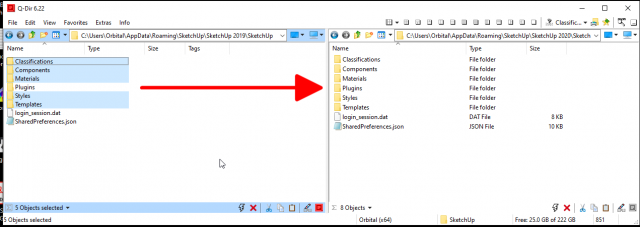
As an alternative, you could just go into SketchUp’s Preferences and change the file locations to wherever you keep those things. I just prefer the way I do it.
I think it would be nice if toolbars could be set up automatically but all in all, I don’t find it to be an especially onerous task. It fives me a chance to do some housecleaning and thing about how much I really need certain toolbars displayed.