I don’t have realized the work on the web version…
As a separate product, this partly explains the poor evolution of the desktop pro version.
Not only is there a problem with the Trimble SketchUp business model, which reduces the SketchUp market, which breaks with Google / LastSoftware, but in addition, R & D is scattered over several projects … interesting.
The interest of SketchUp Make was to have only one development where you could remove options to differentiate the Pro version. I’m not saying that a web version could be interesting, but I see the price to pay as a user of the Desktop version, that is to say the real Pro version.
SketchUp for Web is a light web user interface on top of the exact same SketchUp engine. Every performance optimization is shared with all products. Trimble has multiplied the staff so that I don’t think less developers work on Pro because of the new mobile and web offerings (but of course we could also expect more developers on Pro). With evolution of Pro you are looking for new features/tools?
I understand. There is optimization between web and desktop version. But anyway, the web version necessarily represents development time, it is a different environment and interface.
The lack of development of SketchUp during the Trimble years is obvious compared to previous years. I would have preferred updates spaced over time, paid without forced subscription, and really interesting as it was before. The creation of empty groups / components, presented as new for 2020 is a joke. I also underline that we can do it in Ruby script. Being able to modify a hidden object is of little interest for the majority of users. The addition of icons corresponding to functions little used in the main palette is a basic fault on ergonomics and bring complexity to the interface. Re-visiting the aesthetics of the interface do not bring basically things.
This is indeed the problem, I see a rupture and a misunderstanding on what made SketchUp a great software.
There is a lot to do on SketchUp, and it should be done like Last / Software and Google. Contrary to what might be said, SketchUp is not finished. There are even subjects that have not been pursued. I have a lot to say, but the move to forced subscription does not encourage me to do so.
Thanks for the hint. Web-version of Sketchup recognizes apple pencil input in Chrome yet the app is useless on iPad - you need an external keyboard to enter values and even so apple pencil’s behavior is recognized as click-drag rather than click-enter values. You can’t use finger gestures to navigate in 3D space too.
I do have a keyboard, and that does make things faster. It would be nice to have touch gestures, but given that the web app doesn’t do anything to support mobile, and even actively blocks Safari, it works surprisingly well in Chrome.
Using Sidecar is another way to work, if you would rather be using Pencil instead of mouse. You can reach over to your Mac if there is something that can’t be done on the iPad screen. Though of course that then is using the desktop version and not the web version.
I’ve tried Sidecar several time and prefer not to use this way of modeling. I mean it’s fancy, it is cool yet not practical. I have keyboard as well and it is practically useless in web version on ipad. Probably connecting mouse to iPad be somehow workable, yet I’d prefer laptop and Pro version of Sketchup. So particularly for me web version is useless app. I need to say though the UI of the web version is 1000 times better than in desktop version!!!
Any chance in having a special “touch based” interface for SU Web one day? I have an iPad Pro as well and I just don’t think that current SU (web or otherwise) lends itself well for touch based interfaces.
Thanks
As a brand new user who has only used the web version I would add the keyboard shortcut to the button tool tips. I didn’t know they existed until i saw a YouTube video and they were very handy. Of course I have only remembered a couple and really hate to try and find which video i saw them in. Also, basic 90 degree rotation of textures. Those are the two I have as a basic user. BTW, thanks for a wonderful FREE tool. I’ll be upgrading to shop shortly!
As @Aerilius metioned about wrap, or something else, the web version as a desktop application, i am a bigger fan of the idea.
I’m a normal user, no linked to arch or 3ds at all, i always use it to play around and design my dream home, or even when i had to make house adjusts, i design here to ‘see what it will be’.
But i live in brazil, in the countryside where the internet is, definitelly awfull. The amount of days my whole city gets without connection is huge and you guys wouldn’t believe, and i can’t even rely on mobile, cuz is pretty alike the cable connection.
I would appreciate a local connection-less version, even if is simpler.
But for now i love the Sketchup web, you guys rock
If SketchUp Make is better than SketchUp Free, why are you guys working on Free instead of Make? Not a complaint, I love Make as it is, just a tad confused about what is going on.
Because Free is better for the developers! One code base (no PC and MAC), full control who, when and how to use it - they can change it from free to paid at any time, it is service by design - subscription only, they can charge how they want - by year, by month, by minute and etc. For the user - no control at all. Let’s say You were using Free Web SketchUP for a long time and they decide to make it paid - what can You do? Nothing. With desktop version You at least have a time to reorient and transfer to new software.
Ok, good explanation, thanks. That makes sense. I don’t blame them, they’re a business after all. Personally, I’m grateful that Make has been made available and that I got a copy before it vanished. So, good luck with Free, and thanks for Make.
What SketchWood ignores is that the web-based model can be run on cheapo devices like Chromebooks which makes it ideal for many schools that can’t afford to provide MacBooks or PC Notebooks for their students. It also makes it possible for Linux users who want to use SketchUp to do so without having to run some Windows emulator. Although I normally use SketchUp Pro, I find the web based version excellent for being able to access my models on computers that don’t have SketchUp installed.
As for Trimble changing it from a free to paid version, there already is a paid version. If they were really going to eliminate the free version I expect they’d have done it when they released SketchUp Shop.
The SketchUp folks really aren’t as bad as some people would have you believe.
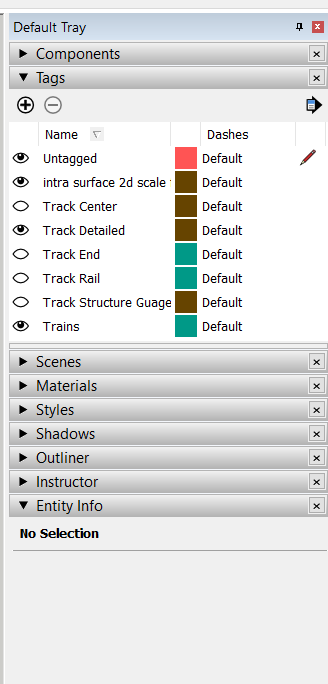
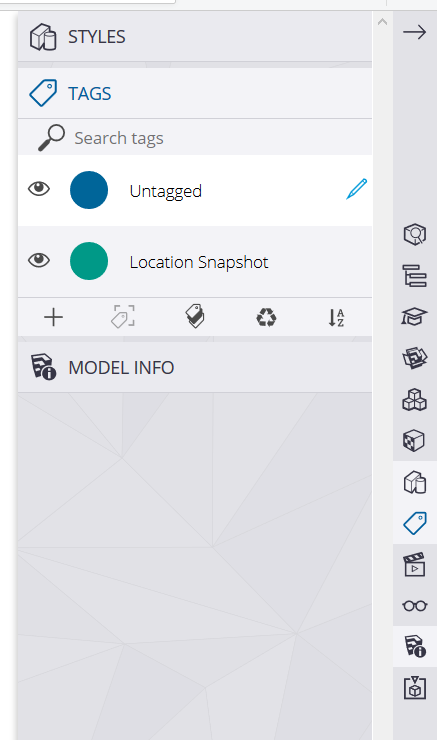
On Web I have to pause what I am doing and stare directly on the sidebar to see that the plus sign resides under Tags. The selected tag is about as prominent as the title bar for the panel as a whole.
Those are good benefits, for those sets of users. But we can’t expect Make users to be impressed as this doesn’t offer them anything except the end of Make development. But, Make is free, so there are no victims here.
Correct. There are no victims in this case. And those who think they are being victimized by the changes are those who believe they are entitled to things they don’t have to pay for.