I am having problems to launch SketchUp and Sketchup Checkup. I got my all c++ 2015, 2017 redistributables reinstalled. Layout and stylebuilder works normally. I have repaired 3 times and reinstalled for many times with ‘run as administrator’, cleaned registry with CCleaner, updated and reinstalled graphic drivers to 417.35.
I got no integrated graphics too, so I am relying on my gpu totally. i.e. no intel drivers can be installed in my computer.
I got my sketchup not working before I did the windows update yesterday, also the ver. 1803 update cannot be reverted too.
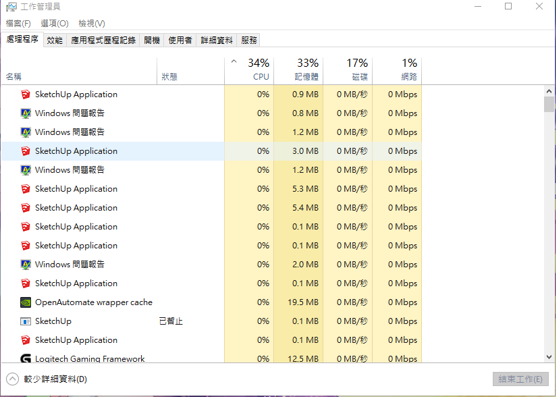
Here’s my situation when I spam and launch sketchup:
Bunch of Windows Error Reporting and nothing launched
Researching Widows 10 Error Reports
If you are aware of Windows error reports from your issue - Windows may have recorded them and you may be able to find them and research them online (generally in Windows forums).
All Windows have Administrative tools as far as I am aware.
log in as administrator to access (modify your account if necessary)
Windows start>scroll to bottom of program list>Windows administrative tools
Choose>Event viewer
A few options here including Custom view>administrative events; Windows logs>application/system; Applications and services>hardware events
If events recording was not turned on, that needs to be enabled
Run SketchUp to reproduce your issue/event, recording the precise time to the second by your computers time
Go back to event viewer and check the various categories to find SU, Windows or hardware issues occurring at the exact time you recorded-not too many
Type appropriate error ID to a new doc or note for re use.
Assuming you don’t have Windows tech support contract, following a Windows link to your error will take you to the general Windows support page
Try Windows Update trouble shooter, requires a Win tool download - I haven’t tried the tool myself yet - let us know what happens.
If you had system restore turned on, you could try that, otherwise I would now consider a fresh start - reinstalling the OS and apps (obviously will require preparation).
I count on doing this about twice a year to keep my system running trouble free.
Bear in mind lots of IT professionals do not try to figure out exactly what the problem is, but just find the quickest solution to get a system back to working order.
I could qualify my suggestion of a WIN 10 “fresh start” - I have been using this process (6 monthly reinstall) for about 20 years on my own workstations and have been very satisfied with the results. It probably does depend on the complexity of your installed apps though, but I find I pare down the number of apps I use, and most importantly, I stay in better command of my settings and general OS functionality.
I do use a detailed check list when doing a fresh start or other type of reinstall and it takes me 6 hours plus. (waiting on forum responses can easily cost that much time).
A reinstall is triggered once I have spent about half a day or more (or looking like it), trying to resolve any particular issue and it then becomes just as quick to do the reinstall. The current WIN 10 “fresh start” does not seem to require unlicensing of apps prior to commencing the process although I would recommend doing it anyway.
@Glennsky let me know what your experience has been and your concerns with a reinstall.
As a follow up to the GSTUDIOS response above, the Windows system typically creates a “restore point” snapshot-in-time view of the state of the system before doing any major updates. Running the restore option is the best way to reverse an update as opposed to uninstalling something. I gather this is an older tool not rewritten for Win10. as you get to it via an old style dialog box vs. the settings pages. Anyway…
Open settings, search for “restore point”, click “create a restore point” (this is NOT what you want to do but it gets you to the app), then click the “System Restore” button. That brings up the app that will allow you to choose one of the restore points you have, There should be one from immediately before the update, if it was a major update. Otherwise choose the most recent one you have. That will take a while and ultimately reboot your system (twice I think) leaving it in a state close to what it was prior to the update. I don’t THINK, but I don’t KNOW for sure, that this touches any applications directly.
You DO NOT want the “Reset this PC” option in the Settings app. That reinstalls Windows.
BTW, is the update you did the October update to version 1809? Apparently it’s been troublesome.
Good luck…
Side Note: given the infinite number of configs and complexity of hardware, software, and versions of same, its a wonder this happens as infrequently as it does. I’m guessing studying turbulent flow with chaos theory would be a comparable pursuit. And as much “fun”.