I Design, Engineer then create a accurate take off using to scale components and Custom Attributes of all the components.
I want my .csv file to be accurate requiring no human modification after the fact to reduce human error, from model to purchase order.
I understand your concept of,
Attach say a Bolt Total to a Bracket
I have tried it, but its not accurate from the point of view of Screws as its to complex, i would need to add extra’s to be safe and in the end up will have hundreds of spares on site.
Also not been able to visualize this doesn’t allow me to share my Trimble model with client so they can see how to assemble my Kit also it breeds mistakes as you can visualize the building and see what’s missing.
But,
Im definitely getting to the stage where im causing sketchup to be basically a laggy mess, so im just looking for better ways to catalog all the individual components.
I feel the new Render Engine has focused more on pretty pictures rather then computing the information with in the model.
Sketchup really have the best Take of system out any software, but they dont understand thats worth more then pretty pictures…
People can actually invent a new product, cost it, create a accurate material order/ purchase order just not huge models like mine.
Producing pretty pictures is lame in my opinion, I call that art not real world changing application like inventions or say what im doing working towards solving affordable housing.
I don’t know much about how SketchUp manages BIM information, but if it attaches those attributes to every instance of a bolt component, it is likely that those attributes take up more memory than the geometry of the bolt, and then simplifying the bolt itself will have minimal effect.
The program has to process every component and when it does this it gets caught up,
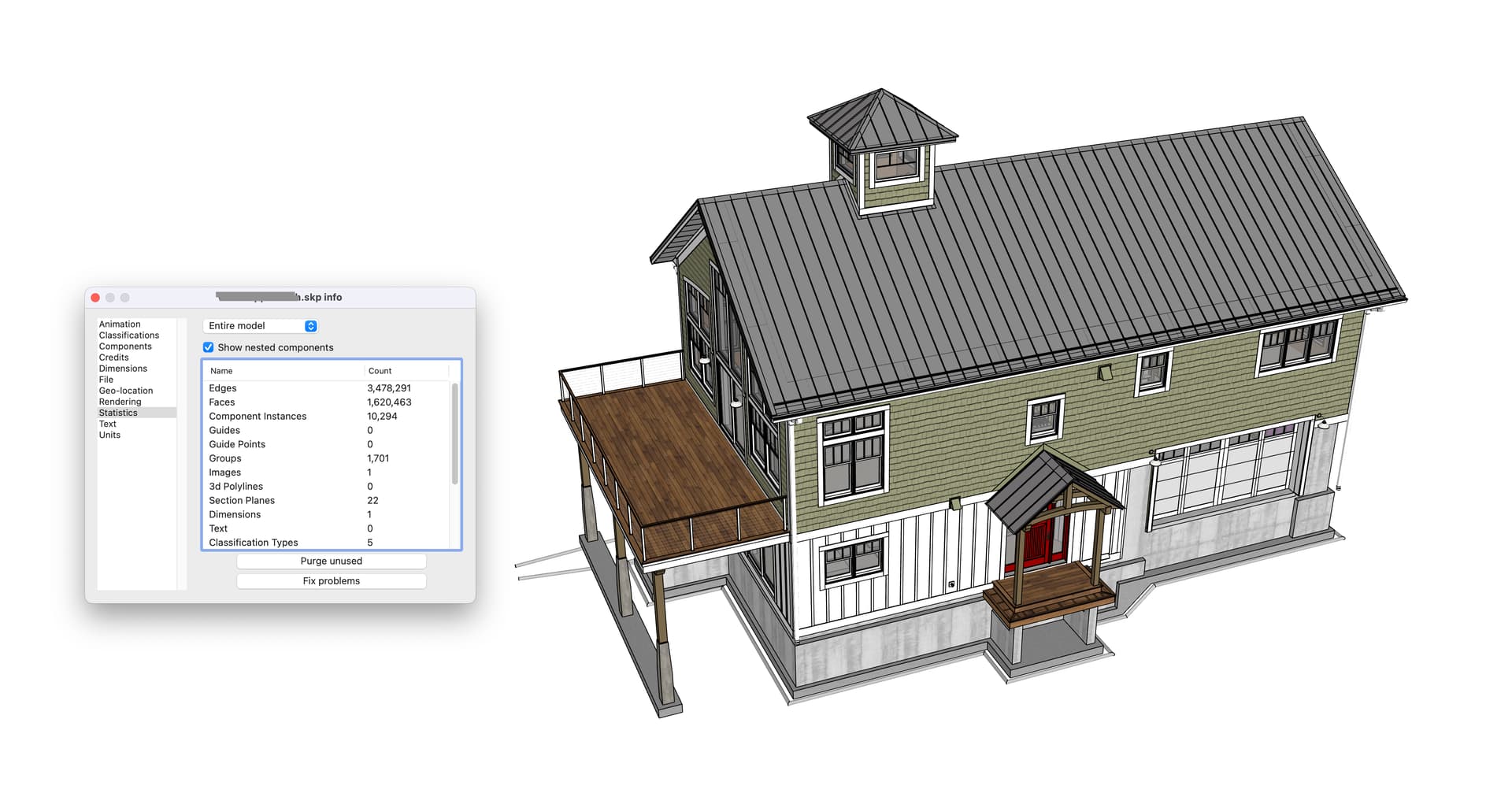
The home im modelling at the moment is a monster.
I also just noticed taking it between 2023 and 2024 all my component instances broke, so now I have say 50 components where it should be 1 component duplicated.
Im fix that tomorrow see if that helps, should do.
Are the steel shapes modeled with sharp corners? Or with radius? This contributes to a lot of extra faces and lines. I only model steel shapes now with straight corners (unless I am making renderings).
Reduce your bolts and screws so they are 8 sides instead of a circle. I do this for my timber frame design packages for the pegs and hardware. Saves a lot of processing power when you have so many in the file.
Do you work in that style that you are showing?
Turn off profiles, shadows, etc, it will speed up model re-draws.
This is a recent model, 1/2 of the geometry density of yours, but 39.3 MB - but with all Simpson hangers, hold downs, shear connectors, framing lumber, doors, metal roof, timber frame, windows, etc.
I generally don’t model to this detail - but this was an owner build, so wanted to be clear in communicating. For timber frame shop drawings I do detail all pegs and hardware - but that is a separate drawing from the main architectural set.
I feel like somthing else must be a work here, perhaps the added BIM custom attributes but I’m suspicious of the text adding that much too. I would be interested in seeing a single bolt file as well, perhaps there is some further purging that could be done? For instance the single bolt file have scenes/styles in it? This info would survive a purge. Or somthing else perhaps.
I often work with complex mechanical designs in SketchUp, and my experience with SU24 so far has been very positive, a faster smoother experience all around. I ran the “Test.time-display” test on a larger file and got very satisfactory frame rate, even with edges and profiles on! This model feels crisp and snappy in SU24, noticeably better than SU22 which is my current version.
Test results:
72 frames displayed in 2.6601 seconds
Average frame = 0.0364 seconds
You shouldn’t need to model the bolt shank if only the head shows. Or just a simple 8 sided circle for the shank plus a simple hex head (and nut, if visible). And no model threads. Use a tiny image of threads if you need to show them in close up.
I can’t see how a single bolt can be a 150kb component unless you are modelling the thread geometry.
I have had several lockups and full crashes bringing in SU22 models to SU24 via the import function. I’ve had much better luck with copy paste having 22 and 24 open simultaneously (in one case this was the only successful method of bringing in the old geometry).
I think my main difference is that i have 8 custom attributes for each bolt.
So maybe when the engine is running the model it has to process every attribute, so if i have 10k bolts its really 80k attributes its processing and i mean each attribute is probably a few lines of code so its compounding.
I use to have a estimating software where i would pull in the csv into it,
Using
Itemcode
Measure
Unit
Then you group components in the estimating software,
But now im essentially creating a fully proceesed order from sketchup into the .csv file
Can you post a bolt component, with attributes, or several if they differ in either geometric complexity or number of attributes?
Otherwise we’ll go round in circles not understanding why one bolt component is even as big as 30kb. Still seems huge. And many copies of one component take up far less file space than the same ‘many’ times 30kb.
Hmmmm. I would think if you have 10k bolts that are all instances of the same component with 8 attributes, then the total in the model would be 8 attributes. More investigation needed. Can you include a bolt file?
Glad you found the solution , but that is very odd if pre-modelled components form 2023 version cause grief !
BTW, I’m very impressed at how far you push SU & I’m an architect who frequently gets laughed at for trying to use SU in a BIM workflow… but if you’ve ever had kids, the notion of ridicule just flies straight over one’s head
What is the needed workflow here?
Yesterday, I had a similar slowdown from using a 3d wave tile for walls from the 3d warehouse and editing it to trim the extra portion was crushing SKP to the point that it was locked up for minutes multiple times before it would come back.