Posiblemente tu gráfica no tiene la suficiente memoria para renderizar ese proyecto, intenta bajar la calidad a borrador y súbela solo cuando quieras hacer el render.
Can somebody help me? I’m having the same issue and open my file.
There’s a bad group in the first .skp file I opened but SketchUp 2025 will take care of it and the model will open. I see this:

Since you are using SketchUp 2023 you must have a current subscription. You can update to SketchUp 2025 at no charge.
The other file shows the same issue but again, the current version of SketchUp will open it just fine.

BTW, I see incorrect tag usage in your file. Untagged should be left active at all times.

All edges and faces should be created and remain untagged. Only groups and components should be given tags. This is the result of fixing one of your files.

It’s also important to keep your model purged of unused content. There’s no reason to hoard this stuff.

That cleanup reduced your model file size by about 90%.
I would also suggest that you reset the model axes and move the model close to the origin.
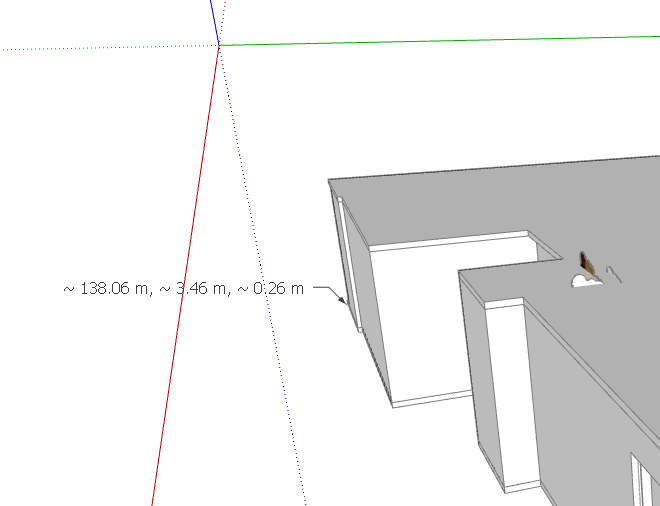
The distance from the origin can create graphical issues.
Hi @DaveR, can you help me with the SketchUp file that I can’t seem to open? It said that the file is not a SketchUp file. I tried the .skb but same result.
I’m willing to try but you have to make the file available. I get an Acess Denied message.
Hi @DaveR, try this link.

What does the zero means? No, I used a licensed version of SketchUp. The SketchUp was bought by the office where I work. I saved the file at a local desk on my PC.
It means that the data that should be in the file has been replaced by zeroes. A viable SketchUp file will look something like I show here when opened in a hex editor.

It’s hard to say exactly what happened. Most often users who have files like this report having been working on the files when they are saved externally; a USB drive, network drive, or the cloud. Sometimes it happens if there’s a power failure and probably sometimes it’s due to a drive going bad. No matter what caused it, the .skp file is now garbage. There’s nothing to recover.
Did you try opening the .skb backup file?
Yes, I tried opening the .skb file, but I got the same result. I even tried opening the files in the temp folder in C:Drive. Guess I will redo the entire thing again. Thank you @DaveR, for trying to open it.
Sorry it wasn’t better news. Hopefully you can build it up again without too much trouble. Make sure you are saving frequently and maybe make incremental saves with different file names so you have the possibility of opening a previous version if needed and won’t have to start entirely from scratch.
Will do, Thank you!
Lamentable mente los dos archivos están corrompidos, no tengo ningún hex editor para verificar que tan dañado está el archivo pero me temo que deberías volver a empezar tan pronto como puedas. Hay algunas causas conocidas para este tipo de problemas, la mas común es guardar el modelo en la nube, un servidor o una memoria extraíble, deberías guardar siempre en tu almacenamiento interno y también en tu cuenta de trimble connect que te da espacio ilimitado para guardar archivos .skp, si tienes una version Jack Sparrow no vas a poder usar trimble connect obviamente y eso también podría ser una causa de la corrupcion de tu archivo.
The SKB is 50% filled with zeros. The SKP is 100% filled with zeros. It isn’t possible to recover anything from the files.
Hello guys! I just had the same problem. A power outage while Sketchup was open caused the model corruption. I always group, tag and all good practices. Hope you can help me. Here’s the link:
Thanks in advance!! Have anice day.
The .skp file contains nothing but zeroes.

The.skb file is a little more than half-filled with zeroes. Unfortunately nothing to recover.
Where were you saving the file while you were working on it? Were you also saving to your Trimble Connect storage? Had you, by any chance, started a LayOut file using the SketchUp file?
Are you still using SketchUp 2023?
Nope, Sketchup 2025. Sorry to hear that. Thanks a lot for trying anyway.
Please update your forum profile.
You’re welcome. Sorry it’s not better news.
Going forward, take advantage of your Trimble Connect storage to save a backup of your SketchUp projects periodically. Also make sure you are saving to a local internal drive while working on the files.
Hi @DaveR I’m currently having a similar issue. My laptop unplugged and died immediately while I was working on the file. I tried renaming the skb and it says “Failed to open document.”. I already checked the autosave files and they’re all gone, even though I have autosave activated.
The deadline is close and I would be glad if you could help check if something is wrong. Thank you in advance.
Both files are fatally corrupted and cannot be recovered. The .skp file is almost half-filled with zeroes and the last third or so of the .skb file is nothing but zeroes.
Your profile shows you are using SketchUp 2023. Does that mean you are using a cr acked version of SketchUp? Or do you have a current subscription? If you have a current subscription, were you also saving backups to Trimble Connect?