Hi, I am having huge problems with copying and pasting viewports in Layout. I’ve purged unused materials and components from the sketchup file, restarted computer, logged in and out, updated the version I am using, resaved the files in the later version, tried adding new pages, tried inserting new viewports and linking the file again and it keeps coming up with the same problem.
The pasted version is at a different scale and appears like an image not a viewport so I can’t change the scene or scale.
Yes I’ve tried that. I’ve also gone through all the steps on Chat GPT like copying the sketchup model into a new file, inserting that fresh, relinking through sketchup as well as layout, exporting as a 3DS file and importing into another new skp file. Nothing is working
When this happens it is because the SketchUp model file is too large to fit into the pasteboard, so we end up only copy/pasting the raster render of the viewport and not the underlying data. To get around this problem you can try 1) slimming down your SketchUp model 2) using the move/copy command or duplicate command > moving the new viewport onto a shared layer > switching to the page you want the viewport to be on > moving the viewport onto a non-shared layer. This process avoids using the OS pasteboard which what causes the problem in the first place.
Hi Adam, thanks for your insights. This makes sense however I’ve created a new skp file with just a cube and a new layout to see if my skp file was the issue and I am having the same problem. The yellow issue icon and I can’t change scale or scenes.
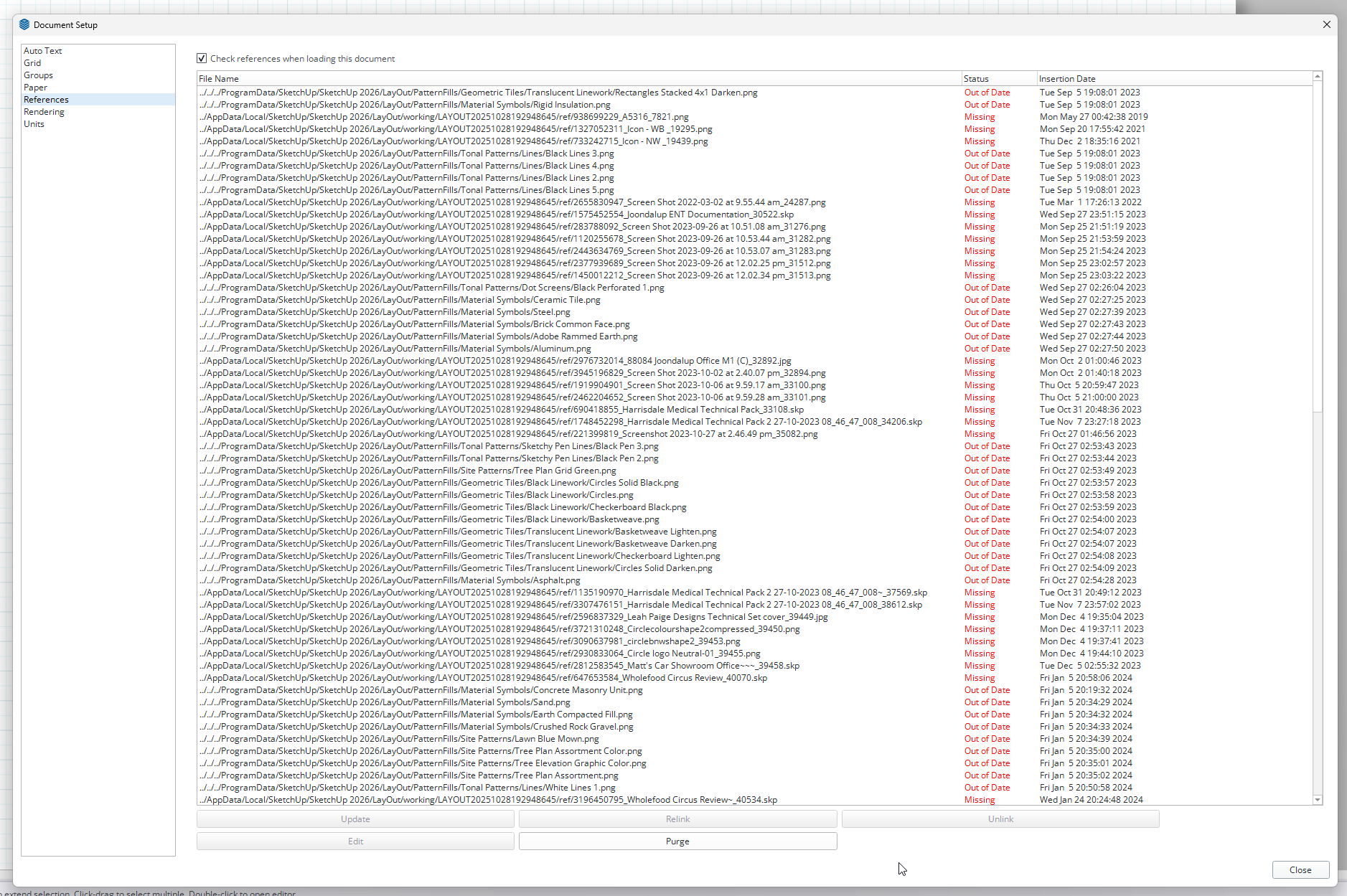
Well, I’m still digging through things but I see a couple of issues right off the bat. One, you have a lot of unused stuff in your LO file. When I opened the references list I can’t even show half of it on my screen.
Another thing I notice is that you have multiple references that appear as though they should be from the same SketchUp models. You’ve not only inserted the original files but also the backups and in one case the backup of the backup of the backup.Notice the SketchUp file references with the tildes (~) in the filenames. You you wind up creating a bunch of different SketchUp models that really should be the same file. Edits you make to one of them will not be carried over to the others so you end up with a bunch of disjointed viewports in LayOut. Even the LayOut file you shared is the backup.
You really have to pay attention to the file names and avoid working on the backups (with the tildes ).
I looked at the Matt & Elsa - Design SketchUp file. It’s more than 323 Mb to start with. Pretty large for copying and pasting which Adam referred to. I did my usual cleanup on it to see what would happen. I fixed incorrect tag usage.
That reduced the file size for that one file by more than 60%.
Straightening out the incorrect references and cleaning up the .skp files would help to make the copy and paste thing work better there. You should then be able to copy viewports without any issues. Also by sorting out the references you will get the expected results when you are selecting scenes and updating the references after editing them.
I also notice the images on the last page want to be much larger than you have the sized. That means you’ve got additional file bloat. The one on the left is 19.8 cm wide but it wants to be almost 107 cm wide. You could reduce those images to the size you have them displayed which won’t hurt anything as far as their appearance but will reduce the file size.
Thought I removed all client data but thank you. And thank you for looking at the layout for me. If it’s just about the file size and data in the background then how come when I created a new SKP of a cube and a new Layout file from scratch I was still having this problem?
That I can’t answer. I tried doing what you described using my own SketchUp files and had no problem. It gets a little weird when you relink a viewport to a different .skp file and there’s no matching scene name but that’s easy enough to work around.
OK. I only cleanup one SketchUp file, though. I was able to copy a viewport that referenced the .skp file I cleaned and it pasted with no problem. I’ll send it in a PM shortly.