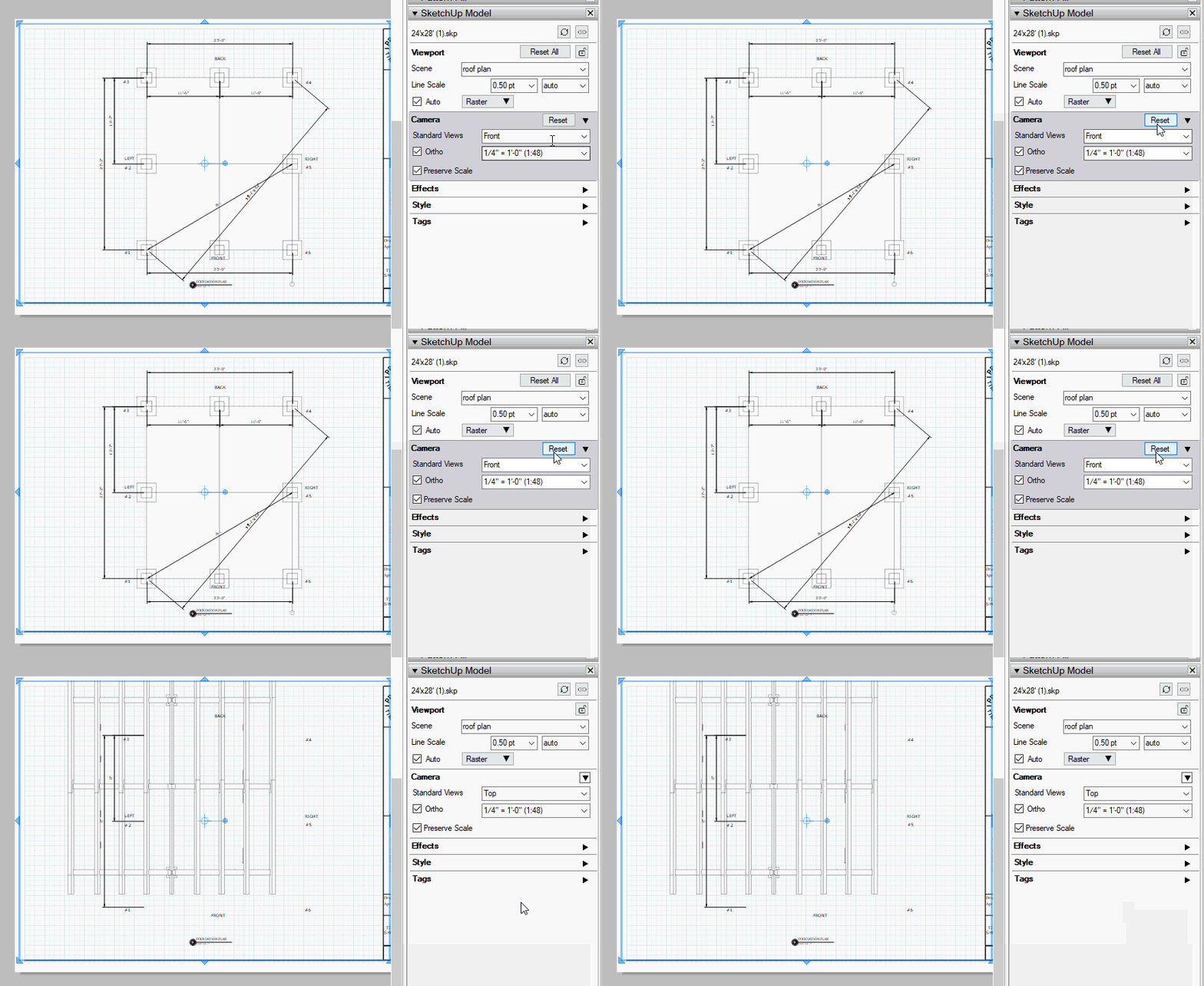
Since you’ve overridden the Camera properties for that viewport in LayOut any changes you might make to the Camera properties for the scene in SketchUp will be ignored when you update the model reference.
The same would apply to the “left perspective” viewport and this “roof plan”
I’m kind of puzzled over the way you’ve set up your model. You shouldn’t need to have your model spread out over nearly half a mile. There’s some odd things about the way you have your components set up, too.
None of the viewports will update. As you can see from my model I don’t really know what I am doing. I went through every scene in sketch up and updated them then save the model.
Still no updating in layout. I am bout sure how I am changing the camera. Am I changing the camera in layout or sketch up?
How can I realize when or where I am changing the camera? How do I undo the camera changes I have made to make the layout update?
What steps are you taking when you try to update the reference in LayOut? I relinked the model reference to the latest version ofthe SketchUp file you shared. That’s the method I would have to use because LayOut on my computer can’t see the reference on your computer. The viewports that haven’t been modified are showing the updates.
I was referring to making Camera changes in LayOut. There are several things you could be doing to modify the properties. You could double click into the viewport to orbit, pan, or zoom the camera. You could also tick the Iso box and/or select a standard view in the Standard Views dropdown in the Camera section of the Sketchup Model panel. I expect you did the latter inthe case of the “iso perspective” scene because it isn’t shown as a perspective view.
You can tell that the Camera properties have been changed by the dark background and the Reset button in the Camera section of the SketchUp Model.
Best, of course, is to avoid those things that modify the Camera properties but if you do it, you can click the Reset button. Below is the result of doing that for the “iso perspective” viewport.
Here’s an example of the sort of trouble you can create in your model when you’ve modified the Camera, added dimensions, and then need to reset the camera. Most of the dimensions have gone away because they are attached to a the part of the model that is located a little over 240 feet from what is now shown in that scene.
I check each page and reset the camera when it was an option. I still can’t get it to update. I am not going into the camera and selecting anything as far as camera setting go. I must be double clicking and changing it some how.
I click the viewport and copy it before I make a new page then paste old viewport. I then swap the old viewport out for a new scene.
I guess I am just going to make a new layout file and send the updated model
With all the scene I need to a new layout file.
Before you start over entirely try this. Check to see that there’s no reset buttons with any of the viewports. Then go into File>Document Setup>References. Select the SketchUp file reference, click Relink, navigate to the latest saved version of the SketchUp model, select it, and click Open.
Either way, before you move ahead with the project I would suggest that you add some layers in the LayOut document for dimensions, annotations, and other content that you might add in LayOut. Let the viewports be on their own layer. This will make it easier to work in the project.
for the life of me I cannot get my sketchup file to work in layout… it used to be so easy to create a model in sketchup. import it into layout and all the scenes would magically appear when they were selected in the dropdown menu… this is not happening for me now and I cannot understand why…
I literally just import the SU into layout and nothing adapts when selected…
this is the SU file I am trying to use and create a prevention in PDF from… please have a look at help me to see where I am failing