Yesterday, i asked gemini to create a ruby code that moves vertices of two spline to the avarage height, it worked ok-ish. Someone who knows ruby can work on it.. Splines must have equal vertices, i use bz toolbar to convert and divide series of lines, after that, i level the splines using the code and then curviloft. Lastly, deleting some terrain and filling to the new levels..
1 Like
I’m also looking for the words necessary to explain as clearly as possible to Gemini what I want from a certain extension - RSAL (road smoothing by angle and length). 
Hi @thomthom, this is what the section looks like, what I was trying to explain in the 3D Basecamp discussion, that would be interesting for an extension.

Today i tried using “endpoints” istead of “vertices” and now it works better.. It works on exploded lines now, but we still need equal endpoints of course..
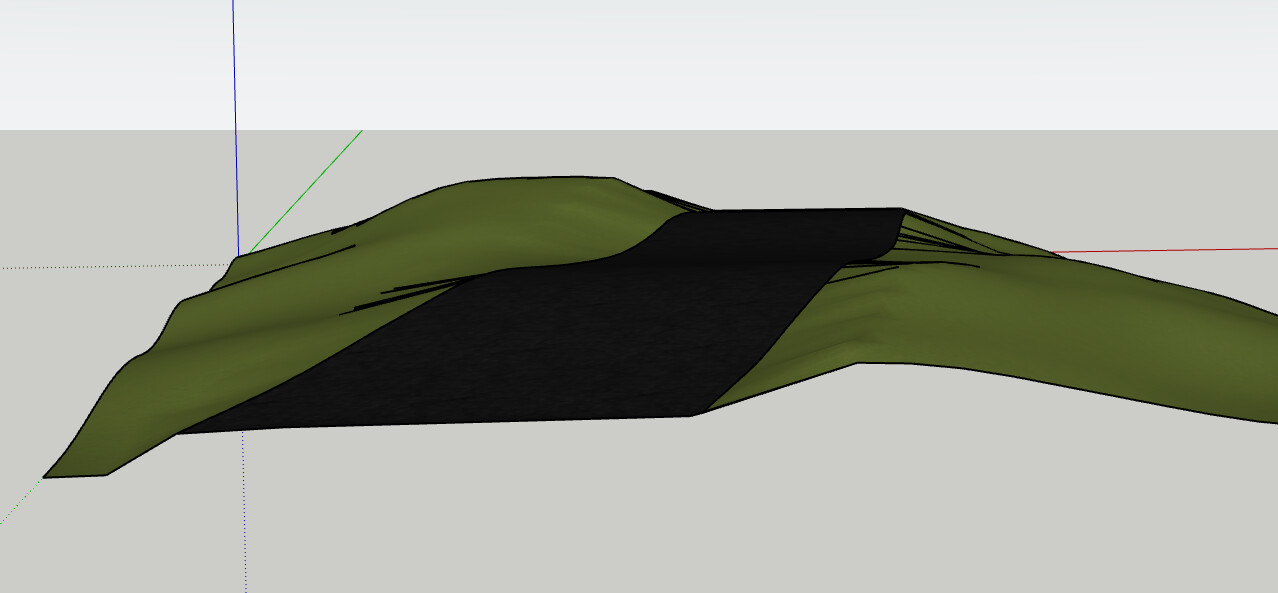
This is actually quite a difficult calculation, at least if you need that the mid-line lies on the surface, which the Gemini-algorithm does not guarantee, as well as a non-Gemini approach shown below.
In the end, the best may be to generate both the surface and the mid-lines.
1 Like
Actually, it’s not so complex to get the mid lines on the surface.
2 Likes
Of course you say that, @Fredo6 !
@JustinTSE said:
I used an extension… another one from Fredo, which is amazing, by the way.I’ll say it all day long… SketchUp wouldn’t be where it is without Fredo’s extensions… the guy is a magician! He has amazing tools.
min. 1:05:32 - 1:05:51

Thanks, Fredo!
5 Likes
I meant every word - SketchUp would not be where it’s at today without @Fredo6 ’s amazing work!
7 Likes
Thanks for the kind words. I’ll dedicate my next plugin to all you guys who are contributing so much to the Sketchup ecosystem…..and popularizing the power of extensions.
6 Likes
It felt that from the way you said it, Justin!
For so long, Fredo has provided the SketchUp community with so many very useful extensions.
When Fredo came back with the message that it was actually possible, I somehow expected it, because it was predictable that he would look for a method or invent one to make that functionality possible.
Thanks Fredo!
Just curious. Can you modify your prompt to Gemini so that it ensures that the mid lines curves lie on the surface.
For my algorithm, there are 2 approaches. The simple one I use so far would is based on projection and should work fine for roads to make curbs or separators. There is a more complex one based on curvilinear adjustment, for shapes that will have complex curvature with overhangs, like a arabic domes.
1 Like
Thanks for the question, Fredo!
Gemini told me that once I come back with requests to improve the extension, they will do it.
I wanted this way to create those lines between the midpoints, but not necessarily to be positioned on the surface. For that I would have used the mcAlignEnds extension. And to do it automatically, of course the Curviloft extension would have created the center lines.
Like the previous extension, C2C Line 3P, which gives me the possibility to select 3 points, but does not require or has nothing to do with a specific surface (the faces can be missing), and for this one, C2C Line 2P, I also wanted something simple, a kind of native stich, which Aaron uses quite often, and only for the presentation video I chose to use a surface (road) and that middle divider that is found on the roads.
If it is of any use to you, I can give you the extension to study its code.
Is this an existing extension or something you cooked up just to compare with @mihai.s Gemini version? Either way I think it’d be useful for landscape architecture and urban design and wouldn’t mind playing around with it myself 
Not existing. I found the idea interesting, so I explored the algorithm on the fly and found that the first question was to get or not the mid lines on the surface.
It’s not a finished extension, however. It needs all the interactive selection process (i.e. 2 curves and a set of faces), which is always a liitle bit long to implement. And some dialog to specify the ratios for mid lines, since you can have several, between the curves but also outside (for instance if you need curbs).
1 Like
An extension that I have wanted to exist since SketchUp version 6. Today, thanks to Google and Gemini’s AI, I had the opportunity to explain what kind of extension it should be and then he generated it. After several attempts and tests, it arrived in a stable form, allowing fluid work with it.
ms TEC, the extension created specifically for 2D drawing, brings 4 very well-known commands: TRim, EXtend, CHAmfer & Fillet, and especially the similar way it works in a CAD software.
Works in SketchUp 2017, SketchUp 2022 and SketchUp 2026, Windows 10.

4 Likes
nice. are your plugins awaiting publication ?
keep at it and you’ll have to do a separate thread in the extension section just like Dezmo did 
1 Like
Yes, I sent one for moderation to see what EW people think.
Mersi, Pierre!
Hi @thomthom,
The image you asked me about on Facebook is probably generated by Meta’s AI, but those objects can be modeled in SketchUp with the right extensions.
A combination of Vertex Tools, QuadFace Tools (I hope Offset Loop will work better), SUbD, SketchUV (Path Select Tool) and Fredo JPP plus Fredo Corner can be used.


-
DAE
-
UV unwrapping and UV mapping in Blender, a Procedural Shader (Wave Texture + Color Ramp), then baking for export.


- Rendering with Cycles in Blender

1 Like
There are a few good extensions that help with edge selection, but I wanted one that worked the way I found easier, fluid and more complete, so I asked Google’s Gemini AI to create one.

Name: ms SPS (Shortest Path Select)
Description: ms SPS brings the powerful “Select Shortest Path” functionality from Blender into SketchUp. Perfect for hard-surface modeling and complex mesh selection. Using Dijkstra’s algorithm, it calculates the true shortest distance between two edges, regardless of mesh density or geometry type (Soft, Smooth, or Hidden).
Key Features:
-
Real-time blue preview as you move your mouse.
-
Edge Loop select for quads.
-
One-click “Undo” with ESC key to backtrack your selection.
-
Dijkstra-based calculation for precise metric shortest paths.
-
“Safety Select” logic to prevent accidental deselection.

–
The extension is still in testing and is not yet published.
For SketchUp versions 2017, 2022, 2026; Windows 10.
Created with Gemini AI.
3 Likes
‘ms TEC’, the extension created specifically for 2D drawing, brings very well-known commands: TRim, EXtend, CHAmfer & Fillet, and especially the similar way it works in a CAD software.
- Added BRIDGE command

Works in SketchUp 2017, SketchUp 2022 and SketchUp 2026, Windows 10.
2 Likes
ms Even Tris is a SketchUp extension designed to generate clean, uniform triangular meshes on any selected face. Unlike standard triangulation, it creates a balanced grid of points, resulting in more aesthetic and predictable geometry for terrain modeling, organic surfaces, or structural patterns.

- Used in landscaping

Key Features:
- Ordered Mode: Generates a precise hexagonal grid of points while keeping the original face boundaries intact.
- Randomized Mode (Jitter): Introduces a subtle organic randomness to the grid and automatically subdivides edges for a more natural distribution.
- Live Preview: Adjust dimensions in the VCB and see the point cloud update instantly.
For SketchUp 2017, 2022, 2026.
Extension created by Gemini Ai for ms.
The ‘ms Even Tris’ extension is currently still in testing, unpublished.
3 Likes