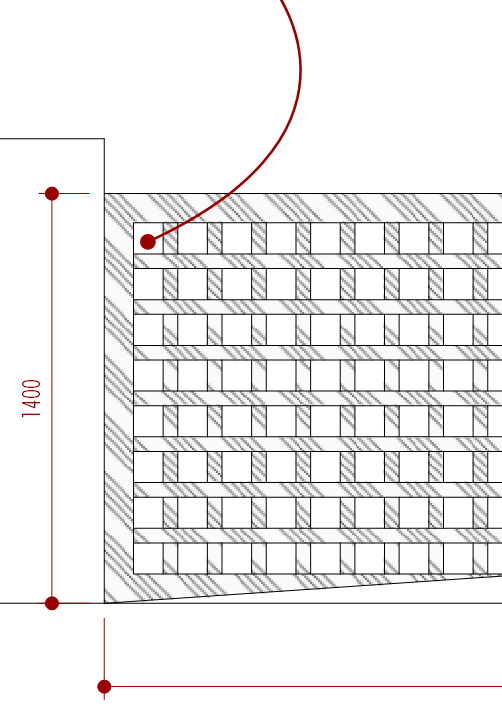
I am wondering if there is solution to make this hatching more defined. I hatched the materials on SketchUp itself, cause I find hatching in layout a time waster.
Unfortunately on SketchUp there is a limited selection of hatching patterns. Any help is appreciated.
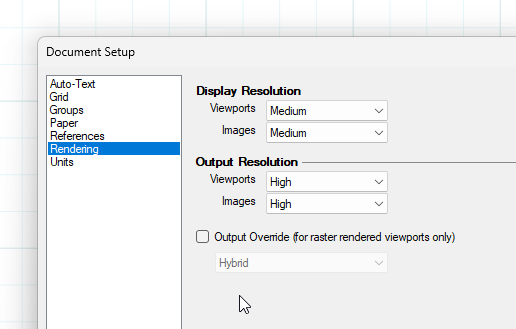
Keep in mind that what you see in LayOut may be different from what you see in the export since the Display Resolution may be set lower than the Output Resolution.
You could make your own if you can’t find something suitable. What exactly are you looking for?
Layout & Sketchup’s Hatching ability is natively very lacking. We work around this by creating hatch patterns in Sketchup as flat, 2D geometry, then creating views for each material. You can then overlay your layout documents with viewports that end up being vector hatching (which is the only acceptable minimum standard in CAD).
It would be ideal for SketchUp and LayOut to share the same Material Library (skm), and also for LayOut to adopt the same editing properties as SketchUp, eg to edit the colour or saturation.
Vector Hatching should be available by now!! What’s taking so long?
Exploding the SKP linework in LayOut allows for some manipulation - but then it’s not aways updated if the model changes. LayOUt isnt good at trimming things to suit an area of a face. I mean , you can do it - but who wants to manually position a series of lines in LayOut? (or SketchUp).
I use a range of PNG patterns, which are images, but I make versions (using Photoshop or similar) that are high resolution. This is fine for PDF out put but no good for export to other CAD formats.
I’ve attached some examples, including the SKM (material files).
Note that in SketchUp, if you make the linework a certain colour (I use grey), then you can edit the line/pattern colour within SketchUp using the material editor.
In LayOut you can fill objects using the PNG as a pattern fill, but you will need different versions for different colours.
Hey Turnervisual. Can i ask a quick follow up on this. When you say you make your pattern in sketchup as a flat, 2D geometry, you mean your pattern has actual sketchup lines? like drawing the pattern on a face for instance? So that there are actual sketchup vector lines?
Just curious how you get to the Valhalla that is vector hatch fills. trying to do this especially in section cuts.
You can create hatch patterns easily in LayOut! Modify your page setup to say 200mm x 200mm > turn on print page colour > draw your hatch pattern so to make it repeatable > save as *.PNG at resolution required! Done, use this in your SketchUp file!