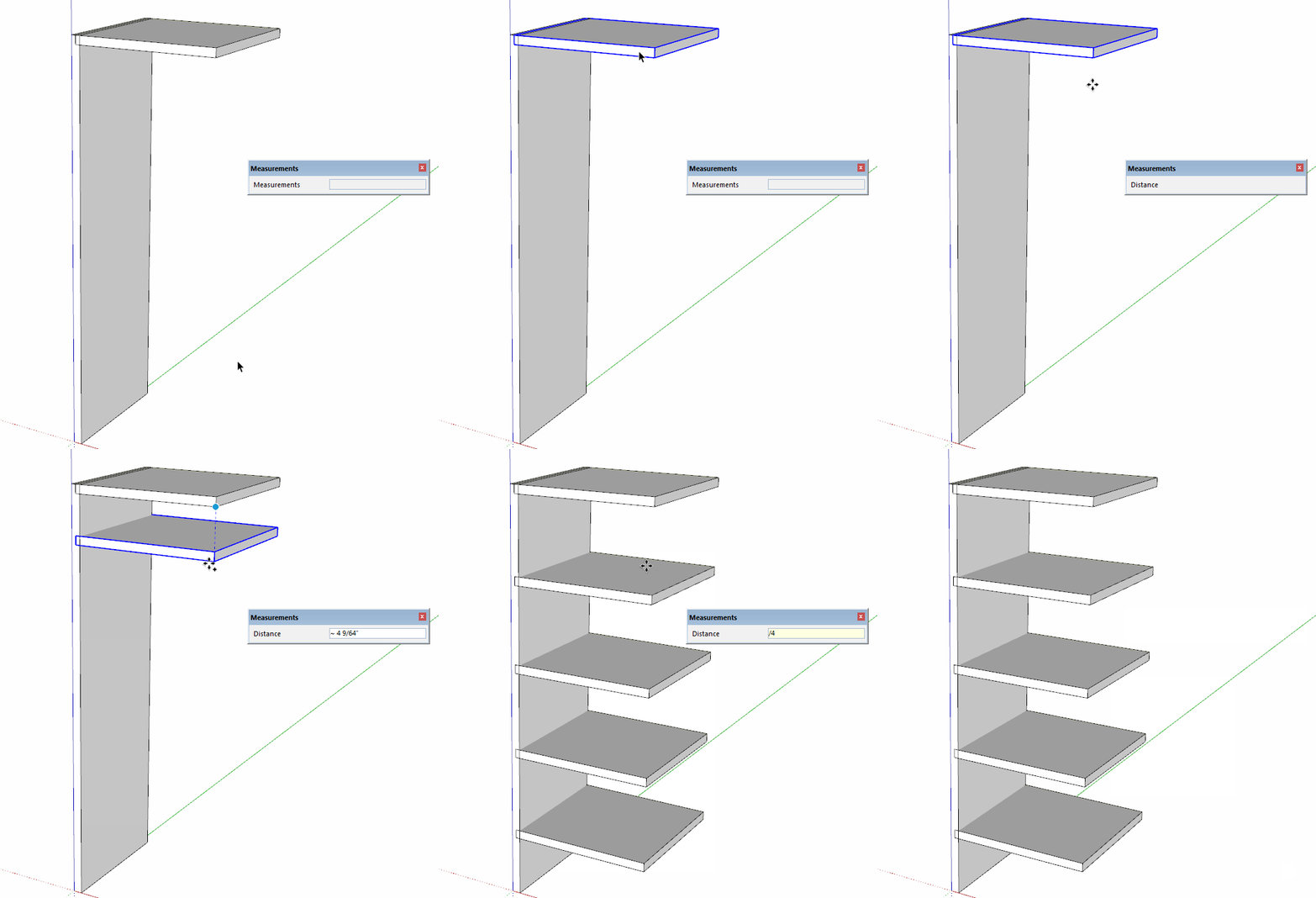
Has the divide and multiply feature changed on SketchUp 2020 as it no longer appears to work.
I have made shelf sides, top and lower shelf. Where I used to be able to hit move and copy and hold it over the shelf top and then hit ‘/6’ or even '*6", this sadly no longer seems to work. Have I done something wrong, overlooked something, or has this feature being quashed in the 2020 version?
You have to start the Move and either set the distance by dropping the copy or typing the distance followed by /6 or *6 and then hit Enter. From the sentence I quoted, It looks like you are typing units in there. Units aren’t appropriate when typing in the number of copies.
took me a while to make that work even after seeing/reading/trying-to-replicate your example, but finally got it to work, just seems rather a fiddle. Thanks though and much appreciated.
That’s the way it has always worked at least since V3 in 2003. You have to tell SketchUp either how far it is to the next one or how far it is to the last one before you ell it how many copies you want.
Thank you very much for your prompt answer! it really works.
But I wonder if it is possible to divide space instead of multiply pieces? I mean: you have, for example, a 3 metres length and want to place two pieces symmetrical in that length (say one at one metre from the left and the other opposite at one metre from the right) without have to calculate, of course