I am currently running Pro V2018, however, I’d like to mention I have all the Pro licenses from 2015 through to 2021.
I have “refused” to go subscription as a lapse in fees would render SkethUp unusable. I was happy to keep up the license but with the option of upgrading by choice… I use quite a few free/licensed pluging and hatted the menu customisation and plugin(sss) re-install during upgrades (and I never managed to get the “auto plugin update” running smoothly as “designed”… maybe more my fault in not enough RTFMs). I have not upgraded from 2018 to any in between to 2021 (end of licenses) as I didn’t consider any of the upgrades of any significant benefit for my requirements vs. upgrade modifications.
Unfortunately time moves on and the availability of the 3D Warehouse models are becoming “too up to date” for us die hards.
I have made quite a few contributions to the 3D Warehouse, that a few users have considered worthwhile, and I do like to download and spruik other peoples efforts in my models (albeit hobbyist).
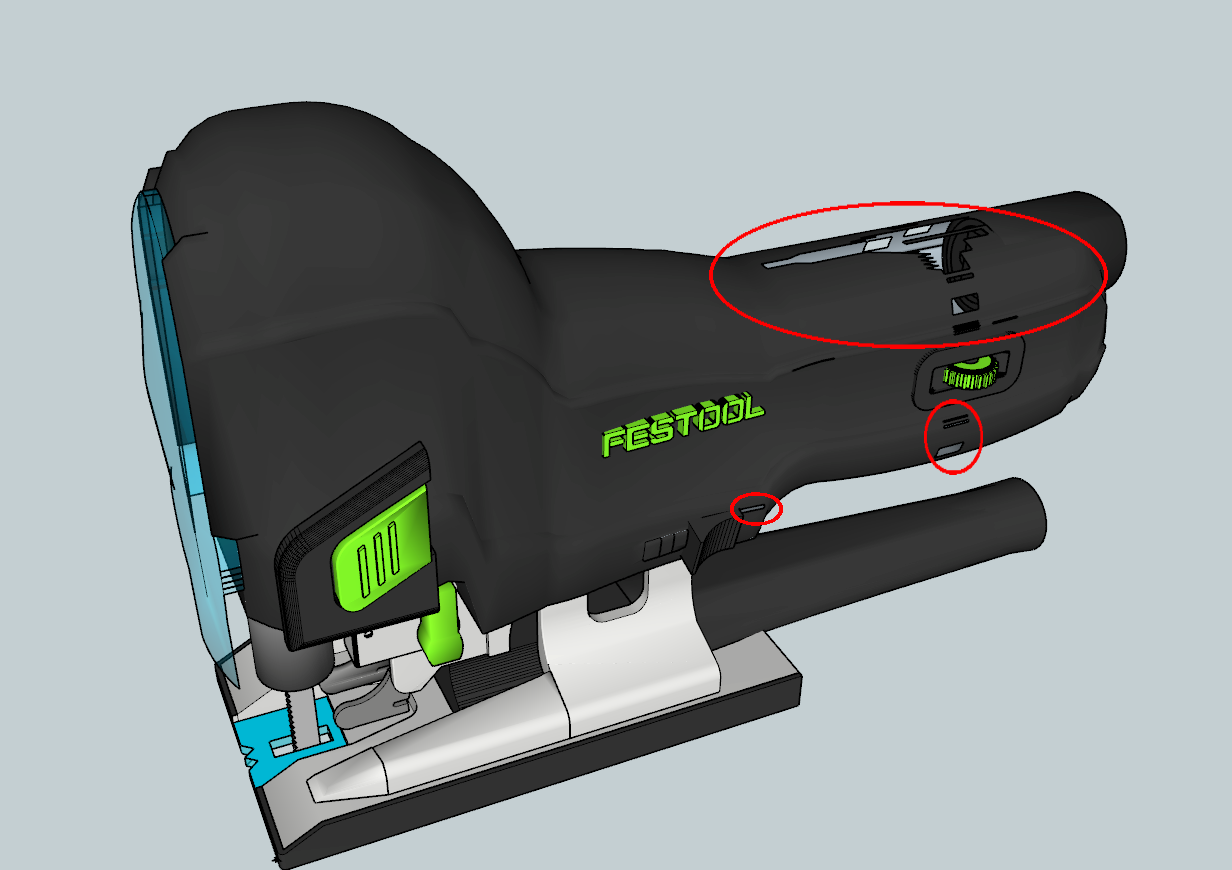
While it seems I can download all models as COLLADA files, I find that the quality of the model is not what I may call “smooth”… compare these two models of the Fe$tool Carvex. The first is the model under the internet “Free version”, while the second is my downloaded/imported image to Pro 2018 from a COLLADA file,
Is there a way of smoothing out my image without having to delete lines.
I appreciate that the reason why a minimal version of Warehouse items are defined, hence the Coollada version, I would have thought that with SketchUp’s backward compatibility feature, say V8 (or V2013) could be maintained instead of the Collada version. Surely it wouldn’t be hard to convert to V8 during download as (I am assuming) would be processed as a Collada) file. I’m sure most users would accept any conversion processing time during download… even if significant
Any help/suggestions (short of subscription) would be greatly appreciated.
You can search this forum for relevant topics by clicking the magnifiing glass top right of the screen…
I used “collada lines” as search parameter and this was one of the results:
that allows your Sketchup to open more recent files than its version, 2018 in your case.
meaning that you don’t have to download collada files, you could just grab the recent SU one.
Thanks twee’ and ateli’… your respone, let alone the speed, is greatly appreciated, I haven’t tried "Eneroth"s plugin, but I think in this case this may be the way to go.
I downloaded and started with cleaup³, which did quite a reasonable job, however, with the cleaner faces the holes contained in the “raw collada” file became more obvious,
With s4u Save As Sketchup I just download the model from the Warehouse and convert it to my version of SketchUp. What I like about this is I can download a lot of models and convert them all at once
Also note that SketchUp 2023, 2022 and 2021 use the same file format so using v.2021 would allow you to open all current Warehouse models. v.2021 also still has the internal Warehouse window working, at least until v.2024 is released later this year, and even that should still be using the same model file format.
I don’t see anyone mentioning it yet (perhaps they did and I can’t spot it). In the import options for Collada there is a Merge Coplaner Faces check box. Make sure that is checked, and the model should come in looking as clean as a SketchUp 2017 model would have looked.
Unfortunately (Ansi) I don’t think 2021 offers anything extra I need vesus the hassle of rebuilding my menu bars, re-installing all my plugins (and risk some not working in later releases).
I’m apprehensive about upgrades and features “lost”… like the small circle segments reduced to 24 in one of my upgrades… Being a woodworker I often work in circles (dowels) less than 12mm.
I continually have to upscale, “96” the circle and downscale… enough times to make it very inconvenient.
colin, maybe the model I’m trying to import has sufficient bugs in it to activate the “collada gremlins”.
I had no idea about the “Merge Coplaner Faces”, however, it seems I had the box ticked all the time…
When imported it had holes in it. Furthermore if I unchecked that flag, it imported without the holes,
Thanks for your input colin. That second file was what I was expecting.
Fortunately I had managed to get that same format after downloading the 2021 version from 3DW, and using what I consider a great Eneroth’s contribution of the file conversion plugin.
It may not be a simple direct download into my current model feature, however, I have no issues with a workaround.
In the past the collada downloads had no apparent issues, however, in this particular model, it’s shortcoming was obvious. Being just a “prop” in one of my models, it wasn’t a super biggie (though just a bit as I did raise a ticket)… but I didn’t consider it did the original author any justice.
Thanks again, and all, for you reponses/feedbacks… greatly appreciated.
Looks like another “ticket” satisfactorily satisfied/closed.
Just hope anyone else with the same issue finds this thread.