That piping example just made my day. New workflow upgrade.
Five minutes of fun with snappy pipes
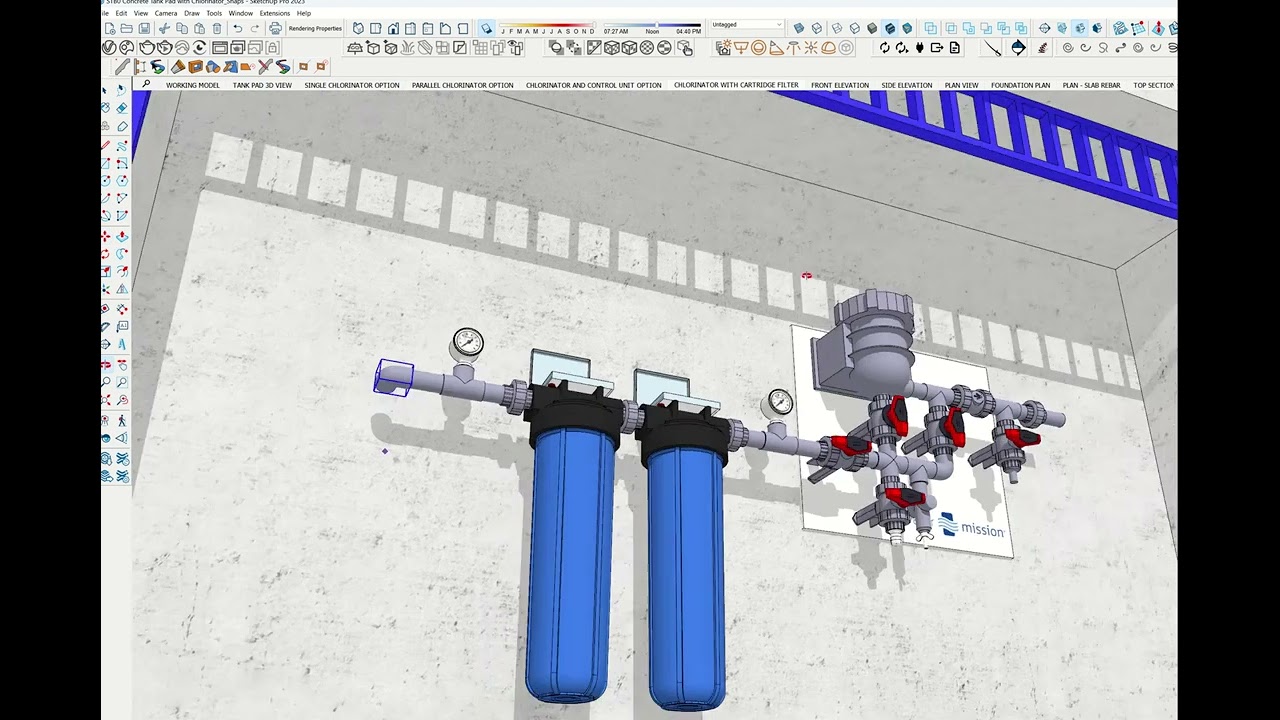
Great job!!!
The ALT tractor beam is fun. And rotating and mirroring objects on the snap points is convenient.
Please enlighten us in what part exactly “the new UI is fine”?
Tiny unreadable pale blue on white homogeneous icons (especially recalling mile-long requests for a dark mode) ? Broken “Use large buttons” mode?
Broken shortcuts, the NumPad keys don’t work anymore 
This is what I discovered within 10 minutes before uninstalling
I wouldn’t mind a bit of contrast. but no, appart from that, I don’t have issues with the UI. on 1080 screens it looks ok. I don’t use a lot of shortcuts besides the official ones, and they didn’t break, but then again, I’m using a mac, it’s more stable.
My numpad keys work as numpad keys. when I press them I get numbers. Same for the top bar numbers, when I shift press them, I get numbers. that’s what I expect of my numpad keys.
So obviously, you’re distressed by the new UI. I’m not. I’m ok with it. but I’ll amend my comment so you don’t take it as a general opinion,
I, personally, think, in my head, that the new UI is fine
Nice idea on reference cards, graphics-wise very poor execution. Printed it on 8.5x11 and can barely read it, font way too small, not at all a quick reference. Hope they can redo it.
Basically your trick for being happy is to restrict yourself wherever possible: don’t use higher resolution display, don’t use Numpad, don’t use icons - ideally keeping SU closed would make it flawless piese of software 
I have a 23" and a 21" screen, both 1080. I’m not made of money. I’m not gonna replace them by some 4K stuff just to please you, also, I’m ok with my screens, I don’t feel a need to get bigger ones with more resolution. Unless off course you offer to pay ? can I send you my paypal info in DM ?
I use the numpad to type numbers. I like it, it’s practical, and it works. you can have all your numbers tightly grouped in one area, it’s really neat.
again, on a 1080 screen, they are ok. plus, you know, a mix of shortcuts and muscle memory after 15 years. Sure, when I see screenshots of people using a 32" 4k screen where the extended toolbar is all tiny in a corner, I weep for them. On my screen the standard toolbar is pretty much the height of my modelling space.
well yes. you found the solution. here, a gold star. 
Now, can we go back to the topic of this thread, saying the things we personally like about this release ? is it ok ?
Thing is, ateliernab has devoted untold hours on this site voluntarily helping people. It’s something to consider before you click the Reply button.
I work with a Ultra-HD 4K+ (3840x2560 píxeles) diplay and I have no problem with icons. As @ateliernab says, I try to use shortcuts and avoid toolbars.
You have to take into account that some people are complaining just the opposite, because the toolbars take up more space on the screen than in previous versions.
There is a thing that we have to admit and take into account. We’re mac users. mainly. and most bugs and problems this years were directly or indirectly caused by the QT upgrade that we haven’t gotten yet.
I mean, looking at the forum, 2023 might be THE WORST version ever. But for mac users, it’s been okay.
I find that in general, the scaling thing is better handled on macs than on PCs, the % zoom thing tends to be clunky with one software and okay with the other. And the UI is a bit lighter than on the PC version, meaning more contrast by default.
off topic
not even a year yet. And to (mis)quote Montaigne, on the higher throne of the world, you’re still sitting on your ass
No matter how long a person has been here, it’s still just a person. you can debate them.
Ticking “use large buttons” in preferences had no effect in v.2023-1-315 (win 11 27" QHD displays) - they fixed it only now in v.319.
My viewport is almost 100% toolbar free, but sometimes icons inevitable evil especially with plugins
Me neither. At 125% the icons on my 32" monitor are practically the same size as on the 15" FHD laptop screen (also at 125%) sitting beside it.
That’s the reason why I changed from Windows to Apple. Windows has tried to make an interface that works for any device and I hated it when I had a windows mobile phone. Selecting something in a dropdown menu was annoying. When I got my first iPhone I discovered the benefits of Apple devices.
Sorry to disagree with you.
PC user here who is sticking with SUP 2022 for now, as I can’t afford any disruption to my project and there’s no substantial reason to upgrade to 2023 as yet. But I’m confident the issues with the latest version will be resolved; and, if not, there’s always 2024…
In an alternative reality, Nab and DaveR will offer a SketchUp extension which is actually the sketchup’s Help button. Users who push the Help button send a direct message to them, and they will solve the problem.
Pushing the button costs 20 cents.
In a few weeks Nab will have enough money for twin 4k monitors and Dave will have enough money to buy new machines to model rather than having to model those old machines.
Until then, maybe Trimble could send nab a 4k monitor for “testing purposes”.
2021.1 Good thing:
Hybrid rendering on export.
2021.1 Notsogood thing:
The Cancel Export button is always greyed out, so if you forget that it’s on, you can just wait multiple hours while your document hybrid renders everything 

v23.0.419 is a good build