I tried to open a model by right clicking on the SU icon and got a crash. I submitted the bug splash and tried again. It crashed again, submitted Bug Splash again. When I tried the third time the message shown in this screenshot appeared. I verified that I was signed in at the Trimble level and then tried again, but only got the same message again. I am at a loss as to what to try next, this is one I have never encountered. Any suggestions would be appreciated. Thanks

Almost all of your crashes happened while space mouse code was running. In particular something to do with overlays.
If you can get into SketchUp, look at Overlays, and see if the rotation center option is selected for space mouse. Try unselecting that.
Colin - thanks for the response. As I should have done before writing this, I restarted my Mac and the problem seems to have gone away. Having said that I will check the SpaceMouse to make sure everything is up to date.
Don’t forget to turn off the “rotation center option” like Colin said!!
Thank you for the follow up. Here is a screenshot of the overlay window. Frankly I am not sure what it tells me. Before Colin’s reply I didn’t even know there was such a thing.
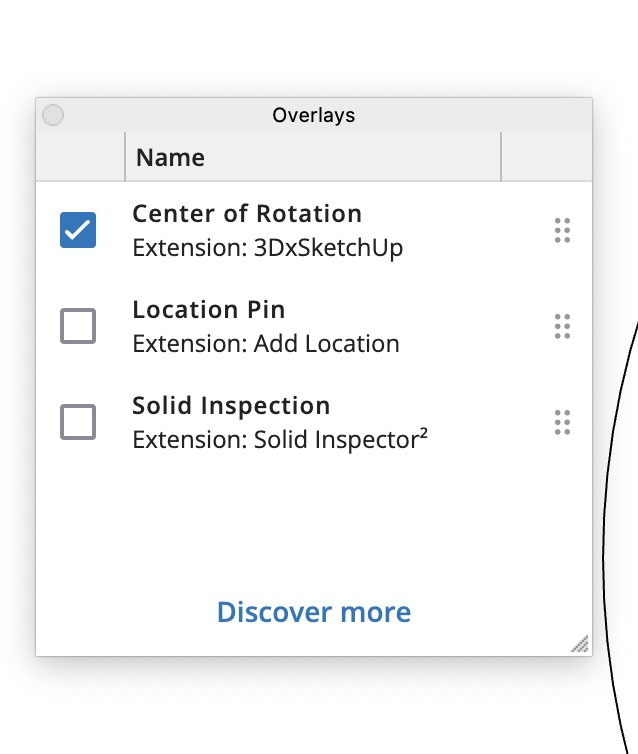
just uncheck the box “center of rotation”, you don’t need it.
It causes problems for some people, including me.
Not sure if it does for you, but uncheck it to be safe!
Will do, thanks
1 Like