Texture distorting

When I apply texture to a face, the texture gets distorted automatically. This mainly happens with new created textures. I have attached images for reference.

Note: I make no changes to size while creating textures

Distorted and original texture side by side:

My guess, without seeing the actual model, would be that you have a scaled group or component and you are applying the material to it as a whole and not to the faces.
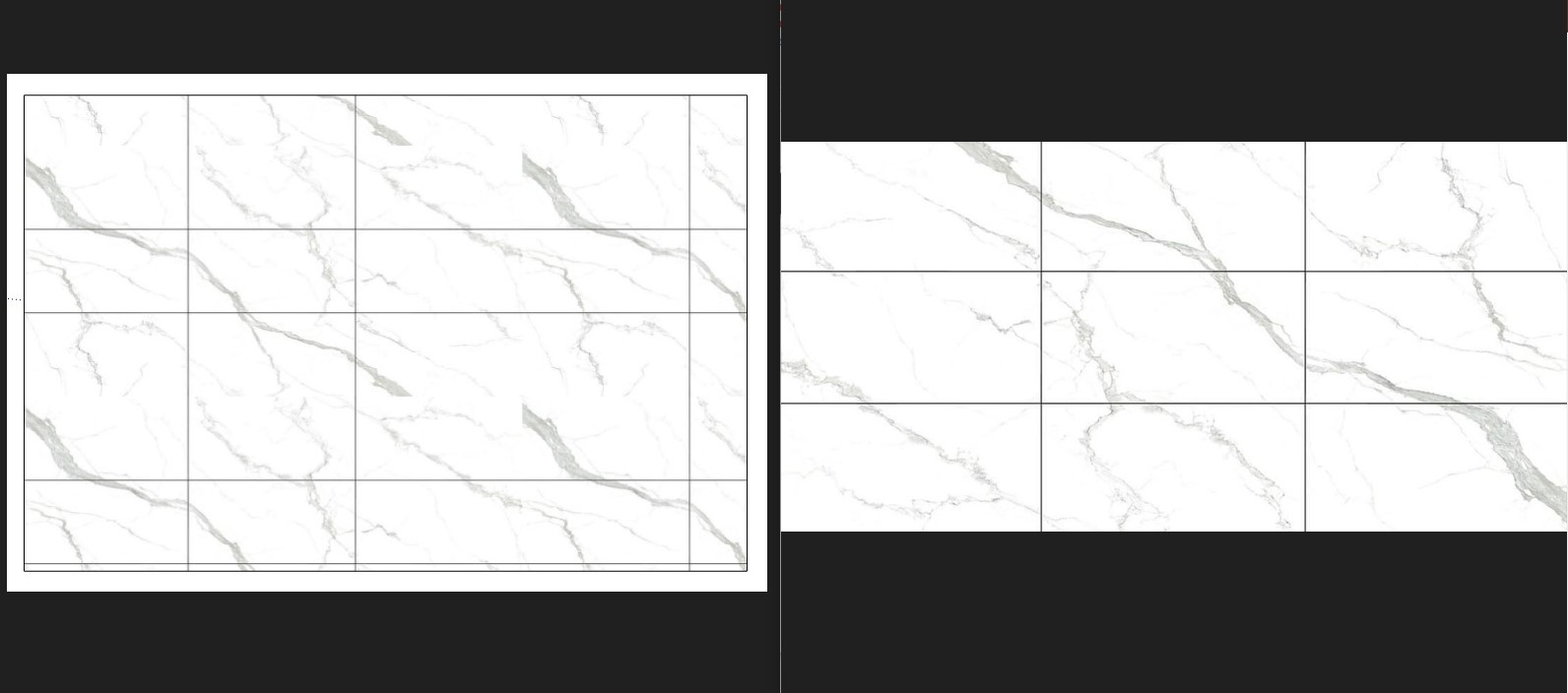
I apply texture directly on rectangular face using the “rectangle tool” and still run into the issue.

Try right click menu on the component, make unique, scale definition if available (not grey out) If unavailable then not a scaling issue

@cadlt15 You should upload the skp, otherwise you open a “Box” of worms

Sketchup.skp (2.9 MB)

Here see for yourself.

Not only is the texture distorting, it is also automatically changing colour. Very weird.

The texture is not distorted, just tiled, but it also gives you that illusion because it is not seamless.

1 Like

Okkk, so that solves that. But why does it change colour suddenly while working?

Because you changed the color.

I swear I didn’t. It happens automatically. But thank you, at least I found the workaround. Now i can continue my work. And sorry for the trouble.

Bye.

This topic was automatically closed 7 days after the last reply. New replies are no longer allowed.