This is not related to smooth / soft edges. I get the same issue with the same group where all edges are made not soft / not smooth.
This seems rather related to the positioning of the plane along the edges of the conic group. If I move the plane slightly up, then the intersection is correct.
I attach the model if ever the Sketchup Team wants to have a look. This is an annoying bug if we cannot count on the Intersect feature (and its API counterpart which has the same issue).
The Z coordinates of the vertices varies. Some are 0.3869 m off the ground, some are 0.3868 m off the ground. Carefully moving them all to be 0.3869 m off the ground gives you a good intersect curve.
So with the (some) endpoints of the curve only slightly off of the plane’s Z I think you are in the danger zone (more or less 0.001 inch). It explains that moving the plane up, away from the curve, you are okay.
However, I miss something: geometrically, the intersection should be a continuous curve, regardless of how the surface is shaped and where its vertices are located.
So, is this a bug, or at least a weakness in Sketchup?
I think the question here is, how was the conic surface created? It seems to be the cause of the intersect issue, but why aren’t the edges at that point equal on the z axis.
It isn’t because it is off plane, it is off between vertices.
The edges are ever so slightly off so the intersection fails due to the ‘tiny face issue’ leaving you with a bunch of separate segments. Move it away from the 'ring and it is allowed to intersect cleanly giving you a full ring at that point.
To me then the bug is in the creation of the conic shape and not the intersection.
The conic shape was created by a loft between 2 circles via Curviloft.
But, in any case, visually (i.e. in real geometric life), if you intersect the conic shape with the horizontal plane, you must obtain a continuous curve.
I’m in no way suggesting your shape is at fault, I’m saying there is a fault with the software if curviloft is able to create a shape that isn’t clean on the z axis. If it was all off axis it would make sense but it dips and recovers, so the actual geometry is off to begin with.
I still do not understand. A mesh is a mesh as long as faces have vertices and edges.
I guess Curviloft creates this tiny difference of altitude when it generates the Bezier curves which are then meshed together. Still, this could have been intentional and still a valid mesh from the geometry standpoint.
So, I would expect Intersect Faces should work fine on any mesh, regardless on how it was generated.
I wonder, could this be related to the problem with “colour by axis” in the styles ? ie. you can have a line slightly off axis that will still be seen as parallel, because of the tolerance / rounding of numbers ?
my reasoning is that if it’s the same issue, curviloft will “suffer” from the same rounding error (explaining why your curve is sliiiiightly off). and when intersecting, it breaks the code when the existing curve is so close to the surface but not exactly.
edit : that’s what Wo3dan called the danger zone. 0,001 inch of difference can be seen as 0 by sketchup but it can also be seen as 0,001inch
Except that when it is close to an edge which is made of vertices it wants to snap to them, which brings us back to ‘the tiny face issue’ which in reality is the ‘edges so short in 3d that the software things they are the same point in 3d space’ issue.
The specific ‘ring’ of the geometry that you are intersecting with is close but not flat, whereas slightly above that edge you get a clean intersection because there are no pre formed vertices to snap too.
This is a whole argument about the long established foibles of sketchup geometry.
Your geometry might be legit, whatever way you created it.
But unfortunately there are vertices that are close to the plane you wish to use to intersect the conical shape with. Some are in the same plane, others are slightly off, in what I would call the danger zone.
Following the result counter clockwise you can see a hickups in the result each time there is a vertice out off plane.
The color by axis tolerance issue is more of a problem with the new graphics engine. For this model the results are the same with the classic graphics engine.
If you scale everything up 1000x the intersecting works correctly.
I will show the model at the next meeting we have, and see if the developers can say why some segments are missing.
Thanks to all. I hope the Sketchup Team will have a look to understand the issue.
In my case, I don’t have the choice of the altitude of the plane. This is chosen by the user, and very likely, the user may choose a vertex as the origin.
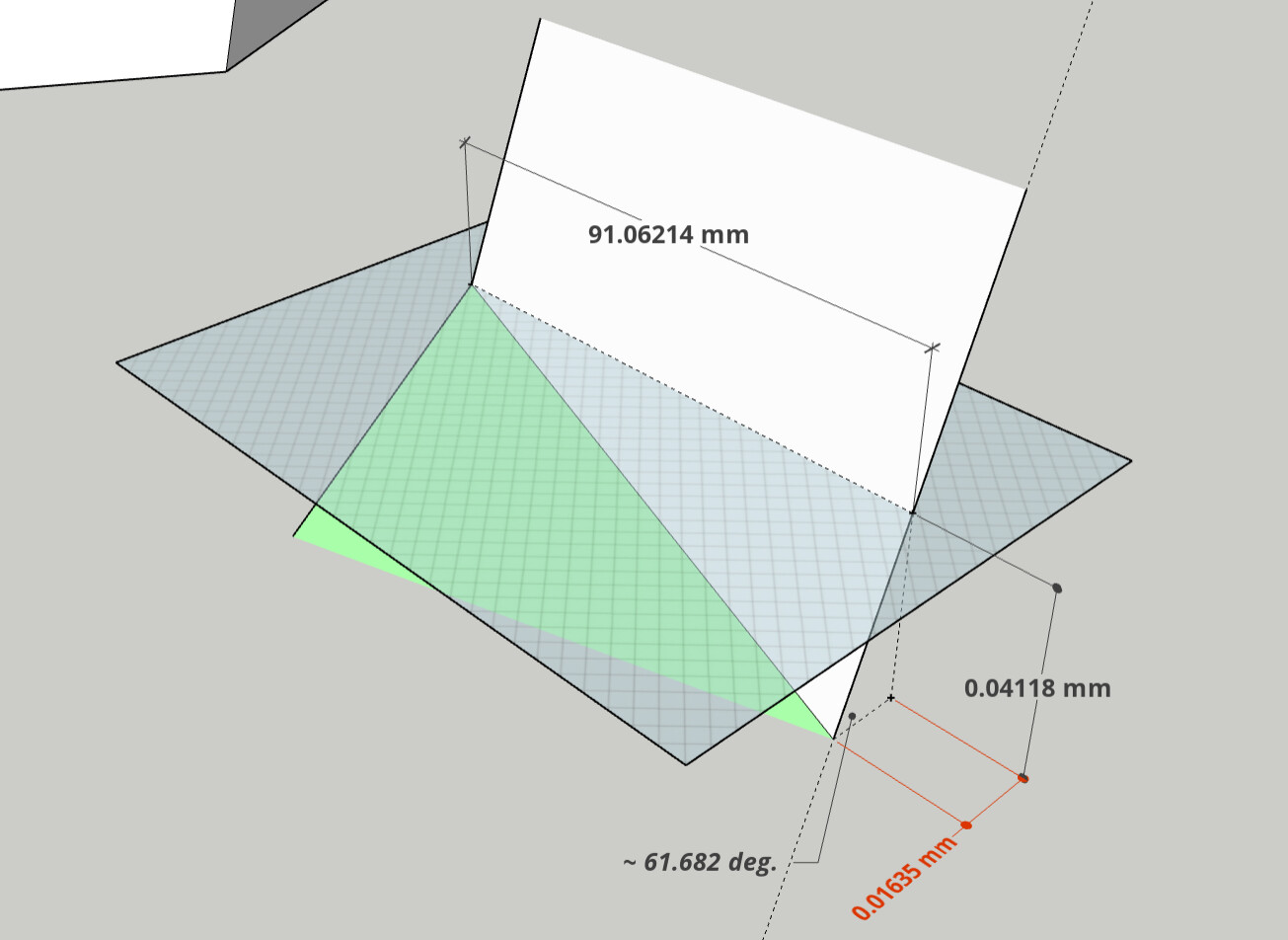
I reconstructed part of your model: dimensions and included slanted face angle.
The horizontal red dimension is calculated from vertical dimension (vertice being off plane) and face angle. This may be the culprit (< 0.001 inch or < 0.0254 mm) of a failing ‘Intersect Faces with …’
The entire intersection is always or at least should be in that horizontal face. Point is: will SketchUp create an edge right there.
What could be happening is that (see counter clockwise) at each hickup SketchUp fails to create that edge. Then it continues to create edges till the next vertice sightly out of plane.
I did eventually get to show this to developers, and although it’s likely to be related to small geometry things that won’t get changed any time soon, I did log a bug for the problem. Perhaps someone will think of a solution that doesn’t require fixing bigger issues.