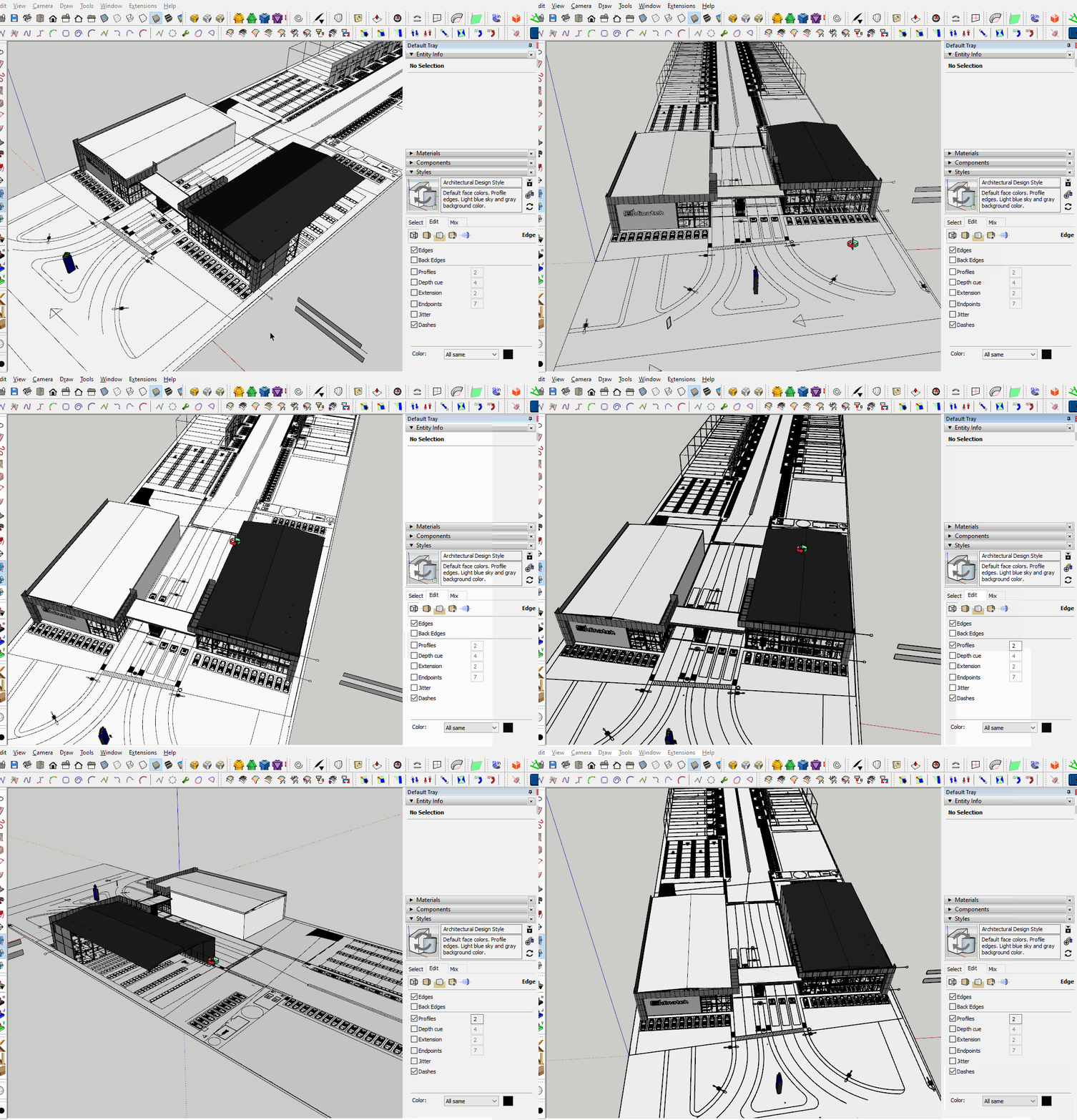
So Im having the same issue with another model, about the same size, with no floor plan available this time, and yeah, same issues, so 3Dconnexion replied again:
As a test, can you create a new SketchUp file, place a few objects and see if the issue occurs?
Would it be possible for you to copy the elements from your current SketchUp file into a new one and see if issue reoccurs?
How about sharing your .skp file so we can see what you are working with?
You never responded to my question about trying a standard three-button mouse. Or my comment about the possibility of your ho-hum integrated GPU struggling with your large file.
Dave, that file you sent runs smoothly with the 3DMouse. But, the original file was running smoothly using the Keyboard/Mouse, so, does this mean I have to be extra careful with what exactly on my next models? what did you do?
And yeah, an update was needed, so went ahead and did that. The driver that shipped in with the Win11 laptop, was a Win10 driver, go figure.
What do you mean incorrect tag usage? I know tags are messy when importing from CAD files, but does that affects performance also?
I edited the style to turn off the Profile edges. Profile edges require extra work from the graphics card. Turning them off eases that. The fact that without Profiles the model behaves more smoothly implies that it’s a GPU-related thing.
Did you try running your original file after updating the drivers and restarting your computer? Have you checked to see that it’s really the Nvidia card being used to display SketchUp?
All edges and faces should be untagged. Only groups and components should be given tags. It’s not likely that the incorrect tagging would impact performance on its own but it can greate other problems. Especially when you start using the incorrectly tagged edges to create faces in the model.
As a habit I always check models I get from others for tagged geometry and I purged unused stuff from the files. In your model there were only unused tags after fixing the tag usage but many times there’s a lot of unused components, materials, and styles. These bloat the file and can cause performance issues.
Yup, basically turning off the profile edges resolves all the issues. I notice that using mouse/keyboard with the profile edges on has the same effect, meaning the navigation is choppy, but I guess it was so fast i was not aware of it, it was too obvious with the 3d SpaceMouse because the way it navigates, and it seemed slow-mo.
After update and restart I did try the original file and also tired activating profile edges on the file you sent. Same issues, choppy but fast on mouse/keyboard, slow-mo on 3D SpaceMouse.
I’m trying to check if the Nvidia card is being used to displa SketchUp, is this it?
What steps did you take to clean tags in this file? Trying to recreate, thanks!
I’m not sure that is a solution, the model you uploaded, which doesn’t appear to be the same one as in your videos, works perfectly smoothly for me and my spacemouse. Even with all tags on and hidden geometry and back edges visible.
You’re right @Box is not a solution. But it did resolve my issues at the moment. What setup did you use to test the model with your Spacemouse? This is the model of the video:
Would you please try to activate the profiles and hide the floor plan, and see how it behaves. @DaveR can you try this too? Whats weird to me, is that this works fine with profiles activated and the floor plan unhidden, when the floor plan is hidden with profiles activated, it becomes slow-mo on Spacemouse and choppy on Mouse/Keyb.
Following the replies to the OP, I believe the issue is caused by a combination of a clash between the Spacemouse driver and the video driver resources.
I played with various settings. With fast feedback off, profiles at 1 and back edges on it behaved as expected, even with various tags on or off. Once I set the profiles to two the issue showed its head. Note I am using Win 10.
So I just experienced a second Sketchup crash in the last 24hs, doing simple tasks like copying or moving basic geometry. Never had a crash in Sketchup. Spacemouse related?
Here you can see the difference in performance on my computer. This is with a standard 3-button mouse. Notice the time it takes for the profiles to be displayed after I turn them on. And notice that the graphics card stops displaying the profiles while orbiting and it takes time after stopping the orbit for the profiles to be calculated and displayed. The dropout of the profiles is a normal behavior when the graphics card is getting overloaded.
I also did the tag fixing and then purging unused.
Here’s an example from one of my recent models. First with Profiles off, you can see that orbiting is smooth and fast. With Profiles enabled notice how even the geometry in the components drops out when the graphics card starts to struggle. That’s also expected behavior withan excessively heavy model like I have here.
I fully expect to see performance issues with models like this when I create them. For something like this which I created mainly for my own amusement I don’t mind pushing the performance limits. For models I create for the contract work I do, however I almost always lean more toward high performance to get the job done more quickly.