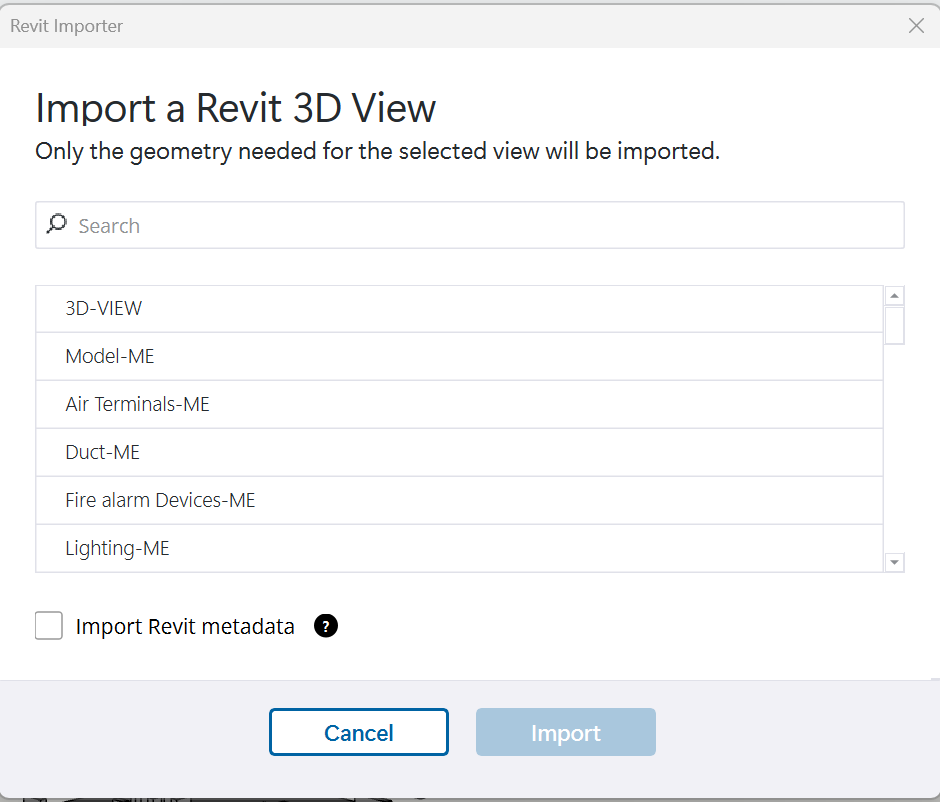
I have a RVT file from client which I’m importing into SU. When I import in 2025 the selection box comes up with the geometry needed to import, which is handy. However, I want to import everything or multiple ones, but it doesn’t seem you can select multiple layers or all?
I have only just switched to 2025, so not sure if this is what it’s now meant to be. Previously, the whole thing would import (it wasn’t always ideal, and I like this option of selecting what you want). Have I missed something or will I have to one by one import the layers?a
Those are not layers, those are Revit 3D views that the Revit user created. If you want to import everything, 3D-VIEW is likely one, or you can scroll down to find a more appropriately named view. You can ask the client to create a 3D view or specify one that is already created that has everything you need.
Ah that’s really interesting to know, never used Revit so that’s news to me. Oddly the 3d view barely brings in anything, whicb is why I thought it was something to do with layers. Thanks for letting me know, will contact the client
The are likely using that 3D view to temporarily hide stuff and model - everyone has their own way of modeling and naming in Revit but typically users designate their working views with something like 3D_KB or 3D_working. If you see a {3D} that is the default Revit 3D view, but they could also be changing the visibility of Revit categories in that view as well
Yer I had opened a couple of the views with names and they had more, but as you say, all slightly different, hopefully client can just hide and show what’s needed, great to understand though, thanks for sharing