Yes. It is very powerful, free, can do about 97% of what Photoshop can but it has some weirdness issues. Photo editors are a problem for people like me who need them occasionally. I have an older Photoshop but every time I need to use it I have forgotten half of how things are done.
1 Like
These kind of operations could be made possible with a few additions:
Select objects and choose ‘View Only’ and a ‘Ghost’ mode added as well.
Trimble Connect:
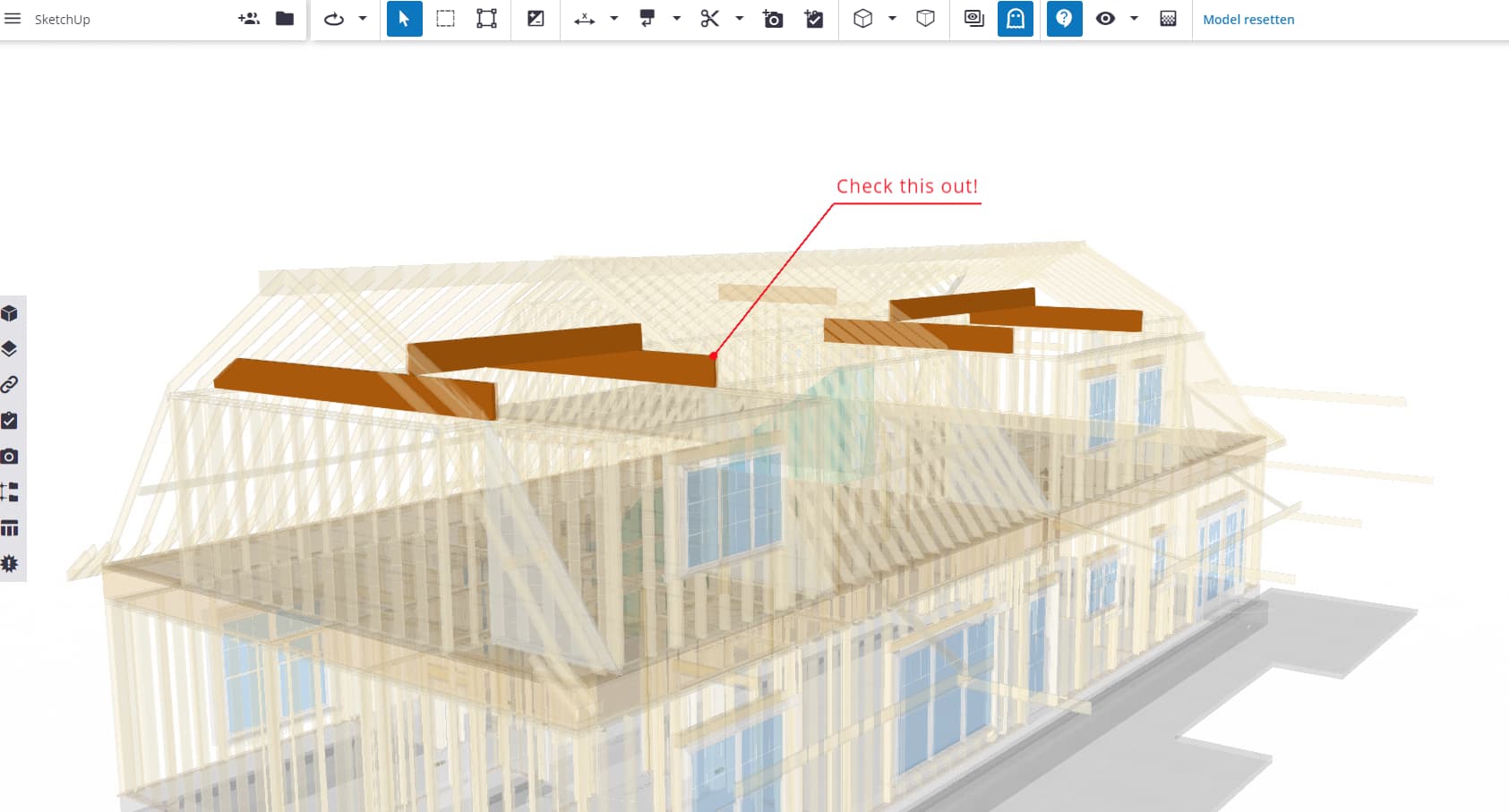
Or the ability of applying different styles to objects (and or Layers Tags)
3 Likes
How did you add that strike through style in your last Post?
I just skim-read the thread, but I think i would use Material Transparency and Saturation to achieve the effect you’re after.
There are a few ways of doing this, depending on how many materials you use in your model and how you apply them. Some techniques are “destructive” to your model, eg if you have to change materials properties for certain components, just to create this image, then change them back afterwards (not too difficult - but it wouldnt be suitable for a series of images over the course of a project).
Example: you can save all the items you want to remain “solid” as a single component., then save it out to a new file, delete it from your scene. Make wood in your scene transparent (or de-saturate it), then reload the component back in; it’s faces will be opaque becaus the material will be added to your materials.
Sorry no time to demo in a video today - hopefully that makes sense.
We have asked for this feature (Tag Transparency) in LayOut before but I think far down a long list of Wishlist items  An it may require you to change tag structure in your model, anyway.
2 Likes
Lots of options… Thanks Sam.
Dave,
Great example of creativity using three stacked layers in Layout. Thanks for sharing.
I wonder if you can say more about using your default template style in your SketchUp file. If the model requires wood textures, then is that style something that includes shaded with textures. So, then when you work with the model in the Layout viewports, you choose from other styles depending on the particular scene: perspectives, elevations, 2D views. Some viewports may keep the shaded with textures to show the grain color, others use monochrome, hidden line style, wireframe, xray etc. All of those additional styles would be in a folder under the SketchUp/Styles directory. So rather then complicate the SketchUp model with setting various styles you defer setting styles until Layout. Is this an accurate reading of your approach ?
My default style does include Shaded with Textures as the face style. Of course textures only appear if I apply them. In LayOut I choose a style from my collection that will show the model as I want: With or without textures, Hidden Line only, maybe Wireframe. It all depends on the viewport and what I need from it.
Yes. Exactly. That allows me to use the same scene in multiple ways in LO.
1 Like
Thanks Dave. Currently I have about 15 styles I choose from, some shaded texture, monochrome, hidden line styles. A number of my styles are specific to the appearance of Section Planes, Section Cuts with standard fill or hatching with section cut face. I have not tried deferring setting those styles until Layout. Thats something I will try.
1 Like
As I mentioned earlier I created a collection of styles that I typically use in LO so I can just look in the folder in LO and make the choice.
1 Like
I was having various problems with styles some time ago until Dave mentioned in a post his single SU style for modelling and applying styles in LO method.
It’s been one of the best things I’ve done implementing it.
3 Likes
Wow Dave This one could be really useful for me. I will try this today. Did you have a video or something explaine the process.
Sorry. No video.
Ok peoples, I took the risk and made a video on this topic. Link is here on Youtube. Applying Styles in Layout instead of Sketchup - YouTube
4 Likes
Keith,
Thanks for taking the time to make the video. I have updated my SketchUp templates simplified them with one style and placed the others in SketchUp/Styles/woodworking for the styles I use in Layout.
I made a triple stacked viewport of a cabinet similar to what @DaveR showed using hidden/xray, color texture and monochrome and sent it to my client. I have enjoyed learning from this thread.
2 Likes
Great to hear!
1 Like
This is so nice, That really help. Just the information that I need to understand. From this info I made a nice presentation and modify couple off thing in SU and LO. Very appreciated
2 Likes
This is the kind of workflow we could hugely simplify if we could have a style per object per scene system instead of the current style per scene.
Anyway you see it, either in Layout, or Photoshop, or similar software, to create this effect you need at least two scenes, or a great control of Layers and Layer colors (which sometimes is impossible) to get what you need.
If we could control the style of single objects like groups and components, so that they detach from the global scene and store these styles in the scene, anything could be achieved in a single scene.
Otherwise we can keep finding clever ways or workarounds to do stuff. Which are sometimes just stupid if projects are too complex, as they take too long and lead us to just quit.
Take a look at this post:
1 Like
I agreed with you. If a small feature is added into Entity Info Panel like Receive/Drop Shadow for per entity will solve all.
Great thought. Had always thought that if we can get outliner access in Layout inside the “Sketchup Model” panel that we would then have something close to that.
Would be something amazing to be able to assign styles and tags in the outliner at the object level and then have access to the outliner in Layout. The options would be endless.
1 Like
Dave,
On the subject of effects with Layout, in other posts you mention you have defined Layers in your Layout template for Scrim, Hatches and Dashes. I have used dashes, as example to place a rectangular outline over a curved part to show the rough stock required. Would it be possible for you to show some examples of furniture that use Scrim and Hatches layers ? Thanks.