Is there any way to recover a path used when applying the follow me tool? This would be useful when changing follow me geometry later.
I suspect the answer is “no”, but I’ve been amazed at some of the creative things people come up with on this forum. If not, I’ll just continue with my practice to preserve the paths by grouping them with the generated geometry, as demonstrated in this screenshot:
@Box, I’ve learned something already: never realized you could offset when applying followme like that. Very cool.
But this doesn’t address my question – which perhaps was not clear. What I meant was, “can you recover a path that has been deleted?” That is, let’s say that I deleted my original path and all I have left is the generated follow me geometry and I want to go back to the path so I can modify it and then use follow me again.
There is a way to recover that path, in case you have a model that doesn’t have it (CenterLine Tool extension), but for those you create, keeping it in a group is the simplest method.
I haven’t tried this, but could you turn on Hidden Geometry and pick the vectors that match your path? If it includes radii then you may need to find the opposing edges, draw lines between each node and then the mid point of those lines should be the path. Depend how much patience and how complex the profile is…
You were given several methods plus explanations, and your question was ‘Is there any way to recover a path used when applying the follow me tool?’. If it means recovering the exact original path, then it can be done with undo (of course, only immediately after you’ve used it). But if it is acceptable an identical one, you can rebuild it from the existing form, and then that is also possible, but not automatically, with a click.
@mihai.s I agree with you that it is possible to regenerate the follow me path, if one uses the extensions or methods you and others mentioned. What I should have said is that “I conclude there’s no simple method without extensions for my case”.
I did try to apply your manual method, but found it too difficult and that’s why I wrote what I did. I’m including another screenshot with hidden geometry shown to demonstrate the difficulty. I’m also including a .skp file
I’m not sure I should be replying as I don’t think I don’t get it.
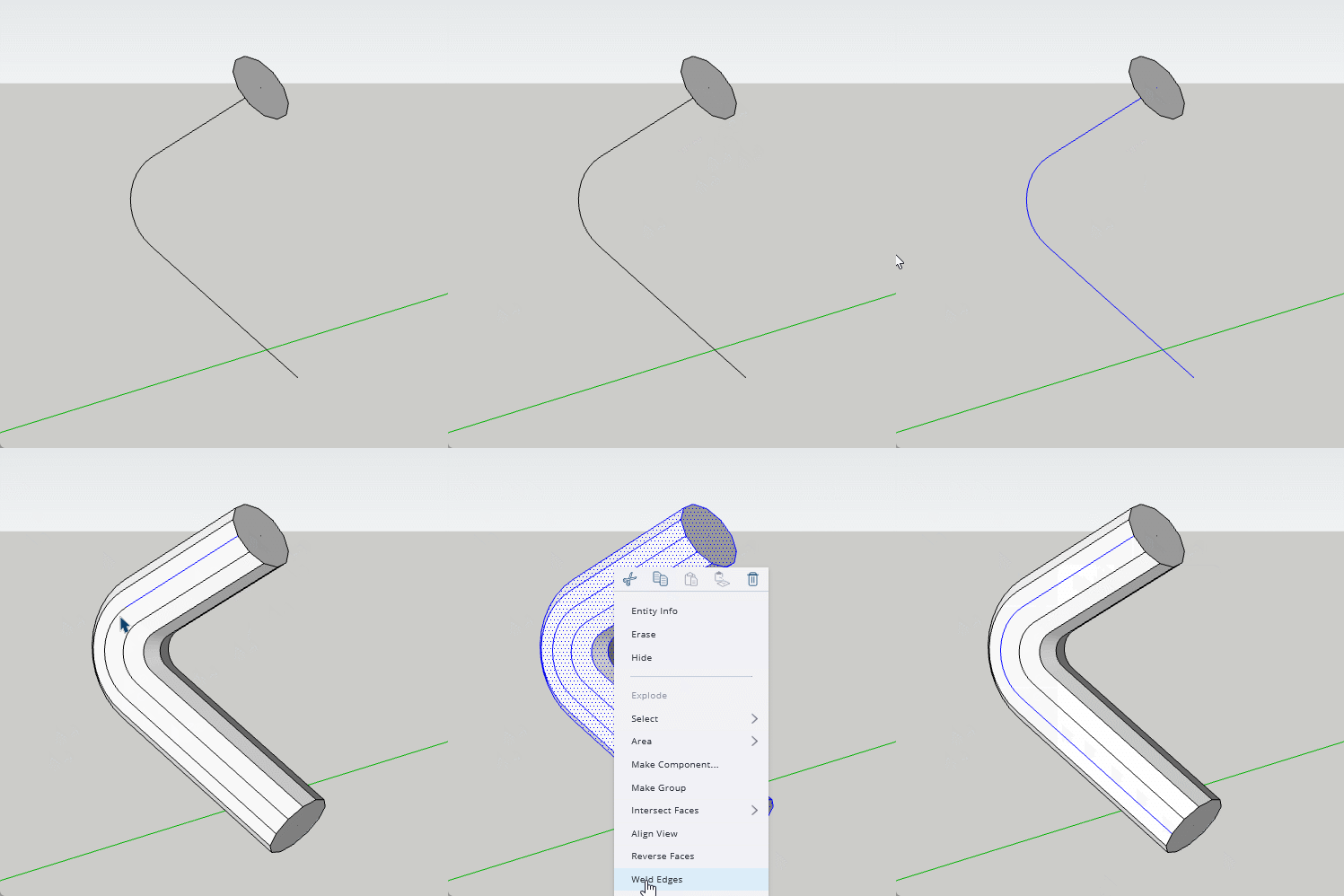
But here is an example of using the followed geometry to recreate the path and replicate the shape. Obviously you would alter it if you wanted to change it.
@Box, it looks like you are managing to do what I want, but I can’t figure out how you are doing it.
Specifically, how are you getting that single (dashed) line of hidden geometry to be selected all the way down?
At first you select the top part connected to the circle, but the selection ends because there’s a break near there. Then you do something to select all of that dashed line – what are you doing??? Here’s a screen recording of what I mean (taken from your screen recording):
I’m marking what @Box put here as the solution based on his screen recording – although I don’t know how @Box makes the selection of that path. I’ve tried many things but nothing works. m.skp (234.7 KB)
I used one of the various path selecting extensions, in this case Curvizard by Fredo6.
But extensions don’t work in web versions so you would need to select the segments manually while holding ctrl or shift.
A small tip for working with the web versions. By exploding the curve of the Profile you create hard edges longitudinally on the follow me which allows you to weld them.