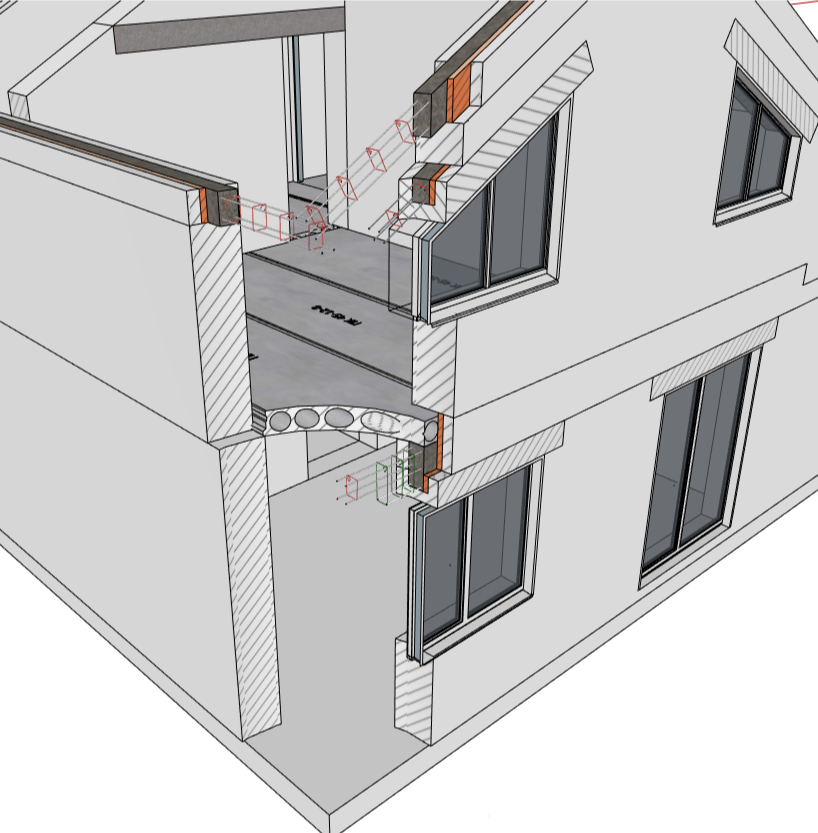
I understand the one off project dilemma and I’ll leave it at this. Any project that requires site plans, floor plans, elevations, sections and interior elevations would benefit from the use of templates. That to me includes remodels and repetitive projects like townhomes. Master planning is another bird for sure, depending on scale.
For section fill, I find no need for hatch patterns given all my plans and sections are at 1/4” scale. A toned poche is all I need. My details cover that issue by using realistic material representation instead of graphic. If I were preparing 3/4” scale 2D wall sections and larger scale 2D details I probably would like a hatch pattern. Although, to me that would be a step backward in my process since I did it that way with ACAD for more than 20 years.
Again, I only replied because you expressed your frustration with documentation and the limitations of Layout. The way I use templates for construction documents has made that part of working with Sketchup, the simplest part.
I would say not everything can be solved with templates and typical details. I guess all our projects are untypical.
Templates would solve only 1% of the job, and we could spend more time setting up the template than we would spend setting up the viewports as the project develops. I don’t even use scrapbooks.
Typical details would imply that we would reuse details from project to project. We do not. It hasn’t happened to us so far and I don’t think it will ever happen. Modelling 3D details that would be project specific isn’t worth it and doesn’t fit the kind of architecture we do. That’s why drawing 2D details is the way to go for us.
I respect that you can do what you do, with templates and a detail library and I can see how it yields fast results for you. It’s not worth it for us and that’s not what we need.
Thanks again for your kind help and insistence on the subject. I know you mean very well and I appreciate the time and effort you put into it.
We absolutely need vector hatches that can be exported into AutoCAD because this is the still the standard way of how we communicate with our consultants here. Now we have a lot of manual work to do in AutoCAD to recreate hatches. And with each drawing change we need to fix the hatches which is a major headache. This is for floorplans and other section cuts… We also do a lot of 3D details and for that I don’t mind using textures for hatches… But for floorplans and sections we absolutely need vector hatches.
We also use templates in Layout to prepare our drawing sets. Our projects are similar so they allow us to use templates most of the time. But that does not solve the need we have for proper hatching which is still the standard way of representing materials in any CAD program today. When exporting fills from Layout as bitmaps you get all sort of problems because bitmaps are separate files, usually AutoCAD users also have black background with white lines so those white bitmaps makes CAD drawings unreadable, etc…
I agree 100%! Stacked viewports are a workaround that may work for some users but definitely doesn’t solve problems for many of us. Otherwise there wouldn’t have been so many plugins trying to solve this pain (Skalp, Curic Section…).
It’s not seamless, but it could help you by accepting solid fills as an hatch.
We are combining at least two stacked viewports, one for the section hatches and another for the hybrid viewport that carries the vector edges to CAD but still has the raster too.
I feel your pain about how raster images cannot be changed from CAD, or how they look bad almost everytime, however we don’t work in CAD at all, so we don’t need to change the raster in the background.
Our aim is to have the best possible fidelity between layout and CAD and we found out that it’s almost impossible to do better than what we do right now, without hurting the presentation.
Maybe where you live but here it is absolutely necessary because it’s the standardized way of representing materials in arch. drawings. We can’t just do what we want or would be easier in Sketchup…
No, not yet. I will try it but then again it’s just another workaround which still requires manual work inside ACAD if we would want hatches to show up the same way as in layout drawings.
I haven’t used a graphic hatch in a long while either - because of Sketchup. The sky has luckely not fallen - very good. I do get weird looks from contractors quite often though. And when I have to hand in drawings to (German) government institutions - well - the sky won’t fall either, but I will get a “rejected” stamp.
Hatches are not really THAT outdated as @Sonder makes it occasionally look like. They are a standardized and accepted visual representation of an information. Hatch fills represent material information at a glance. No matter where on the plan . all objects with the same hatch fill are of the same material or material type. Why I would want to not have that is beyond my comprehension.
So let’s not argue too much about who needs it or not - Trimble should implement this rudimentary feature and should add it to the Sketchup-Layout workflow before too long - without destroying Sonders workflow of course!
Adding raster-type hatch-fills the way I proposed feels entirely possible and not too hard to implement. Adding vertor-based hatch-fillings that export to ACAD would be a dream of course but that would likely take a lot more effort on Trimbles side. So I’d be fine with either one - as long as I can stop stacking a viewport for every single different hatch color I need.
We shouldn’t have to dumb down our work nor output because we use sketchup, but unfortunately we have to.
It doesn’t mean it doesn’t pay off. It pays off because Sketchup allows us to model faster and more creatively, but our output is under par even if it looks better.
Dumb down? You have got to be kidding me. I’ll put my SU and LO drawing set up against any similar project done in any other software for level of detail and coordination. I don’t get funny looks from contractors or review agencies either. In fact everyone I work with compliments the level of detail and coordination.
I can’t think of one time where someone said “ Oh my god!, where’s the hatch?”.
I have no issue with it as a feature so don’t get me wrong, but saying hatches are mandatory and without them we are “dumbing down” our drawings is ridiculous. Especially since not every material has a designated hatch.
You keep measuring Sketchup by your own practice, by your own standards and by your own experience.
In our context, unfortunately, DWG is norm and even if we produce better work, better looking presentations, better understanding of the project because of our 3D model and eventual renders included, as well as a coordinated Sketchup model that allows for a much better design with great looking PDF files, the final output is DWG and our DWG files are under par, thus dumbed down.
The fact that we can’t have true circles, arcs and splines being exported to DWG, the fact that the export scale isn’t exactly right, the fact that there is an utmost disregard for drawing origin in DWG exports from Layout or Sketchup, the fact that we can’t have a model with true world coordinates nor we have an even close solution for solving the issue via a datum, the fact that we can’t create layers from Sketchup tags from a Layout DWG export, the fact that our DWG model space has to be fixed manually because of stacked viewports, or we just have to ignore how awkward it is with all stacked viewports side by side, the fact that even if we fix model space we are left over with several different empty viewports in paperspace, and finally, among other things that I might be forgeting, the fact that we don’t present hatches for materials, as everyone else does, and have to use raster or solid fills instead, is a dumbing down of DWG standards.
I don’t agree that DWG should be a standard. I hate that I have to deliver DWF files for municipalities that respect a standard that Sketchup cannot produce. I produce better work with Sketchup than I ever did with CAD. However I can’t change my whole context and I endup having to deliver dumbed down DWG files, or work on them so much in order to fix them, and I do so just so I can keep everything else Sketchup is great at.
Dumbed down is the expression that better fits the DWG exports we produce from Sketchup. In my world, that is a fact!
Understood and very unfortunate that building departments would require a specific file type that is not necessarily a universal one. PDF would make much more sense since editing the files is not the goal of the municipality, reviewing is. That is the standard submittal format here in the USA.
I’ve been trying to argue with everyone about that, but I still have to have a DWF printer from 2014 or whatever installed in my computer just so I can deliver permits.
I do deliver everything in PDF to contractors, they do love the amount of detail put into them.
They endup asking for DWG.
I’m not as lucky as you with Engineers and Landscape architects. They can produce their work based on mine, but they have a lot of trouble.
Believe me I would like to have all of this simplified and, like you, use PDF exclusively, as the final 2D output I need.
Until then, I have to support every feature request made to improve DWG export from Sketchup and Layout.
Hello, everyone. In my subjective opinion, apply hatching to the section using a tool from Whaat, BooLTool. A certain plane is created with a tag, for example, “cut”, 1mm thick, and the color of the hatching that you want to see in the section is assigned to this plane. The “cut” is placed in the model at the place where the cut needs to be made and is cut using BoolTool. The hatching from the “cut” is transferred to the cross section. The hatching on the “cut” can be changed depending on which one you need in the end on the cross section. It is better to cut into one group/component rather than a grouped assembly. Please don’t throw your slippers at me, but it seems to me that this is the easiest way available.
That’s basically what we had to do before SketchUp did solid fills in the first place. It’s labor intensive when the model changes, because you have to regenerate the section. Also, if you dimension to it in Layout, those dimensions loose their link when you regenerate the section. If the dimensions aren’t actually changed, you can leave them broken, just fix the ones that are, and the red highlight doesn’t print in the output.
I see, so not a flat (SketchUp) section cut, so now I know why you turn to BoolTools. I haven’t used them, but does that “destructively” change the model in a sense? Do you keep an intact copy as well?