I am using Sketchup Pro 2019.2.222 fully paid for and on active support.
I sometimes need to export to DWG for others to use information from my models. This appears to work OK.
Usually, I verify the information in the DWG, by opening the result using Autodesk DWG TrueView 2019 (this is free downloadable software).
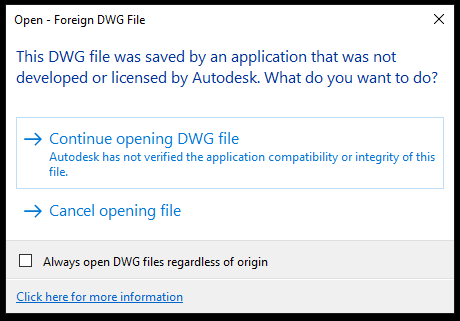
Then these dialogs pops up in succession:
The content in the DWG file is then displayed correctly.
I have not really thought much about this until now, but may be it is time to ask someone…
My question is:
Why do Sketchup’s exporter claim to be a “student version”, and why does is say that
the produced drawing must not be used for commercial of professional purposes???
Surely results from a licensed Pro can be used for “commercial of professional purposes”?
Hi JoNoS, I am seeing some strange behavior and I am curious to know if you see the same.
Using DWG TrueView 2020 I had seen the “Student Version” error and the “Foreign DWG” you described with the 19.2.222 initially. The “Foreign DWG” is expected as Autodesk stamps their files with a genuine Acad stamp but the library we use (and others use) we cannot authenticate the same way.
The strange thing is that I do not see the “Student Version” any longer when opening the same 19.2.222 file twice and any subsequent exported files I do not get the “Student Version” warning. Printing these file (pdf or hard copy) also do not show the “Student” stamp.
Also any 19.2.222 or 19.2.221 (Mac) file I open in AutoCad I have not seen the Student error.
Printing the DWG files (from TrueView) which I have generated using Layout shows the text “PRODUCED BY AN AUTODESK STUDENT VERSION” on the print.
I am not sure I follow you when you speak of opening the 19.2.222 file twice… Every time I open a generated DWG file (using TrueView) I get the mentioned warnings and every time I print I get the same informational text on the printout.
Ctrl+S does nothing on my machine (in the context of TrueView, that is).
But thanks for the suggestion anyway
I am really a litte surprised that this issue has not been flagged more.
I know trent is looking into it now, so I believe it is in good hands…
I thought I did… but maybe I did not…
Anyway, I reinstalled Sketchup 2019.2 as administrator using Repair, and the dates of the Layout files are now much changed.
Also, when opening the DWG files I do not anymore get the STUDENT VERSION warning.
So it appears this did solve this particular issue.
Thanks to all.
A thought, however, it appears that it is (too) easy to forget to install Sketchup as administrator, so would it be possible for the Sketchup installer to check for this when installing and thus warn the user??
Awesome thanks … yes… those are not the correct .dll’s they are the .dll’s from 2019.0 that had the student version issue.
It looks like we have an issue when users upgrade from SU2019.0 to 2019.2. We made the fix in 2019.1 to accommodate the fix so upgrading from 2019.0 to 2019.1 you would get the correct .dll’s.
The work around for this is to uninstall SketchUp 2019.2 and reinstall 2019.2. I have verified that you will get the correct .dll’s at that point.
Hmmm… Interesting. I seem to remember that I upgraded directly from 2019.0 to 2019.2 (I never got around to install 2019.1 for lack of time or some other cause).