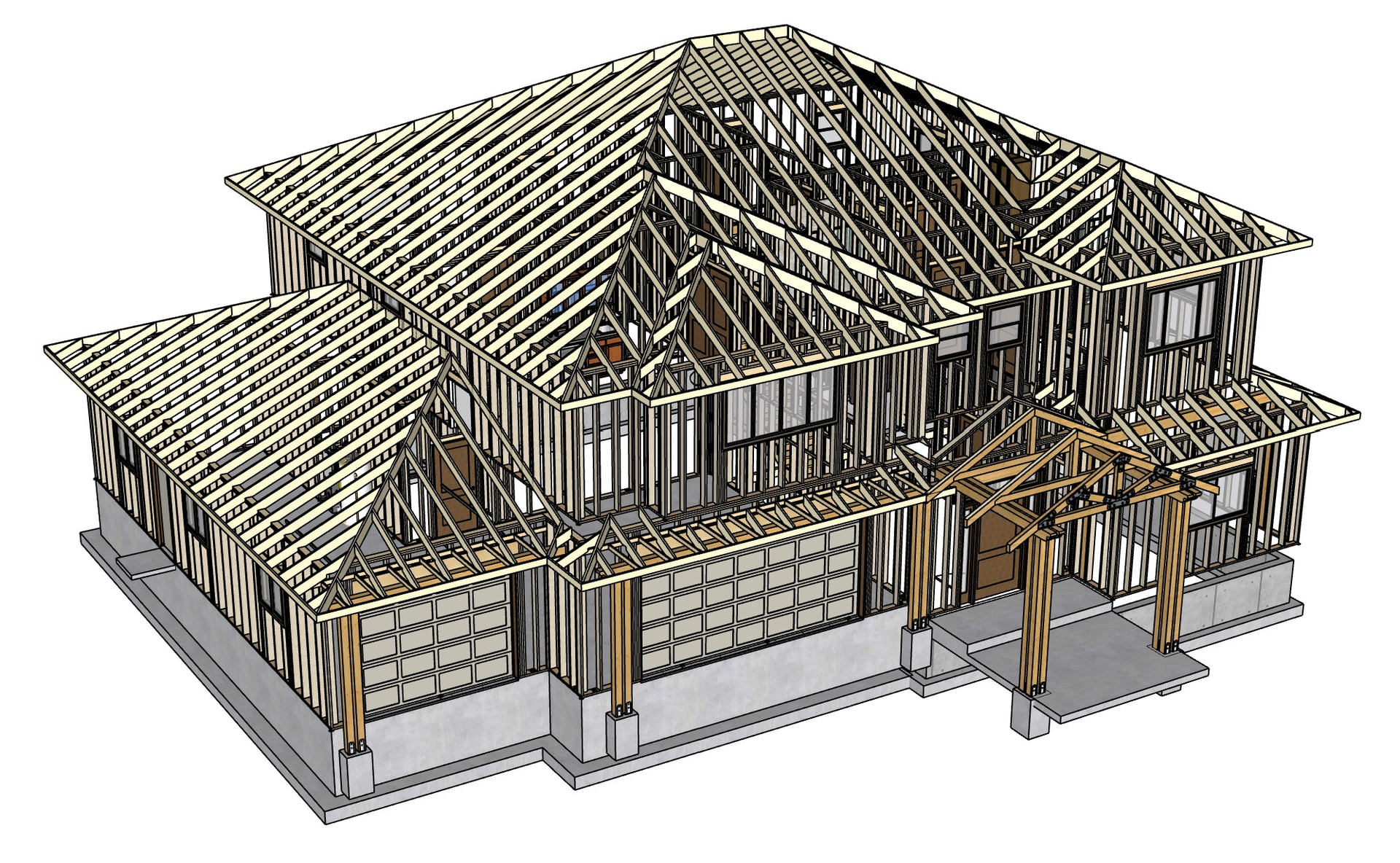
The stairs, yes. Everything else on the deck I modeled.I don’t think Nate’s Floor plugin offered decks at the time. I spent two years being excited and confused by a lot of things Medeek. But I had the time to dig in and keep making mistakes and then rewatching his YTs. He is also the best developer I’ve encountered regarding responding to problems and questions by email.
I’m a semi-retired carpenter and GC and the allure of Medeek was being able to control how things a built. The excruciating minutia. There are a lot of work-arounds I’ve used to get what I want with all of his extensions.
My goal has been to be efficient as I can be because their are a lot of good designers/draftspeople out there. I have enough details saved (wall sections, foundation details, etc.) that I almost never draw walls fully framed any more.It’s easy enough to switch them to full framing if you need to for some reason. I don’t draw SOG foundations or slabs. I don’t model floors, mass walls or flat roofs with Medeek. I love the 2D model option in tight places. I’m not a huge fan of the casing and trim options and sometimes use Dynamic Component windows and doors, again to be efficient and get the desired results.
What can I do different with the trim and casing options to make them better align with your workflow?
I have recently added a few more casing options and trim features to the Wall plugin. All of these updates were customer driven, I curate what gets added to the plugins but most of the recent features are coming directly from suggestions by power users like yourselves.
I have quite a few tutorial videos now, and I probably should put out a few more. I think with many of these more complicated jobs it is still really difficult to get 100% there. The plugins, especially the Truss plugin can get you pretty far but eventually you will run into complications that the plugins still may not be able to handle. At that point some manual editing will be required.
There is still a lot more I can do especially with the Truss plugin and various roof configurations and porches.
I think the casing options are ok. It would be nice if wood grain were correct to each member but thats getting a little to picky I think. In most drawings you dont really see that detail. I will draw a detail that dimensions reveals and any coving or maybe dental molding.
I find issues in the truss module. Sometimes facia doesnt get drawn things like that. I use the floor module to add ceiling joists. I think when it comes to porches and entry ways and timber framing it would almost be a dedicated module. There are so many options and styles. Piecing it together works. Texture options would be nice and Plate color so a regen doesnt wipe out Texture.
I used to spend more time in the model than I do with the Medeek Extensions. More time is spent now annotating in Layout. I had a lot of dynamic components and used some different framing extensions none of them were as accurate as the results I get from The Medeek extensions. I have for a long time drawn Framing elevations where I can show Plate heights and headers. This wasnt done in old school drawings. Too much work!
Because I want the framing (it sets the drawing set to a higher standard) I have to draw a wall solid so that section cuts look correct. I dont hatch it isnt necessary. Even back in the day with manual drafting you would shade the velum on the back side with a red pencil to get a gray fill for section cuts. Im discussing this here so if others find it useful they will comment and I can get the solid/framing both turned on and have them in a separate tags so section cuts render and I can still show framing in my Layout drawings set. More attention to Data in assemblies. I would love to use the custom label for doors and windows and have that available to labels in Layout. I have requested this maybe other will comment if they would use it.
I appreciate Bradens @LinearGraphs attention to detail His drawings are beautiful but making everything as it would be in reality might be detail that doesnt get noticed. Even these days drawings produced from other software just represents things like roof planes and its up to the truss company to make it work. Here we do better and i get comments appreciating the accuracy.
I’ve been giving some thought to the wall solid problem. I could add a tool that generates a solid for each wall panel and then unions them all together into one solid/group. With this sort of thing would one want the sheathing, cladding and gypsum included or just the framing (wall solid width)?
My self I make a solid for just the framing. The Gyp and cladding and trim are on layers that can be turned on and off. I also make a vector layer in Layout with all cladding trim and all unnecessary things turned off to make dimensioning easier. As you know dimensions are to the framing and although dimensions dont really snap to section cuts I think the underlying edges are snaped to. The Vector layer is turned off and a Output layer is the final with all textures for flooring and Components like toilets ect. The Sketchup Viewports are stacked on layers for vector and final output. The vector layer is off for final output. Dimensions are on a separate layer as are notes such as Labels. This method makes for accurate and quick dimensioning. I would love to hear from other users how they approach these things.
I didnt use the Rafter tails (Overhang Option) for the TJI’s I drew them in as I would build them with the prescribed blocking method from Weyerhauser not everything is drawn. A little Subtraction to make the assemblies fit together and look as correct as possible.
I have learned better ways and may redraw this roof. I just got the grading back after a year if you can believe that! The house is on a steep lot. It was modeled off on an online plan that had its typical issues and became longer and wider to fix poor room sizes, small doors, hallways that are bad in most every set of on line plans. The client loved the flat roof look. I still dont have redlines back for the retaining walls an structural So I will get a crack at redrawing much of the house.
I hate to even say it. The doors and trim all have the grain the same direction when I use one of my textures. Styles and rails all the same, casing headers are all the same. Panels in the doors horizontal when they would be vertical. 99% of the time you dont see it accept in a section cut or elevation. In a Vray render I would fix the door that showed. I have no criticism that house I posted because the roofs are crazy and I wanted to show that crazy is possible with out too much work. I think its a compliment to the Medeek Suite.
I might be able to fix the orientation of textures for the trim and casing, however the only way to fix the orientation for door panels, stiles etc… is to model these type of doors with separate groups which would significantly increase the polycount of a door. I will have to give this some more thought.
Traditional wood doors are still constructed this way, with separate wood rails and stiles, hence the grain runs in certain directions. Modern (cheap) doors molded from steel, fiberglass, or MDF often have this wood texture as part of the mold, even though they are one piece in most cases.
I may experiment with adding some additional lines into panel doors so that one can more easily apply textures etc…. The gears are turning but I can’t guarantee a proper solution just yet.
Can you post an example or screenshot of a panel door applied with one of your textures where it is not displayed correctly. Just so I have an example to further study.
I struggle a bit making roofs do what I want. Thank goodness for Subtract, Custom, and trim options.
I have trouble making the soffit and fascia look correct on steeper pitches. I came to realize that adjusting the sub-fascia and rake board widths fix most of the problems. I think the gable soffit/fascia option needs to be fixed. Please take a look at this sample model. It might help to be able to adjust eave end fascia and gable end fascia heights separately. Honestly, I started this thread to learn from others who may experience the same kinds of issues. Thanks
I do have one serious problem with the copy opening tool when used with windows. 99% of the time it works great with doors, though sometimes it stops working after pasting changes to a few doors. However it almost always causes a Bug Splat when used with windows. Has anyone else experienced this?
Sorry we were getting off track. Im curious about this. Are you saying you edit into the assembly and copy an opening then paste it elsewere? Ive had trouble copying things like posts and beams then creating a group or component. Lets say I have pier or footing place a post with brackets and a beam. Make that a component or group them first make a component then paste copies in different locations so edits would affect all instances. It sort of works and often doesnt. Seems like each assembly wants to be unique. Same with roofs I dont think you can select a roof rotate a copy and have them unique.
There is no getting off track for me, as long as we’re discussing Medeek. I use copy opening like you would copy wall. You select the parameter you want to apply to other openings, say a dimension, material, grilles, etc. and you can paste those settings to other existing openings in your model. It saves a huge amount of time when you (or your client) change their mind about a detail.