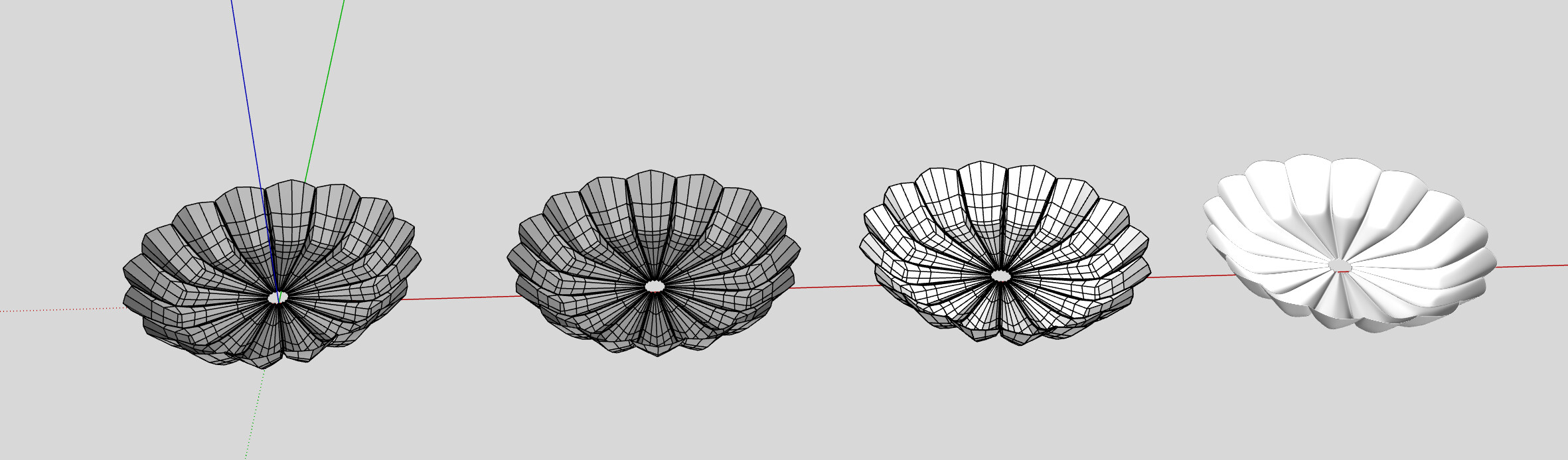
I am beginner in Sketchup, so I apologize in advance. But I need advice on how I can go about creating this scalloped bowl.
I was trying to make an arch then use the follow-me tool to make an individual scallop which I was then going to paste to another, than another to ultimately make the bowl but I can’t get the follow-up me tool to make the basic shape (perhaps I need to work larger then scale down?)
Any advice would be appreciated. I can’t located a tutorial video online that mimics this kind of shape.
Thanks for that. I am exploring it now but I am finding it’s really slow and heavy on my machine. I am curious - is this file slow on your machine?
I have a fairly new system [new dell XPS 15 9520 computer purchased in 2023 with 12 gen intel(r) core (2300Mhzm 14 core(s)), 23GB memory, NVIDIA GeForce RTX 3050 graphics card] and sometimes I wonder if it’s just not enough to run Sketchup/Enscape.
Thanks for sharing this video. I am following along with it but I am having trouble in the beginning after I have my arc, use the follow-me comment and generate the noodle that I copy and multiple. I am able to extract out the outside edge - but the center is not a sharp point - which I think is the issue for why I then can not copy/rotate 24x more to make the overall shape. When I do the arcs don’t math out to create a bowl - there is a slight overlap.
Is it because I am working with just an arc and not making a more pumpkin shape which then I will cut in half? Aaron doesn’t give dimensions, and I am trying to work with dimensions - perhaps that’s the issue? I feel like I am missing a fundamental set up issue that is not explained/no obvious to me.
Below is an example of what my model looks like after I do the 24x rotation hoping to make a bowl.
No, it’s not slow on either of my machines, it shouldn’t be slow, it doesn’t have much geometry, have you increased the subdivisions?
Personally I don’t like dell xps laptops, their overpriced for the specs they offer, I guess it has an i7 processor with 12 cores which is fine but the 3050 might struggle with enscape specially with medium and big size files.
I didn’t alter your file and it was slow for me. I am working in Sketchup 2025. I do have Enscape, but this particular slowness was when I was working in SketchUp. I have also had lag issues with SketchUp Layout so i hate to admit my system sucks but… it might be the case!
You know, I ended up starting over and instead of working with an arc I mad the “full noodle” pumpkin shape per the video and cut it in half and it ended up working out. So now I have a bowl. it’s not perfect but it will get me thru the current crunch.
it would be nice if it wasn’t so faceted because i want it to look like stone. I tried to smooth and soften the shape and this was the best I could do.
You need to UV map your geometry so the texture fits well, there are a lot of ways to do it but imo the best plugins to do that are thrupaint and WrapR, those are paid extensions, you can also try SketchUV which is free.