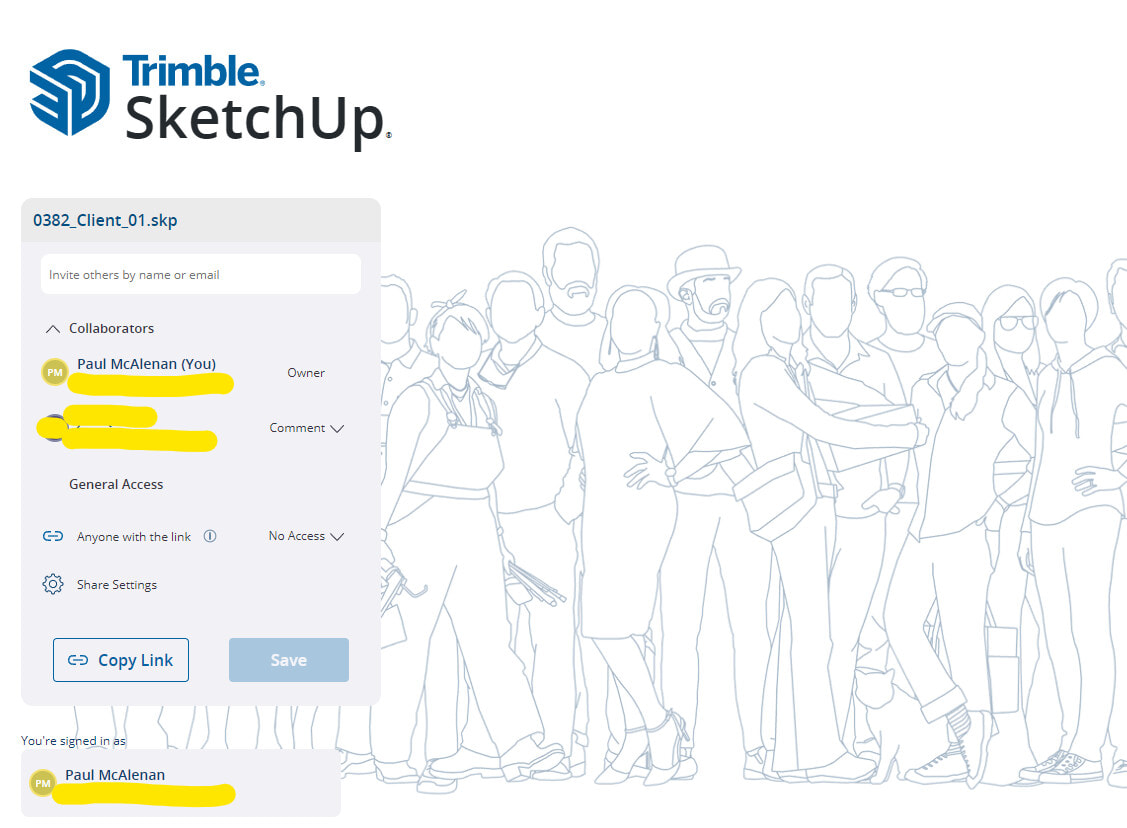
So, I shared a model to a different email address I have and I was able to access the model without needing to request access from myself.
For some reason the other email address appeared to be another instance of me, i.e. the account I have with SketchUp.
When my client received my share notification, I received an email asking to grant access and when I did, I got this page – which I had landed on with a previous attempt to share a model with someone else but couldn’t ever get back to that page!
So I kept this page open in my browser because I was worried that I would lose access to it forever.
When I was finally able to log into Trimble Connect there was no menu option to view share details – it was making me really cross.
And in SketchUp itself there doesn’t appear to be any option to manage sharing as the above webpage does – at least I can’t find it.
So, in an act of desperation I navigated to app.sketchup.com/app and Lo! I was presented with my online SketchUp Home showing my recent models. And when I opened my model from there I was able to click on the Share link to get this:
Thanks Kyle – the frustrating time I was having was getting to a point where I could access this dialog, where – as you point out – one can click on down arrow to access the options:
The person who left the comment can delete their own comments. As the model owner, you cannot delete others’ comments. You can mark others comments as read or unread and filter those.
Thanks for trying this new feature and for the feedback, Paul.
If you are using SketchUp for Desktop, you can access your share dialog from this icon in the toolbar. This will open the Collaboration bar and clicking Share will reveal the share dialog. You can also get to the dialog via the File Menu > Trimble Connect > Share a Link
To see all your Trimble Connect files, you can do the same File Menu > Trimble Connect > Open from Trimble Connect
If you’d like someone to leave comments, they do need a Trimble ID. If you’d just like them to view the model you can choose “View Model” for the General Access section and copy the link to share.