Hello,
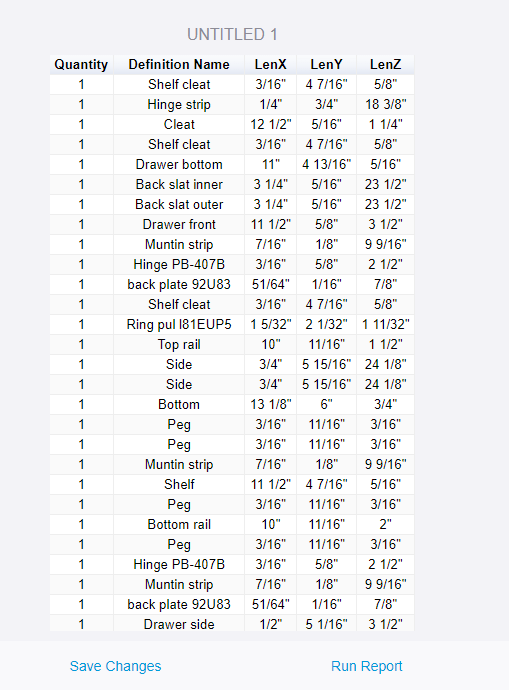
In SketchUp 2024 and 2025 (on macOS 15.5 Sequoia), I am encountering a bug when generating the quantity report. See the screenshot below.
The generated table does not separate the different elements and, moreover, the “Definition Name” column is empty.
DaveR
2
Can you show the setup of the template? I just made the following template …
… and this is the resulting report.
DaveR
4
What happens if you choose an appropriate nesting level and move Definition Name to Reoprt Attributes?
The result is better, better but the Definition Name column is empty.
DaveR
6
Are they all unnamed groups?
DaveR
8
So they are all groups and thus don’t have Definition Names. Replace Definition Name with Entity Name in the Report Attributes list.
Definition Names only apply to components.
This shows the columns for both Definition Names and Entity Names with groups. Obviously Definition Name isn’t useful if all your objects are groups.
DaveR
10
You can remove Definition Name from the Reoprt Attributes since there are none in your model to report on.
If you drag the entity name in the ‘group by’ area, the groups that are being used more than once should aggregate…
Could someone please reassign this to the Dynamic Components category?