 This is a very serious bug, which has never been reported to me before. To solve this problem, I need one of these files that blocks the Find And Report window. Can you send it to me at
 ? I guarantee the confidentiality of the information exchanged, of course.
Use an AppObserver to detect when a model is opened (or on the Mac, the active model switches to another open model,) and then fire off a reload for your F&R web dialog.
I had put this “bug” on my list as “minor, to be fixed later”. But reading your suggestion, Dan, reminded me that on the Mac a user could frequently switch from one model to another. Thanks for the input, and this will be adapted in the next version.
Now I’m waiting for a file from @mon0423 to understand and try to fix the other bug he reported.
I have sent the sample data to you for your reviewing. Thank you Wisext.
Hello,
I’ve found the source of the bug. The attributes contain dates imported from Excel into the model. This bug will be fixed in future versions of Find And Report.
In the meantime, here’s the workaround to get on with your work.
- Export all the attributes to Excel
 .
. - In the Excel cells with dates, put an apostrophe in front of all the dates.
- Update the data from Excel.


You should be able to review the attributes in SketchUp.
 Many thanks for reporting this major bug and for sharing your file. This is how the project can evolve.
Version 0.702.5 of Wisext Tools, including “Find And Report”, is now available on the Extension Warehouse.
Improvements have been made following previous discussions on this forum:
- Importing dates from Excel to SketchUp no longer blocks “Find And Report”.
- On the Mac, the Find And Report window refreshes when you switch from one model to another.
So don’t hesitate to post your questions and comments to help the project progress!

 Find And Report” may no longer respond in version 0.702.5. In this case, you need to upgrade to version 0.702.6. Instructions for the update can be found here : Updating - Wisext .
Has something changed in the version 0.702.7? When I open the Find & Report window it shows no buttons and I can’t edit anything.
Hello Ido. I replied to you in PM. The problem has now been solved. If anyone else has any problems, please let me know.
 New Beta Release: Attribute Structure Export/Import
Hi “Find And Report” users,
Following a request for a feature to export and import attribute structures and their values in Find And Report , here is beta version 0.702.81 (How to test a Beta Version? - Wisext).
A more detailed user guide is in the works, but here’s a quick overview of how it works:
Click on  available on the F&R toolbar or the F&R window.
  A window opens.
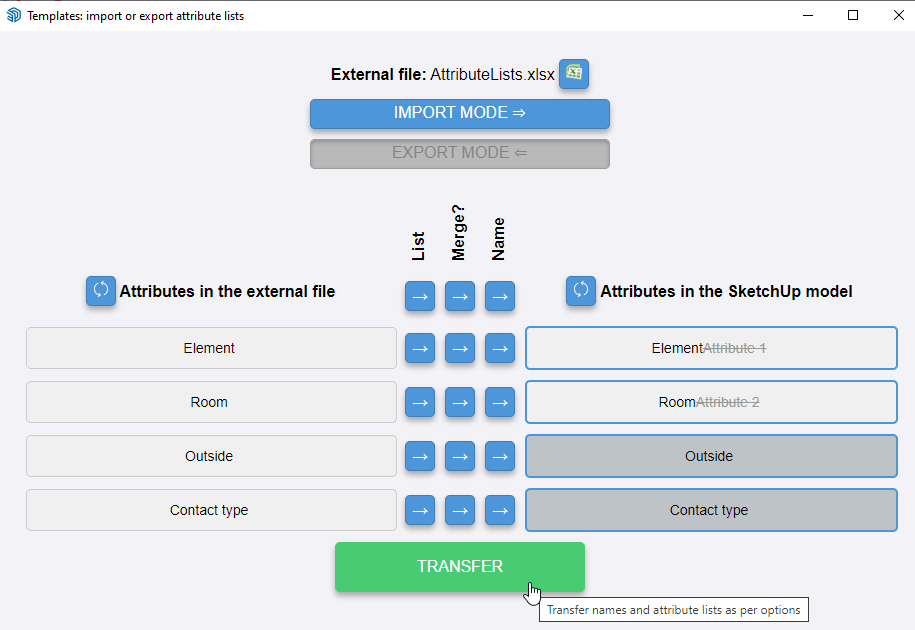
 Three Main Buttons in the window:
-
 Set External File
This file can be different from the one used by Find And Report for attribute exports. -
Choose Exchange Direction
Select whether you want to import or export the data.

-
Start Transfer

 Import Options:
- Include or exclude specific value lists
- Include or exclude some attribute names
- Choose between overwrite or merge list of values
Thanks to everyone supporting the development of Find And Report!