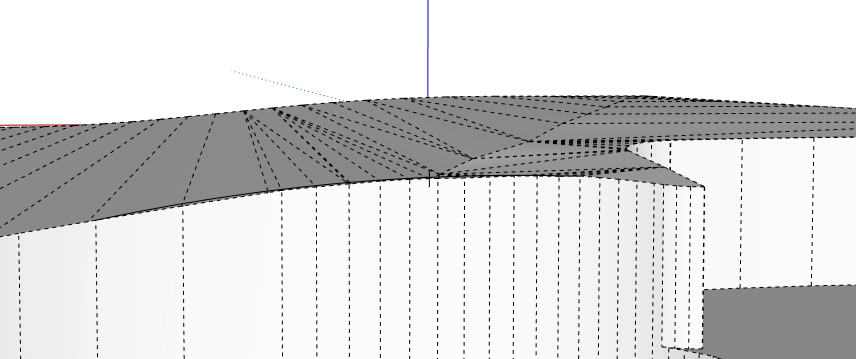
Hi all, I am modeling a guitar body with a carved top & need some advice on the best way to even out some sharp vertices left on the surface after carving it away using longitudinal & transverse profiles to define the top surface, see pics.
Want to take these verticies down to a more uniform curve without altering the rest of the top too much. Is this doable in sketchup without an extension like Vertex Tools?
Thanks for the reply, I’ve tried doing that with terrible results. Moving one at a time just destroys the adjacent surface. Is there a trick to doing that?
I don’t have the time just now to be more specific, here I have used the Smoove tool from Sandbox to adjust the vertices, it helps to move them only vertically.
Be aware you can adjust the Smoove tool size by typing in a radius, 1m grabs a few at once, .5m can grab just one.
Be aware you may not get it as smooth as you want this way, you may need to redo your cutting shapes to get the shape you want. Curviloft may be a better option for creating a smooth skin.
Do you want the face of the guitar to look like it was surfaced with four swipes as you have it? Or do you want it to be more of a smooth shallow dome shape? I made the latter version. Applied a shiny material so the curve shows.
Hi Dave, That’s exactly what I am shooting for. Removing those 4 faceted-looking ridges left by the profiles as they cut across the surface! What technique did you use?
ps. I really want the profiles to have a nice symmetrical bezier curve like a violin top.
I used an extension called Soap Skin and Bubble from the Extension Warehouse to make the sort of inflated surface in the rectangle shown on the left. I intersected a copy of that surface with the body of the guitar to replace your surfaces. That doesn’t create a Bezier surface, though. It’s just a simple bulge.
There are other options, though. You might find that starting with Bezier curves instead of the straight edges I used would make SSB give you the shape you desire. Or perhaps using Curviloft or TIG’s Extrusion Tools or Vertex Tools (the Soft Selection feature would be useful to you). In any case I wouldn’t try to fix the surfaces you have. I think your effort would be better invested in making a new surface. I would also consider creating the surface slightly larker than the outline of the guitar body and then intersect that surface with the outline.
Maybe if you start with a profile and a circle like this with Follow Me and then scale the thing to make it more elliptical you would get the kind of surface you want.
Another thing I did was scale your model up by a factor of 1000 (1mm in the real world equals 1m in the model) which helps to avoid potential issues with tiny faces.
Thanks, Dave! I’ll give your suggestions a go. I’m actually going to be carving this top on a nice bookmatched, quilted maple guitar top & I’m going to be using cross-section slices from the model to make real-world templates to guide my progress.