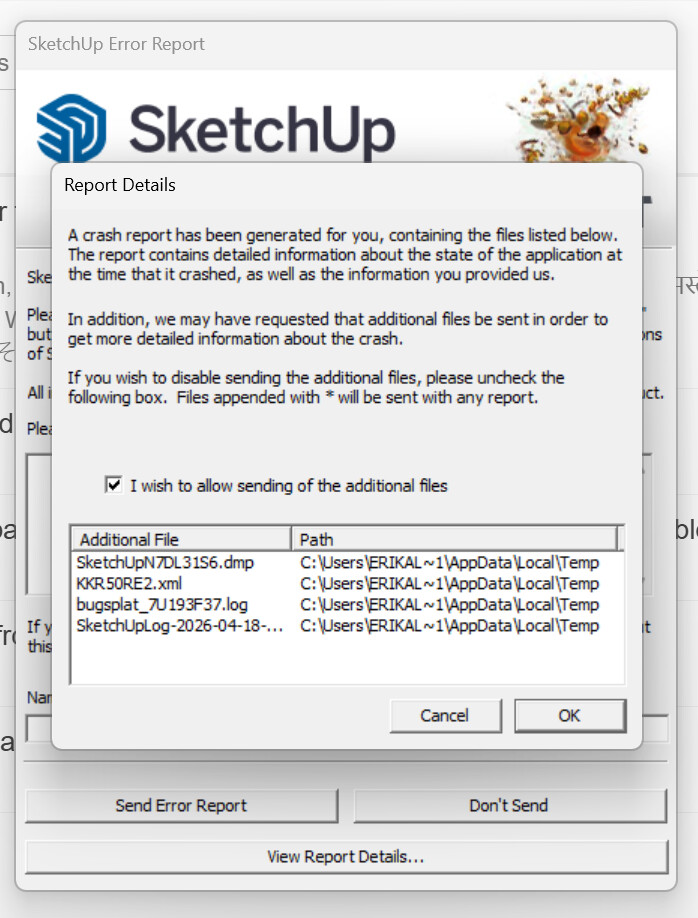
Hi, a bug splat crash keeps happening every time I open sketchup 2026. I just downloaded and installed the 2026 version, before that it was working normally. I’ve uninstalled it and installed it again but it’s still happening. Any idea of what it could be and how to fix it?
Do you have Lumion installed?
Did you install SketchUp 2026 correctly? That requires right clicking on the downloaded installer and selecting Run as administrator from the Context menu.
What graphics card do you have?
Yes, I have lumion installed, and no, I didn’t install it like that, I didn’t know that was the right way to do it. I just double left clicked the installer and followed the instructions. Good to know, I’ll try that. thank you. graphics card -

That has been the cause of crashes on startup for numerous users. Remove Lumion and see what you get.
Double clicking to run the installer often means that Windows won’t grant SketchUp the required permssions to write some needed files. Repair the installation by finding the installer, right clicking on it, choosing Run as adminstrator, and then when prompted, Repair. After that do a cold reboot of your computer.
Put that information in your forum profile.
Alright, I will try those! thank you!
Hey, just an update - I tried all of that and it still wouldn’t start. I think it’s the 2026 update that’s just not working properly. I installed the 2025 again and it’s working just fine. Thank you for the help!
When you get the Bug Splats have you sent in the reports with your email address and name attached? If so, @colin could look them up to see what the cause is.
yes, i did, waiting to hear from them
You don’t need to put your email address in your reply and you should remove it to avoid bots collecting it.
The crash happened while Lumion was loading. A number of people have seen that, and I have reason to believe Lumion are working on the problem.
You can go into this folder to remove the Lumion file and folder:
%AppData%\SketchUp\SketchUp 2026\SketchUp\Plugins\
I too am having this issue, I have been using 2026 since the first week or so of release, my problems just started on Sunday 4/19, I was still running on windows 10 pro, CPU is intel 12th gen i9-12900KF, GPU is Nvidia RTX 3090TI, (I updated Nvidia drivers last night) with 64 gigs of ram on a Gigabyte Z690 Aorus Master mobo. I have been bouncing between this forum, and Grok looking for a solution for the last 24 hrs +, I do have Lumion, however I had not used it in several days previous to the problem starting. Regardless, I removed Lumion from the plugins folder, (I even uninstalled it from my machine) That did not help. I upgraded to windows 11 pro this AM, I uninstalled SU 2026, emptied recycle bin as a precaution, rebooted, disabled windows security, downloaded 2026 installer, again, and ran it as admin to install it fresh. I get the welcome screen, and it does not care if I choose a new template or an existing file, the selection is followed by a splat dialog. So I just went through the same procedure with SU2025, with 2025 I get the welcome screen but it does nothing when I select a file or a template, it does not even give me a SPLAT, just nothing! 2024 still opens just fine but I have never configured my toolbars and plugins in that version, and my old 2022 install still works too. Of note here, and “possibly” a factor, on Saturday 4/18 AM, my machine was off, so apparently MS did some overnight updates and shut the machine down. Grok indicated that some recent MS Visual C++ Redistributable files could be suspect, specifically the 2015-2022 (x64) and (x86) versions. On this machine where I am having these problems those files showed an install date of 04-18-2026 the day before I experienced issues. I have uninstalled those Redistributables, and reinstalled them run as admin, and still I get the same results. Now, Both of my other machines, both still on windows 10 pro, but specs are not as good as this / my primary machine, 2026 installs, opens, and or runs fine. Both those machines have older install dates on the MS Redistributables. Coincidence?, I do not know, but as far as I am concerned, Lumion is or was not the issue, at least for this issue on my Primary machine, as far as this machine goes right now at this time, with a fresh proper install of SU2026 and Windows 11, Lumion does not even exist. Yet the same problem persists ? What am I missing guys ?
Same here! After installing new version (build 256, on Windows 11) and starting the program (after choosing the template) program crashes with bugsplat window.
I find out that there are two reasons:
- launching the program with a new graphics engine or
- launching the program while logged into Trimble
When I’m logged out (through the template selection window) and when the program after a crash and restart starts with an older graphics engine (there is a message), then the program starts. It crashes again when I log in or change the engine to new (and restart).
I’ve never had this with previous versions (always working ok with new engine and logged in) and never had any Lumion, new Nvidia drivers, new installation next to the older 2024 version on disk, settings migration worked correctly.
Did you send it in? Did the browser open and give you a crash number?
No, I didn’t send the crash files (report), but I have them.
Trimble employees will not be able to help you unless you send them in.
Maintenance fixes are prioritized based upon the BugSplat database.
When was the last time you updated your Nvidia graphics drivers direct from Nvidia?
About 2 month ago (mine 591.86, newest 596.21), but I’m sure it’s not the cause.
I sent the bug reports: #204665, #204669.
Hi, I don’t know whether you solved this but a similar thing happened to me after the latest update.
I tried doing a Repair but it still didn’t work.
Out of interest I renamed the plugin folder so SketchUp couldn’t load any I’d installed (I’ve read that sometimes plugins can cause crashes)
After doing this SketchUp worked fine.
I’m not saying this will work for you but it’s worth a try.
Just installed new update from SU 2025 and the same thing appears to be happening to me. new ‘updated’ installation crashes when I click on the template. I used the update dialogue of the SU pro 2025, where it asked me if I wanted to migrate all my plugins, so I did. Now this new version of SU will not open past it trying to load in plugins. Luckily I can still load in safely with version 25.0.660.
Incidentally it is fortunate that SU does not ‘update’ the current version you are using, but installs a separate ‘updated’ version, and calls it an update. I think many software updates override the older version… so at least this beneficial…
The same happens to me also when I make any complicated drawings. Each 5 minutes I have to save the file, otherwise the whole work will be gone and not able to recover.