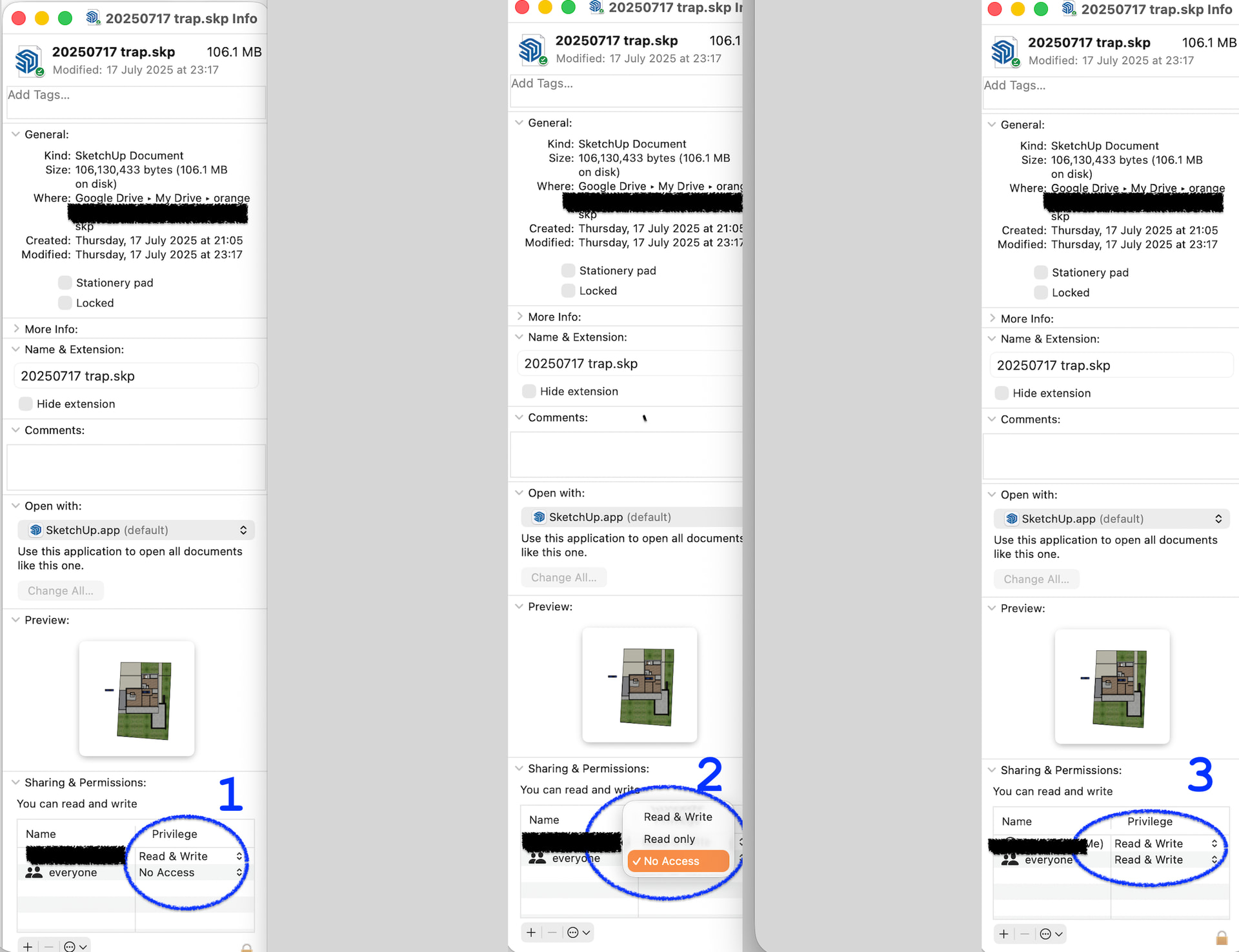
This has happened a few times now. Open a file after it has been unused for a bit, and get the file locked message. I can use save as and over write the file with the same name no problem, but the message keeps appearing every time I try to just cmd+s. If I rename the file (version number 5 to 6), it saves as expected with cmd+s, and so does the previous version that would not save. Behaviour is new to me, the file is not locked and my desktop is backed up to the cloud. This is just annoying not super problematic. Anyone have any insight?
It appears the save location was the cloud-desktop not the desktop. However it all works now, and this seems to happen randomly to different files. Like the previous 4 versions of the project do not display this behaviour, it seems to only be the latest accessed version that does this and only at the beginning of a session. Once I rename the file and save it’s all fine, everything works as expected. That’s the weird annoying part lol, I can’t replicate the behaviour on purpose. Trimble connect no problem.
Maybe, but there is no lag time, message pops immediately. Next time this happens I will try for more detail, opening other files before I re-save/fix the problem. Thanks Dave, figured I’d post and maybe someone would be like “oh ya - it’s this”. But I guess it may remain a great mystery of the computer age lol, my old mac and SKP 2024’s days are numbered anyways.
That’s a MacOS message - the OS is locking the file, likely because it is doing something do it (uploading it to the cloud?) or it is being used by another process/application.
That’s the kind of thing I would expect as a precursor to a corrupt file.
Now that I am thinking about it, it only seems to happen after SketchUp has been sitting for a while, like if I leave it open before bed and pick up in the morning. And only with the first file I open, any other files after that are fine. It’s a really old Mac too, 2016 MBP. I have not had any corrupt file issues so far.
so, the other day, we had a discussion about this with a couple of other sages. what causes so many SU files to be corrupted on PC and so few on mac. and not just with sketchup, you’ll find testimonies with other softwares, especially ones with big savefiles.
and basically, it’s because of one drive being activated by default on PC and so many people having it turned on without knowing.
the dumbed down version of how it works
my TL;DR, it’s because of ntfs vs whatever apple uses. hfs ? not sure.
on a mac, the data is written separately, then when the save is successful, it replaces the old data. that’s why a failed save will not corrupt the file, you’ll just keep the old save.
on a PC, it creates an empty shell, then it fills it with data
if a cloud storage tries to sync the file as soon as it is created, it temporary locks it for upload. and sketchup can’t send the actual data inside it, but still considers the process as done. and you end up with a partial or completely empty file. The power cut is also valid.
Here, something goes wrong when talking to the cloud. because it’s a mac, it tells you, and you can save locally / under another name.
had it been a PC, with onedrive turned on for example (as is the default with win11)there would have been a partially empty save and no alert in su I guess.
Thanks, next time I will try a reboot of the computer before renaming the file and see if that fixes the issue. If it’s a cloud comms thing would a restart clear it up?
maybe, maybe it was just being indexed by spotlight or something, and because of the process it was locked for a few seconds.
apple has done a lot of things recently for us to use our various devices as one. start taking notes on your phone or watch, seamlessly move to your laptop, and finish on your ipad in the couch.
at some point icloud needs to index the stuff you’re adding, so it can be sync’d everywhere.
saving as a different name solved the issue, you’re not touching the original. I guess saving as the same name would count as erasing the old file (and not just updating the content), could work too.
File corruption with large SketchUp files isn’t a Windows-only issue, and it isn’t caused by OneDrive itself. The real risk comes from editing large, non-atomic save files inside any live cloud-synced folder (OneDrive, iCloud, Dropbox, etc.). Windows users encounter it more often mainly because OneDrive backup of Desktop/Documents is frequently enabled by default (AND there are more Windows users) , whereas iCloud Drive and Desktop/Documents syncing on macOS are opt-in and explicitly confirmed during setup. That said, there are documented examples of Mac users encountering SketchUp save errors and corrupted files when working directly in iCloud-synced locations—so the underlying issue is platform-agnostic.
This does indeed sound like a cloud/local conflict. However it might be worth just checking the permissions for SketchUp in your System Settings. Ensure SketchUp has permission to save to your desktop, this would make saving files elsewhere work and fail on your desktop. Sounds like this is maybe not the specific issue but it’s simple to check.
I’m not saying it is
I’m saying that too many users have OneDrive activated by default without knowing (like you say). and it turns out that the way NTFS storage works is not great with OneDrive, or any cloud based drive really, because it allows the cloud to start looking at the file while it’s being written.
doesn’t mean we don’t get corrupted files on a mac, plenty more reasons to kill a file, especially with external storage. just de-sync and loosing connexion during the copy will do it.
on this forum, most people with broken files will be on pc.
a bit off topic, but you know, when people ask for help with their file, and they say “no, it was saved locally on my PC”. we should ask for a screenshot of the preference / folder section.
Turns out, many, if not most of my trainees, when we look at this panel, have one drive activated without knowing.
and if asked, they’ll swear to you it’s stored locally, in documents.
little do they know it’s not, and onedrive is peeking at their files as they save.
I mean, this is what I see almost all the time now.
Yeah it is turned on by default if you sign in with a Microsoft account (this is most users now- the I see a lot of problems with the Google drive sync and drop-box options. I often wonder if they are prone to different issues as they are not baked in.
Whatever the case, there are a million different things that can go wrong I’m sure - I hope one day SketchUp will be able to get the bottom of it
On macOS 26 Tahoe, the settings have been rearranged (see image below). You need to look in Privacy & Security->Files & Folders then expand the entry for the relevant app. And Tahoe has kindly dropped the SketchUp year from the listing, so you have to right-click->Show in Finder to determine which is which! [sarcasm]Thanks so much Apple UX designers for making things easier for users![/sarcasm]
That error is due to permissions. I maintain two profiles (one personal, one work) on my Mac and this comes up semi-regularly as a result. It’s an easy, albeit cumbersome fix.
Open a finder window and navigate to the root folder where your file(s) is/are.
Select the folder then use Command-I to get the info window.
Unlock the padlock in the lower right corner of the Info window.
If your profile is not listed, add it with the + in the lower left corner of icons. If it is listed, highlight/click your profile. In the bottom left, select the circle with three dots.
On the dropdown, select “Apply to enclosed”. On the confirmation window, select “Yes”.
You should be good to go. I hope this helps. Good luck!