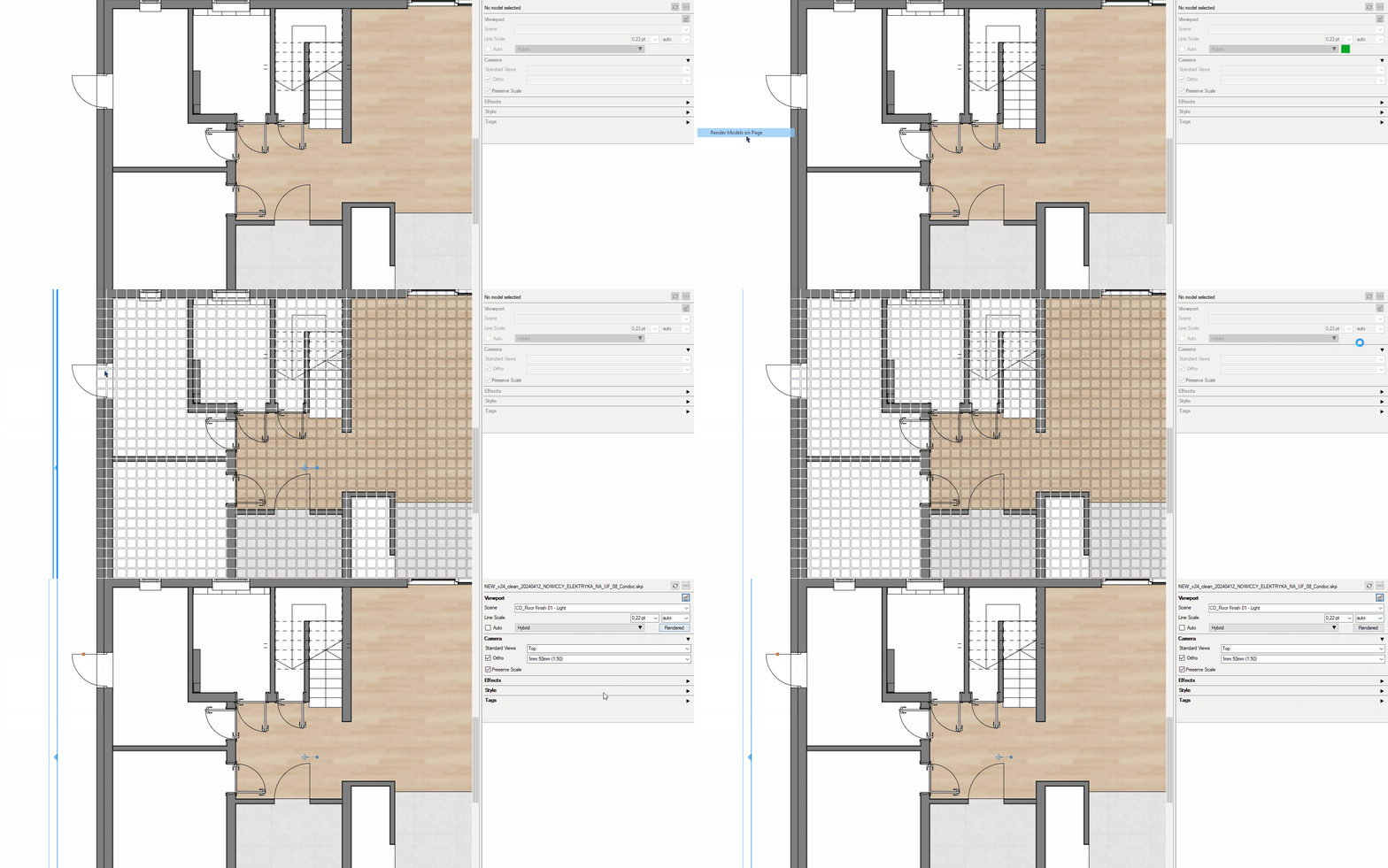
Hi, I’m testing Sketchup 2024 with Layout because the update feels like a super improvement, but I’m facing a weird behaviour.
Any idea what could be causing this in Layout? There’s a grid that only appears when I choose: “Render models on Page”. If I select the viewports and render them using “Sketchup Model” tab, everything is fine.
It happens no matter if the experimental engine in Layout is on or off.
I wouldn’t feel comfortable uploading the files publicly but if someone would need to dig deeper in the model, I can send it via private message. But who knows, maybe that won’t be necessary.
I’ve been going through your LO file but it’s very very slow and I’m having to wait for viewports to render. So far I have not seen the grid that you show in your screenshot.
I took a few minutes to look at your SketchUp file. A little bit of incrrect tag usage.
Some stuff, including a whole lot of unused styles to purge.
And a few excessively large textures. After making them more reasonable the file size was reduced by about 25%.
I’ll keep looking at the LO file as viewports render but I’m not sure I’ll see anything useful.
Yeah, I’m aware of the mess in my model. Sorry about that.
If you’re not getting the grid while using Render Models on Page then I’m beginning to think that this might have something to do with my drivers. Which version you’re using? Mine is the one reccomended for vray which is
551.86.
Other thing my be repairing the installation of SU2024 on my machine, although I ran the installation package as the administrator in the first place.
Does choosing Repair option reset my Plugins and workspace?
I wasn’t really asking about the version of Sketchup but the version of Graphics Cards drivers you have installed on your computer. I would like to install the same version you have and see if that helps.
Performed a clean install of Nvidia Studio drivers (same version) - I don’t think that helped because I have other project when the same thing still occurs.
I resized 3 huge textures with Material Resizer. After that, I used CG Impact Report plugin to look for the heaviest models and then used Transmutr to make them lighter. That were only like 10 components I changed and then ran them through CleanUP plugin, Purged unused Materials and Components (without Purging Tags or Styles)
I did not use the Repair option.
Let’s see if point 2. works on the other file.
EDIT: I was too Not really gone. It’s gone in SOME viewports, in others not. I’ll keep digging. But I will send you guys the files once again if I may.
The navigation in the file is absolutely stunning for me in 2024. Both Sketchup and Layout. Not sure why you’re getting slowdowns as it’s completely smooth on my computer.
Anyway, I still can’t figure out where that might come from. If you take a closer look at the viewport with Door, this is where the problem occurs. This viewport is rendered as hybrid.
Did you try using Render Models on Page command to recreate the “grid” effect?
Hey! Don’t put this on me!
We do have some watermark hatches that utilize the blend slider toward image. Doesn’t appear to be one of those.
The only place I’ve seen a grid like this is when a group or object is hidden and “view hidden objects” is enabled in the style.
When I insert the model into a clean LayOut template, I don’t get the grid?
I would start with a massive purge, cleanup, and optimization of this entire project and then see if there are still issues. Both files are heavy!
Yeah, I figured that out too. Looks like the grid is the floor group so I tried to explode it, reset tags, group again, assign tags again. Now, after copying to a completely new file, setting up the scenes from scratch I get the same result.
My guess is that this has something to do with the software - drivers or other stuff which I am completely unfamiliar with.
I reckon it would be great if someone from the Sketchup Team took a look at that to at least rule out the possibility that it’s Layout 2024 malfunction.
on that image it almost looks like there is an hidden object on the floor and that hidden objects are turned on in the style panel (the last one, blue cube)
hmmm… looking again at the isolated view, any reason this viewport is in hybrid ? since all you need is the linework for the doors, and it’s already vector anyway ?
Can I have a look at the file ? (I have an hour to kill this morning)