I have opened a case through Trimble. But I am in a panic. Everything was fine last night. Today, I am asked to sign in and when I get to “sign in with Passkey”, it is my phone that says it has no pass key set up. Even though it has worked many times before. Sketchup 2026 Samsung Galaxy S24 Ultra….no recent updates with it. Can anyone help?
if you have a google/apple or microsoft account that uses the same email as the one you use for your trimble ID, you can sign in with that instead.
Can you walk me through that?
Oh, I think I get it….
A passkey usually is set up on your Desktop device (not your phone) and is unique to that device for a given website (in this case Trimble.) A one time 2FA 6-digit code is what is sent to a phone and is clunky compared to assigning a passkey to Trimble login.
It is possible to use the same 4 digits for multiple passkeys for multiple websites. They are not passwords and are links to encryption keys unique to your machine, so if someone knows what digits you use, it will not help them on another machine (since they do not have the keys stored on your machine,)
Did you setup a passkey from your Trimble account’s Manage Passkeys section (in the right column) ?
1 Like

From the Gemini AI …
Why it says “Security key or Biometric”
The reason Trimble uses that specific phrasing is that it’s a “catch-all” for whatever Windows Hello hardware is available:
- If he has a fingerprint reader: Windows will ask for a touch.
- If he has an infrared camera: Windows will just look for his face.
- If he has neither: Windows will default to the PIN.
In all three cases, Windows 11 treats the “handshake” the same way. It is the secure hardware chip (the TPM) inside his machine doing the work, and the “Biometric or PIN” is just the key that unlocks that chip.
 Helping him use it
The most important thing for him to know is that no matter how he “unlocks” his computer—be it a finger, a face, or a PIN—that is now his replacement for the 2FA codes.
When he sees “Sign in with a passkey” or “Use a passkey” option on the Trimble login page, he just needs to click it and let Windows handle the rest.
Yes, he must have Windows Hello active [on his machine].
On Windows 11, the “Passkey” system is essentially a feature of Windows Hello .1 Windows needs a way to verify it’s really him before it releases that digital key to a website like SketchUp.
The Two Minimum Requirements for Him:
- A Windows Hello PIN: Even if he doesn’t have a fingerprint reader or a special camera, he must have a PIN set up for his Windows user account.
- TPM 2.0: Most computers that run Windows 11 have this security chip already, but it’s what stores the passkey safely so it can’t be copied.
How to tell him to check:
If he’s getting an error when trying to create the passkey, tell him to do this:
- Go to Settings > Accounts > Sign-in options .2
- Make sure PIN (Windows Hello) says “Set up” or “Change.”
- If it says “Set up,” he needs to create one. Once he has a PIN, the SketchUp passkey will work immediately.
Why he’ll love it:
Even though it’s “one more thing to set up,” once his PIN is active, he will never have to wait for a phone code again. He just clicks “Use a Passkey,” types his 4 or 6-digit PIN, and he’s in. It turns a 2-minute “wait for the text” ordeal into a 5-second login.
If he’s still stuck, it’s almost certainly because he hasn’t set up a Windows PIN yet.
Okay. I am currently on my work desk top. At HOME, on my lap top this morning, the HELLO came up. It started, then sent me a code to use my camera on. When I used my camera, this is what I get. Here at work, my desk top takes me right to the Code, I take the photo and it send me the same message. I really appreciate all the info you sent so far!

You are still seem to be confounding two security workflows. Passkeys do not involve your phone.
That rigmarole with your phone is a Two Factor Authentication (2FA) workflow that is the old way of doing things. The Qcode image or 6 digits unlock code is not a passkey.
Please reread what I wrote above. Keep in mind that passkeys are unique to the desktop.
This means that you will need to open your User Profile page on each machine and then create a passkey on each machine. They both can be the same 4 digits if using a PIN or if you are using biometrics on both machines, then they’ll each use the fingerprint reader or camera to look at your face. However, as necessary, one machine could use a PIN and the other machine the fingerprint reader.
The PINs for a passkey are really just an index to the actually private and public encryption keys that are held by Windows Hello and exchanged with websites.
I think I figured it out…kind of accidentally. One big problem is that for work I am often logged in to my work microsoft account, and generally use Microsoft Edge. As soon as I re-logged in to my home account and switched my default browser to Chrome, all was well! And I DID go ahead an set up the pin as well. Thanks again for your patient replies!
1 Like
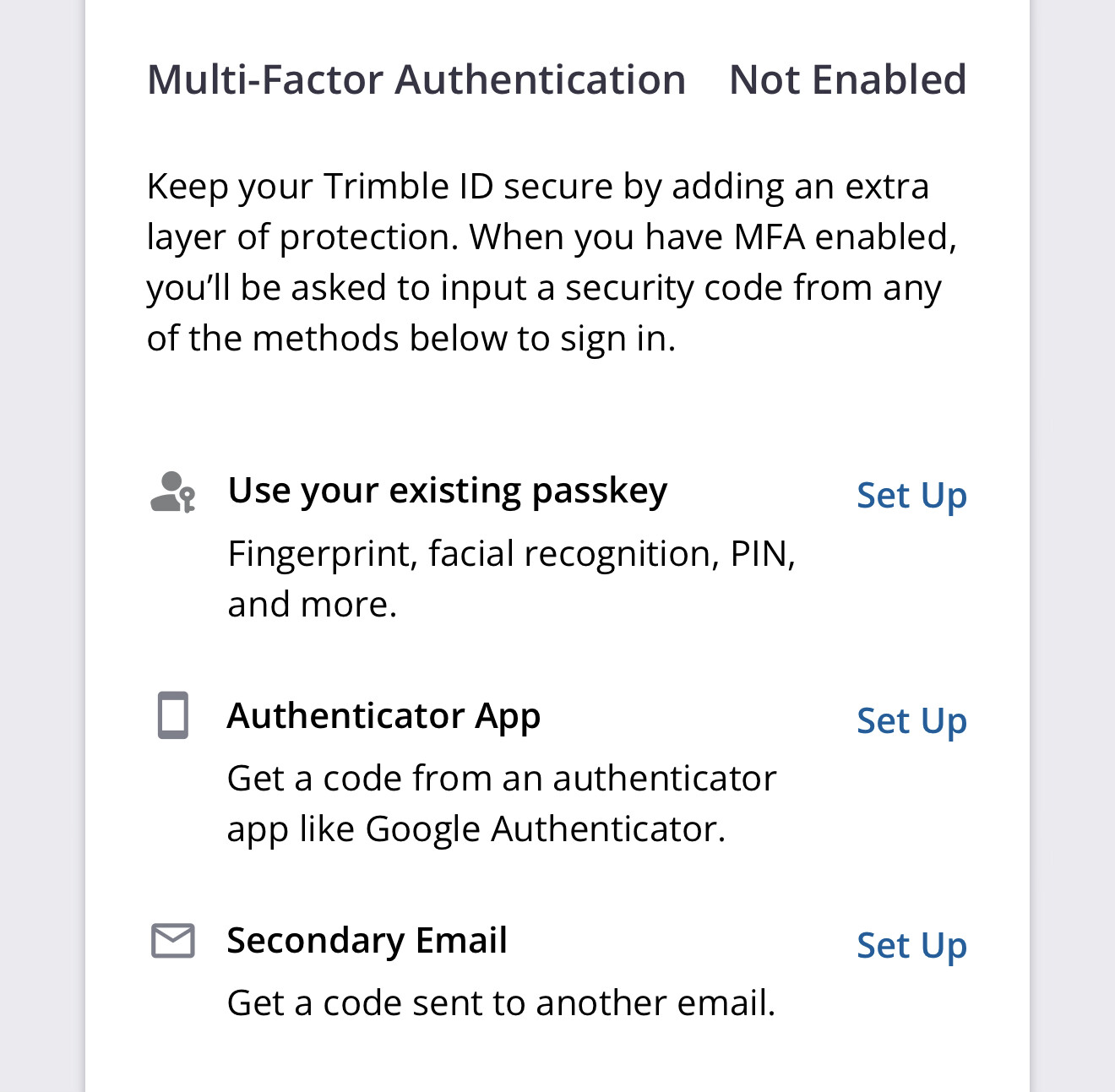
There are 2 ways which Passkeys can be used, one to sign in with and one to validate MFA with.
The TID passkey experience is poor and It’s very easy to get yourself into a situation where it will expect a passkey to be validated on an android/iOS device that does not have a passkey already setup.
If you are a Microsoft edge user and you select the MFA option to use an existing passkey on this interface and said passkey does not exist/is not accessible on an android/ios device , then you lose access to your account.
I’ll correct myself here after more study.
Passkeys can be portable for use on multiple computers in various places using Cross-Device Authentication (CDA), also known as Hybrid Flow.
In this scenario, the passkeys are generated and stored on a mobile phone.
But in order to work, the passkeys must exist on the phone before trying to use them.
REF:
How to use a passkey on your smartphone to sign in on a computer – Computer Techs.
This topic was automatically closed 7 days after the last reply. New replies are no longer allowed.