Oh, I’ve used it multiple times. Particularly when a rim joist above the top plate is more of an actual structural member that does the job of a header.
1 Like
Version 2.7.7 - 02.08.2022
- Added a “NO” header option for windows, doors and garage doors.
- Fixed a bug with ladder blocking when the stud offset is non-zero.
- Fixed a minor bug with ladder blocking for hip walls.


1 Like
I’ve found this helpful in a few cases when I’ve needed a plain “break” in a non-traditional wall, so thank you for keeping it in!
1 Like
I have searched for and found the file you have mentioned here: C:\Users\Braden\AppData\Local\SketchUp\SketchUp 2021\SketchUp
However, it appears that this is a SketchUp file and that messing with it will mess with other things that I don’t want to break. Do you know where the file you’re talking about would be?
There are specific sections within this file that deal with the plugins, you would only want to modify those sections.
1 Like
o.o
I ain’t touchin’ that stuff. delete/modify the wrong thing = Bad juju.
1 Like
Exactly, there is no easy way (push one button) to fully backup the global settings of the plugin currently. It isn’t too hard to edit the JSON file and with a little care it can be done but if you leave off a comma or mess up the formatting within the file it could be a problem.
1 Like
Hence the BACKUP
I’ve had quite a few requests for a tool that will draw circular walls however I need to wrap my head around the geometry and some of the issues that arise when you curve the entire wall (or partial arc) like this:

As you can see things get a bit interesting when you introduce windows and doors into a tightly curved wall. In particular notice how the window opening is framed normally (no curve) and the cripple stud in the middle of this opening is problematic. So how does one handle this? The problem really is how to frame a straight opening like a window or a door into a curved wall.
View model here:
Before I can make this a functioning tool I need to iron out some of these details in a rational manner.
1 Like
Version 2.7.8 - 02.11.2022
- Enabled staggered studs for rectangular walls.

Rather than enable yet another parameter and make the menu that much bigger I decided to utilize the “Stud Ply” parameter to toggle this option. If you set the stud ply to “0”, you will get a staggered stud wall as shown.
I don’t think I broke anything with this latest update but only further testing will tell. Once I am satisfied that everything is as it should be I will enable this same feature for all the other wall types.
This option was requested by wall panel manufacturers and also builders up in the northern climates who want to construct a more insulated wall with better thermal performance.
View model here:
3 Likes
Version 2.7.8b - 02.14.2022
- Enabled staggered stud walls within the Copy Wall tool.
Tutorial 27- Staggered Stud Walls (15:09 min.)

3 Likes
Could someone tell me how to access the Medeek Wall library folder on a Mac? I would like to add the Marvin Modern product line to the windows and doors folders. In Windows it is Sketchup\Plugins\medeek_wall_ext\library, but I can’t find anything comparable on my Mac. In fact, there is no plugin folder for Sketchup at all, even though I have Sketchup plugins installed and working fine, including Medeek Wall.
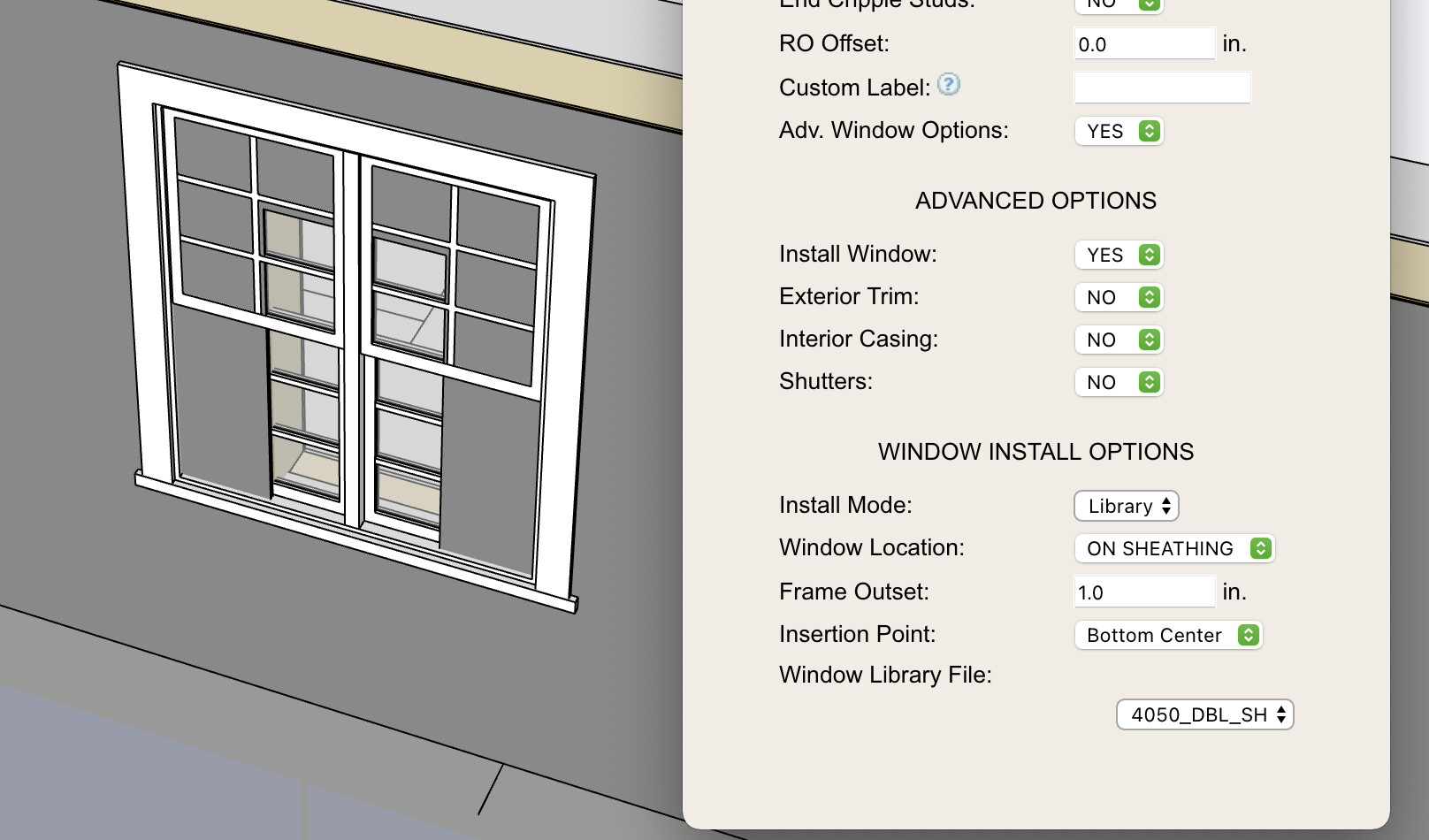
When I am using Medeek Wall and click on the Window icon, the only item in the window install options that shows up under Library is 4050_DBL_SH (see photo). If I search my Mac for 4050_DBL_SH just to try to find the location of the Library folder, it doesn’t show up either in Applications or elsewhere on my computer. I’ve attached a screenshot of the Sketchup folder and well as my Global Settings for Windows.


2 Likes
Attachments can be amended to new posts, and the first deleted. No need to mess with it now unless you really want to, but I often will edit and/or re-upload stuff multiple times for detailed posts.
1 Like
Version 2.7.9 - 02.16.2022
- Fixed a bug with vertically offset doors and garage doors in the “No Framing” mode.
- Fixed a bug with (arched) half or full glass doors that have a prairie or perimeter grilles installed.
1 Like
Version 2.8.0 - 02.19.2022
- Enabled insulation within the preview menu of the estimating module.

The insulation was already part of the CSV file output however I had not added it to the preview screen.
This update was per customer request.
2 Likes
Tutorial 28 - Estimating Preview (12:02 min.)

I’m still not entirely sure what direction I am going to take the estimating module but much work remains to be done.
1 Like
Lots of people have lots to say about it, so thanks for the update!
1 Like
My biggest issue with adding totals for any specific item (ie. sheathing) has been the variability of these items. In other words you don’t want to total up all of the sheathing if some of it is 1/2" and some of it is 7/16", or perhaps you have some OSB and some plywood sheathing on different wall panels for whatever reason all in the same model.
After giving it some additional thought I devised a simple hash (accounting) solution and now the module can provide totals and break it out separately based on thickness and/or material as needed. Here is an example of three different wall panel sheathing totals with different sheathing parameters for each wall panel:

2 Likes
Version 2.8.1 - 02.21.2022
- Added material totals to the CSV output of the estimating module: Common Studs, Top Plates, Bottom Plates, Sheathing, Cladding, Gypsum and Insulation.

I will need to give some additional thought on how to handle cripple studs, king studs, trimmer studs, sill plates, headers and studs from non-rectangular walls. Some of these may not need a project/model wide total and the current tabulation may be sufficient.
3 Likes
In order to start off the year on the right foot I will be offering a 10% discount off of the regular mdkBIM bundle price (permanent license) using the coupon code SPRING22. (promotion ends Mar. 31, 2022).
This will reduce the bundle price (permanent license) from $280.00 USD to $252.00 USD. This promo code does not apply to any of the extensions purchased separately or to the electrical plugin. The offer also ends on Mar. 31 and no rain checks will issued thereafter.

1 Like