I will also be developing this extension as part of the mdkMEP suite.
The Medeek Plumbing logo shall be:


The mdkMEP bundle will consist of the following three plugins/extensions:
Electrical, HVAC and Plumbing
I will also be developing this extension as part of the mdkMEP suite.
The Medeek Plumbing logo shall be:
The mdkMEP bundle will consist of the following three plugins/extensions:
Electrical, HVAC and Plumbing
I woke up this morning and for some reason my mind turned to how I could adapt my current wiring module into an HVAC and plumbing path finding plugin. After some considerable thought I decided that a completely different approach needs to be taken, especially with plumbing.
Unlike wire, plumbing is just a bunch of straight sections of pipe that are then coupled together by various off the shelf fittings:
What this means is that like the Simpson hardware within the Wall plugin I will need to model up a good number of low poly fittings for PVC-DWV, ABS-DWV, CPVC, copper, PVC Sch 40 and Sch 80. It would be really nice if I could get accurate models from the manufacturers themselves but that is probably a long shot.
Unless you take into account PEX 
Pex and other flexible hoses are a whole different ball of wax.
Medeek. Your commitment to development is inspiring. Keep up the good work!
i think McMaster-Carr has a bunch of models you can download and import into SU using the universal importer plugin. McMaster-Carr
also, the Engineering Toolbox may have some to get started.
Well I’ve had quite a bit of inquiries about the status of the plumbing plugin so I will wade into the shallow waters this weekend and see if I make any headway.
I have to start somewhere, so here is a first look at the global settings (created by templating the current HVAC plugin).
A long ways to go yet with this plugin. The biggest challenge will be creating the fittings accurately.
I will be using the documentation I received from the “Charlotte Pipe and Foundry Company” as my primary source for dimensions and pipe fitting types. Sadly I don’t have any decent 3D models I can just adapt, so this will all need to be modeled from scratch.
I did try emailing them but that got no where. Tomorrow, I will actually try calling their land line and see if they might be willing to share some basic 3D files with me. If I could get that, I would probably save myself a couple months of work.
Contacted Charlotte this morning but the respectful southern gentleman I spoke directly with was less than helpful. I don’t think he knew much about their Revit library of parts or what they offered.
I then dug around on the website quite a bit and I think I may have hit the jackpot (I could be wrong). I found the ABS DWV revit library (about 20 Mb) however it is a .rvt file. I don’t have a subscription to SketchUp Studio so I am unable to import this file into SketchUp. I am wondering if anyone who does have a subscription would be generous enough to import it into SketchUp and then hand the SketchUp file back to me.
I don’t want any edits or cleanups made to the imported data, just a simple import and a save. I can take it from there and I will probably spend weeks splitting it out and fixing and simplifying geometry (low poly), as well as checking that the parts conform dimensionally to the documentation that I already have.
The revit file in question can be downloaded directly from this folder on my website:
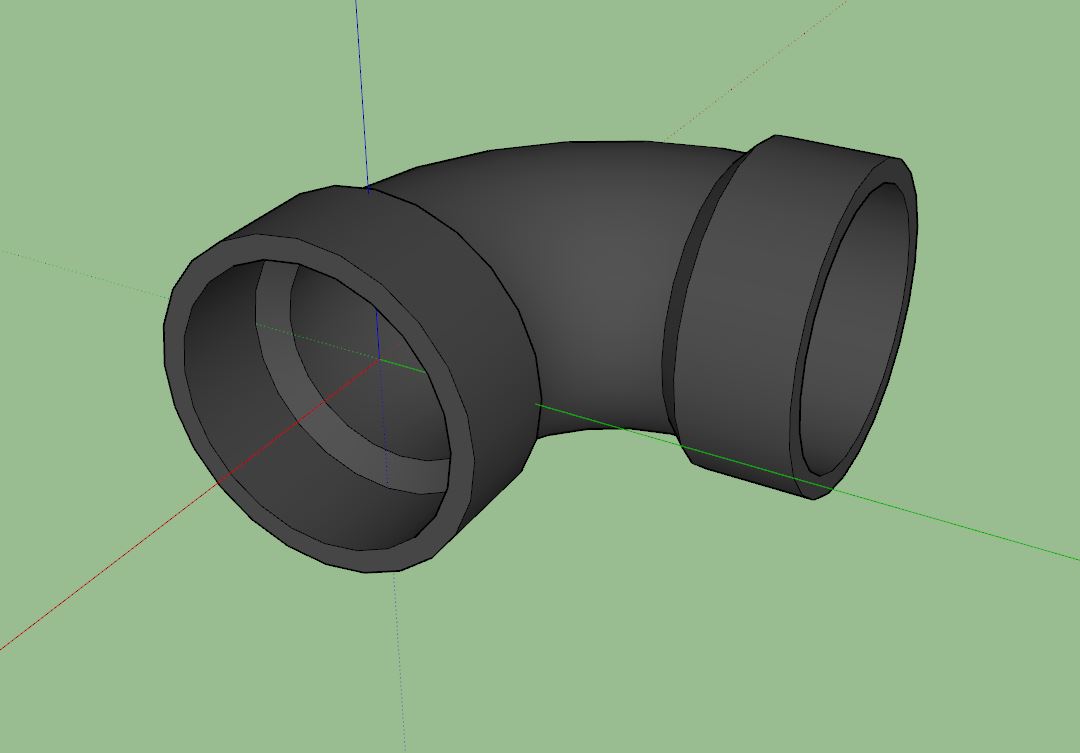
While I wait to hear back from anyone on the Revit file I spent about an hour trying to figure out the best way to model some of these fittings. The most basic or commonly encountered of which is probably the 90 deg. elbow or quarter turn. I decided to use the default 24 segments in a circle so that the fitting doesn’t look too blocky but now I am worried about the polycount. Here is a precisely modeled elbow (1-1/2", ABS DWV, Part No. 300).
All dimensions are in agreement with the Charlotte dimensional catalog (pg. 28). My concern is that the file/component size is 112 Kb, is this too large? There will be many such fittings in a given plumbing model, then again maybe I am overthinking this.
I will probably have to model all these fittings by hand, especially if I want them to be low poly and clean. The problem I have found with bringing in models from other vendors is that they are often messy and not even dimensionally accurate to their own documentation. I end up spending more time trying to clean things up when it is sometimes easier to create a clean model from scratch.
Along those same lines this “double 1/4 bend” is 169 Kb.
Should I dumb the geometry down further? Instead of 24 segments on a circle I could do 16 segments.
Also with threads it makes sense to use an image/material to represent the threads, similar to what I do with anchor bolts and holdown bolts in the other plugins.
Why would fittings or pipe even need interior detail?
Ask yourself what is the goal of a piping plan / model.
Most calculation software exports with much less resolution, most of the time they do it with 12-segment circles.
This is the “t” in Europe
Revit file has nothing drawn. I opened it with Revit and it has lots of fittings families loaded ready to use with Revit.
Take a look at this cross section of an ABS DWV 1-1/2 to 2 reducer:
The actual pipe length between junctions or fittings is dependent not only on the distance between the fittings but also on the internal geometry of the fittings themselves. In the case of this fitting the total length is 2.09375", the 1-1/2 pipe is inserted 0.687" and the 2 pipe is inserted 0.75". There may be some variance between manufacturers but overall these dimensions are fairly standard from what I can tell.
I’m not overly concerned with the interior geometry but I do want to make sure that the important geometry is represented.
I also want the models to look good and not too blocky, but at the same time trying to keep the poly count at a reasonable level.
That is what I was afraid of. No big deal, I will just model everything from scratch.
We use sensors and fittings from GF, so I’ve used this cad library of sensors and fittings before. https://cad.georgfischer.com
not likely that useful, unless you start wanting to add valves…
Where you place the snaps would determine how far into the fitting a pipe intrudes (assuming the snap for pipe ends are at a point flush with the pipe end.)
I agree it doubles the number of edges.
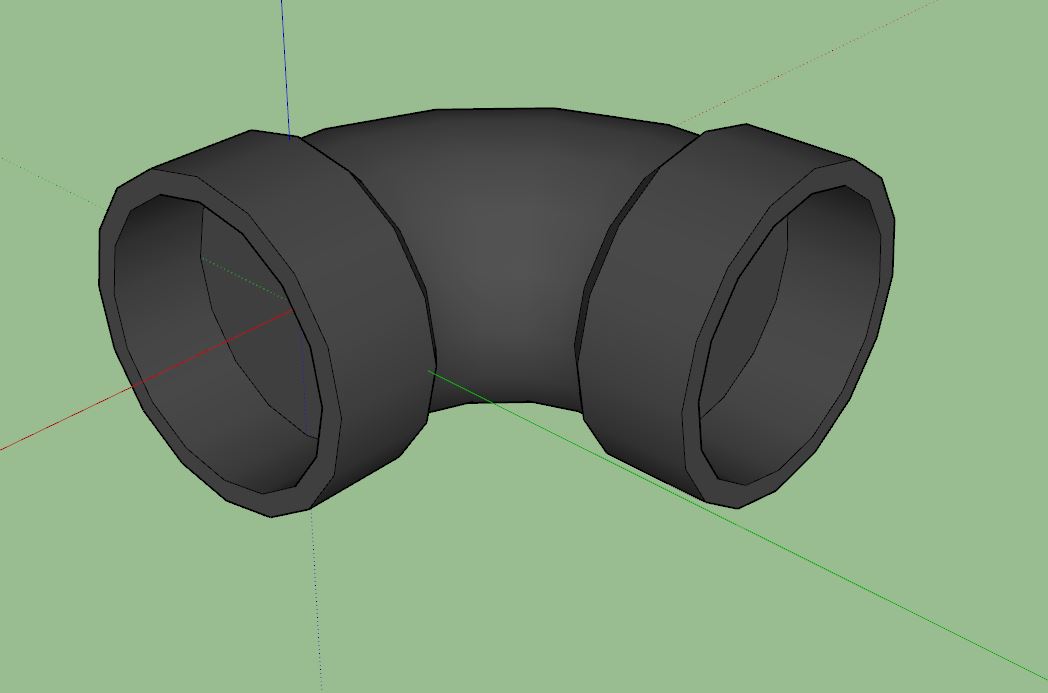
So here is the exact same elbow (1-1/2 ABS DWV) but without the internals and with 16 segments per circle as compared with 24 segments per circle.
The file size is 52.8 Kb as compared to 112 Kb, about half the file size. Thoughts?
Whichever path I decide to go down I need to figure it out now otherwise I will have to duplicate a lot of work, hence I’m taking my time to really think this through before jumping in.
I’ve also attached the files below so you all can roll them around and give me your honest feedback and thoughts on the matter:
ABS_112_300.skp (112.7 KB)
ABS_112_300_LP.skp (52.8 KB)
The low poly version is certainly more lightweight but it does look a bit blocky to me, however if you zoom out a bit will one even notice. Also from a slight distance how does it render?
Here are a couple more files for side-by-side comparison:
ABS_112_327.skp (170.0 KB)
ABS_112_327_LP.skp (74.5 KB)
The LP version is the low poly version.
I use fittings that are 24 segment circles. As mentioned, it probably just depends on what scale they are shown at and how many fittings are in the model. I sometimes show closeup perspective piping details and the blocky 12 segment probably wouldn’t be as great for those details.