I never used arcs that way before. Thanks for highlighting it- Works great.
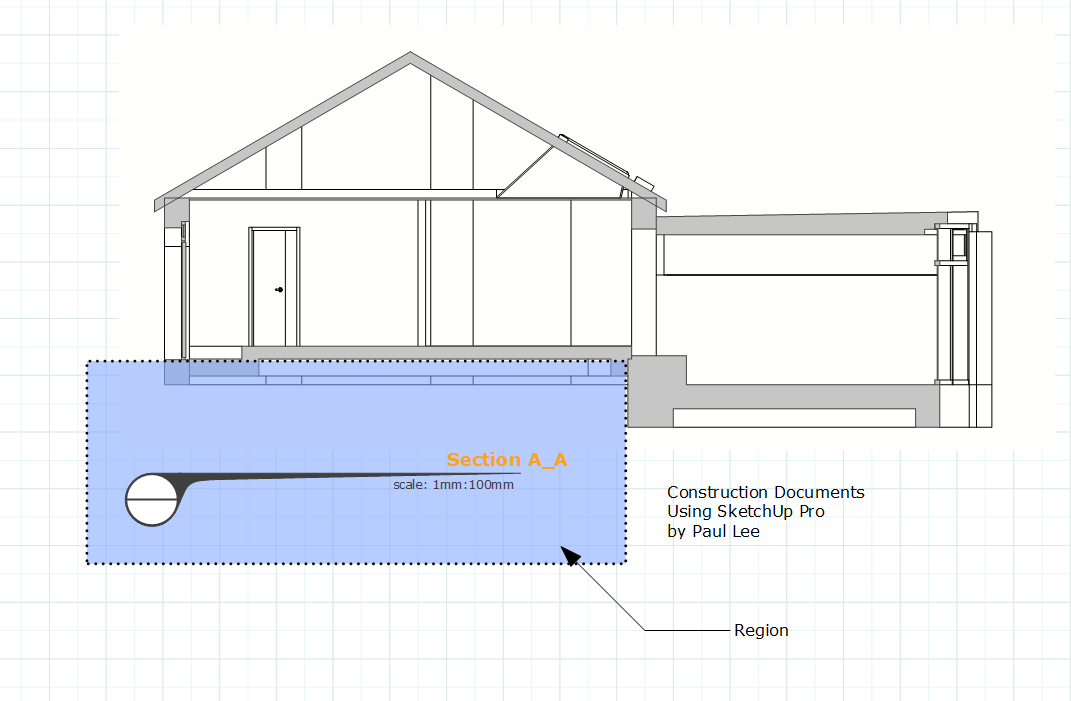
My architectural consulting firm uses SketchUp and LayOut full-time in our workflow to produce complete construction documents. These tools have proven to be powerful and efficient, meeting all the demands of our projects.
LayOut, in particular, is an underappreciated tool that many potential users overlook. However, when used effectively, it can streamline the documentation process and create high-quality deliverables that rival traditional CAD workflows.
By showcasing the capabilities of SketchUp and LayOut, I believe more professionals can recognize their potential to transform the industry and take a significant share of the market.
2 Likes
I’m a beginner, and used Sketchup for 3 months solid to design my house. Again I’m not a professional. Sketchup’s learning curve was substantial, but I felt like the efforts paid off with the final product.
And then I worked on translating my whole model into arch. plans with Layout. I detest Layout. I have Photoshop experience and then the hundreds of hours of SU experience over the summer. Just getting into AutoCAD for a few minutes made me wish I had instead invested in learning how to work with DWG files instead of Layout.
1 Like
Was there anything in particular you struggled with?
2 Likes
Your comment could be improved by stating what you were trying to do, what went wrong and how ACAD did a better job so that we might learn from you.
1 Like
I prolly jumped in a little strong here. I haven’t interacted here much if at all, but I get the weekly digest and thought I’d add something. I might be too used to Facebook where nobody pays attention to other comments.
I had put it all out of my head - I’m building now, and I only refer to the 3d SU model. But I opened the last file to see what I could see:
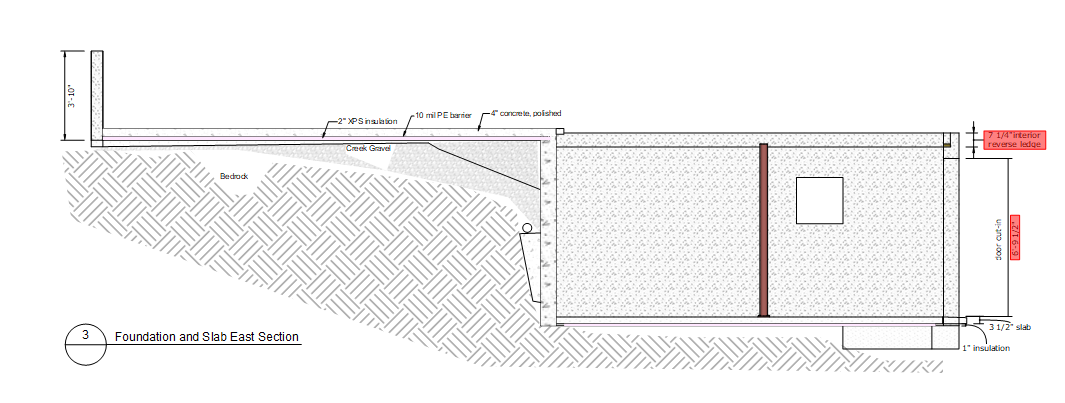
- adding geometry in LO doesn’t integrate with SU model, so I drew in the bedrock, but when the SU model changed I had to manually go through the geometry points and adjust to match
- one time I opened this file, and half my measurements were in red like the attached. I found someway to fix them (reconnect to model I think). But that only worked for 80%. The others I had to simply delete and redo if I didn’t want them red.
- sometimes the measurements just do 0" or something like 1/4" even if you are going feet in the model
- copying and pasting the label for each drawing, and then I have to go through and do something like double click, single click, double click to move the arrow that attaches each label to that particular drawing
- Elevations and Sections weren’t terrible, its more that I found the drawing capabilities of details so awkward and cumbersome
- I was working with an architect who focused on Revit but also Autocad DWG, and a struc. eng. using DWG/PDF, and it was again very cumbersome to try to import and export these
6 Likes
thanks, I fiddled a bit with it and now I can do that too.
1 Like
You make some fair points. I can see where your frustration comes from. I suppose I haven’t had huge requirements for coordination of LO geometry like you illustrated, but when you do have a lot of need for this then LO perhaps starts to look like a bad bet- at least for now. I certainly would appreciate this functionality however.
The connection between the viewport title and the drawing label can be made easier by exploding the group that it’s contained in. Then all you need to do is select the label double-click on the leader which is then highlighted to place it where you need it.

1 Like
That’s one of the more frustrating aspects of labels when you need hidden leaders. It can take longer maintaining and making the required connection than just typing dumb / unlinked text. Unfortunately that breaks the association and quality control.
3 Likes
Obviously you’ve got to name your scenes appropriately which is one aspect of this.
It would be incredibly useful to streamline this- Have a super-powered drag and drop kind of component that can be set to “mine” the correct info from the viewport- As in- Set it once (have the default setting display the scene name), have a region that, when overlapping with the viewport just causes the label to display the desired info.
What is cool about your comment is that you’re a beginner, not an architect, yet you’re dealing with what we deal with.
As architects we MUST solve our issues and we can, therefore solve them. Layout is great because we can circumvent all the issues you found by leveraging working in Layout for some stuff or Working in Sketchup for another. If neither or the other work, we can workaround using the plaethora of accumulated knowledge and software we use.
So, we can use Layout to produce excellent work, but it isn’t excellent.
Layout is the best software to connect to a Sketchup model in the way it does, because it’s the only one.
Layout is bad for that, but as it’s the only solution we have, it’s excellent!
But Layout is even worse for DWG work. This whole thread shows that and your comment is the best at it.
2 Likes
It’s great the amount of debate that this thread has stirred. I have learned a hell of a lot about what people’s issues are and things about the software that I wasn’t thinking about.
While I totally agree that for power users of CAD, Layout is very far away from competing in many respects. There are many who use CAD like a drafting tool and don’t get into the power user end of things.
Again it’s about the individual user. I try to be objective when I’m talking to people who are looking for solutions. On occasion I have steered them away from SU based on their requirements.
When it comes to DWG work, as you say, LO clearly doesn’t suit you-- but it’s not true for everyone.
2 Likes
What matters to me is not if it is already suited for DWG work or not. If it is suited for some, then please use it as such.
What matters to me is that this thread’s aim is focused on having Trimble pushing Layout into some sort of CAD alternative. It is not suited for that, as there are a lot of tools lacking for it to be marketd as such. It’s possible to do some work with it, but in order to be used as a CAD app it must have development efforts thrown into that.
There are several options, both free as well as paid, with a huge variety of complexity, all of them much better at DWG than Layout. Trimble Drawing is the app you should be looking for from Trimble’s eco system.
There is a single app that is aimed at converting Sketchup files into drawings with added drafting abilities, which is Layout. This is it’s core business.
Any resources invested into Layout’s development, shouldn’t be at what it does bad, but at it’s core development, especially as, in this case, and as I pointed out before, the investment isn’t as low as others try to make it look.
As an user, it really makes me a angry, that the only software that exists in the world to do what I need, would suddenly shift it’s aim at something that is the opposite of what made me choose Sketchup over CAD.
I do need Layout to export better DWG output, where layers from viewports are taken from Sketchup tags. This is the main issue that should be solved in Layout and CAD. It could also be better at importing CAD files, as well as Sketchup. That should be minor development.
Apart from that, please Trimble, focus on what the majority of Sketchup users need, not what a minor group of CAD users need.
6 Likes
Seeing the above comments gives me perspective on where some of you are coming from. If I was looking to LO as a drafting tool I would be frustrated too. Drawing linework in LO is clunky and cumbersome and the drafting tools of CAD and other programs are superior for generating/ modifying geometry. I don’t use it that way. All my geometry is contained in the Sketchup model, except for hatches and a few lines to further delineate/ outline geometry. It’s a similar workflow to InDesign, with the added/ necessary functions of scalable viewports and dimensions. With that said, SketchUp/ LO is an open-source software and should be used however you want to use it. I’ve found success in my methodologies, and I’m sure others have in their workflows too.
My thoughts on Le_Corb’s Biggest Question of capturing CAD User markets:
-Most people here know the learning curve for SketchUp is dramatically lower than other programs. Many CAD users already know SketchUp. A half step would be to introduce them to Layout, and show them how it can be used successfully to generate full CD packages. SketchUp’s marketing is starting to tap into this this with recent adverts on CAD to Sketchup. Hit it harder and show the full process from 3D model to full construction doc’s in LO. CAD to Sketchup is tepid. Show them SketchUp To Layout (forget the CAD). The general public has no idea what LO is as already capable of. Sketchup was branded long ago as a conceptual modeling program only, and it’s going to take some work to rebrand it’s image.
Capturing the BIM market. This is where I see the biggest opportunity for user adoption:
-BIM (Revit/ Archicad): Capturing this user market would also be possible/ relatively easy. Most firms I know insist on BIM because it’s “industry standard” and are quietly looking at all the other firms saying “this is what everyone is using”. (Think Spiderman’s standing in a circle pointing at eachother). The realities are many of those firms quietly detest BIM and have buyers remorse. I’ve seen this many times and can provide multiple examples of both small and large firms. What used to take a team of 1-3 to design a building now requires a village + a full time IT/BIM manager. SKUP + LO already has the infrastructure to develop technically savvy, iterative, and fully coordinated construction drawings. Firms just need to see what is possible. 2 factors limit BIM user adoption: the I in BIM for simple functions like room names to schedules. BIM does this well. Teamwork functions to work on a model at the same time/ reserve geometry. Firm Leaders are the ones that determine the software their teams use, and the appeal to have an all hands on deck option is important to them (architecture’s workflow is often a dumpster fire). I’m a small 1-person shop so those functions don’t appeal to me. Perhaps the target market for SKUP/LO is the small firms (1 to 10 persons), which also happens to represent the dominant demographic of most architecture firms.

My Opinion on Key Improvements for LO in order:
-CAD Export with layers
-Processing time to update a model reference
-Dimension strings. Not reliable and they blow out. Learn from Revit’s infrastructure. Revit does this exceptionally well.
-Hatches: Develop a better library with custom and scalable modifiers
3 Likes
I’m biased but I only see two flaws in your line of thought:
Simplify the model by reducing faces. I use hybrid all the time and have no issues with speed.
The main advice is to never download a single model from 3D warehouse nor use vegetation models. Only use proxies and boxy shaped furniture that you can easily model in 3 minutes.
You should hatch in Sketchup too.
3 Likes
what is permitted work ?
Your suggestions are very valuable and useful- The very kinds of suggestions that I created this thread for- so thank you.
2 Likes
I’m glad you see it that way. Most people these days get offended while some try to understand where the other is coming from. Thanks for that.
2 Likes
Hi all, some of you come very near my opinion, but not quite.
My opinion is: LayOut will never be a CAD killer. It is just not build for it. The internal architecture is wrong.
It was introduced to me in 2005 under @Last Software carrying the work name Grizzly. The rep that demonstrated it used it as a photo album to create an album of her trip to Europe…
LayOut is a great tool to create 2D documentation and it should be used for that. Bring together 3D models, 3D drawings, cutouts, 2D Warehouse items, annotations and images. And 2D CAD drawings, created in a different application. Like… :
Trimble Drawings should be the desired 2D CAD application. In the Cloud, generating 2D drawings from any 3D modeler using AI, ready to finetune by the user.
And we should bring all of this together in LayOut. So in LayOut you bundle 3D model views, 2D dimension drawimngs, images of the construction site, interior mood boards and photo renders.
Cheers, Orlando
6 Likes
I agree AND it needs to be able to bring in other vector files (PDF, SVG, EPS, WMF, Ai, CDR etc).
3 Likes