I need Another ESC key

on Sketchup , ESC key is important.
We used many times,
To exit nested group, To cancel measure tool, etc,

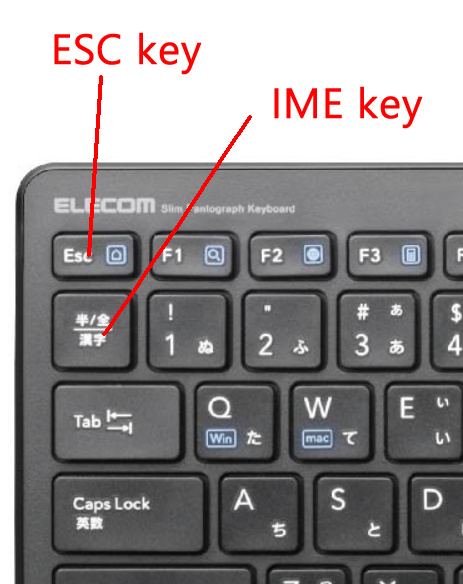
I am using Japanese keyboard.
in Japanese keyboard, ESC key is small.

I many time, many many time mis-type IME key instead of ESC key.
If I type IME key, All Sketchup short cut is disable.
“H”, “P”, “Q” , is not disable.

I need help to add another ESC key on my keyboard.
Using sketchup short cut, Is it possible ?

I want to use “SPACE” key to exit nested group or Exit from measure tool , etc, or Other key is also ok…

What if you got another keyboard to use for SketchUp? Get one with a full size Esc key. You could certainly do that sooner than waiting for the software to be changed to suit your request.

If you use space for this purpose, you will override its default shortcut for activating the selection tool.

in Short cut menu,
There is no item for ESC key.
Can you find it ?

OK -

I applied ESC key on small button on my mouse.
It is not perfect. But I will try to get used to it.
2020-02-01_130524

Thank you , DaveR

Funny how workflow differs from person to person, I can’t remember ever using esc except when testing something for someone.

I wrote a script that adds a “Cancel Operation” menu item that sends ESC key.
Once added to the menu you can assign any key chord accelerator (shortcut) you wish.

It is funny. I use the Esc key quite a lot and, on a Mac keyboard, it is just as small as the Japanese version. I probably do hit the key below it sometimes by mistake but maybe it is not as bad as hitting the IME key.
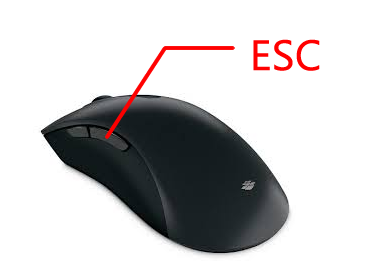
I have a Logitech vertical mouse and have assigned one of the extra buttons to perform esc

Same here - kind of! My Logitech is the M570 trackball with 1 button assigned to esc - the other “extra” button is assigned to space.