Deceived by SketchUp for the first time in 20 years (2026 version not working)

I cannot start SketchUp 2026.

The bizarre thing is that Layout starts without any problem.

This first screen capture shows what I see after clicking the Start Modelling button on the first screen that I see.

After clicking on the Disconnect button, this is what I get:

Finally, I see this:

I read somewhere that my computer, a Macbook Pro 2017 with an Intel CPU is not able to support SU 2026. Your web site state that SU 2026 works with Monterey OS and up. I have Ventura 13.7.7, which is more recent than Monterey, so it should work. Maybe your site shall be more specific and state that SU 2026 doesn’t work on Intel CPUs. If so, why is Layout working ?

My main concern is the following:

Shall I continue to try making 2026 work on my computer or shall I buy a new one?

I recently gave up on my iMac 2019 intel with Sequoia, as SU2025 kept crashing so I was stuck on SU2024. New M4 and SU2025 works but SU2026 actually feels stable. Now just debating with myself over the Tahoe update


Hello. You can check out our hardware recommendations here when it comes utilizing the new graphic engine. https://help.sketchup.com/en/sketchup/system-requirements#:~:text=SketchUp's%20Graphics%20Engine,Iris%20Pro%20Graphics

Intel Mac is not supported on the new graphics engine.

Sorry, saw your message earlier but I was on my work PC, wasn’t sure of the files path :

have you tried deleting session_dat to force a logout ?
(it’s the equivalent of waiting for the 28 days time period between logins)
it’s in ~/Library/Application Support/SketchUp 2026/login_session.dat
(in finder, menu “go” then at the bottom “go to” and paste the path.)

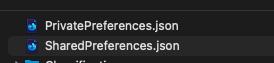
you can also manually force the classic engine. If I’m not mistaken, once you’re in the su26 folder mentioned above, you open the sketchup folder. here you’ll see 2 preferences files.
Capture d’écran 2025-10-24 à 18.37.52

open the private preferences one (it opens in text edit)
there, scroll down until you find a section called “preferences” (it’s all alphabetical)
in there there is a bit at the bottom that says
"usenewrender": true
type false instead of true. save. restart sketchup, it’ll start with the old engine.

2 Likes

OK, but how can I switch to old graphic engine if I cannot open the program?

read my message Jean, you can manually change the preference file :slight_smile:

I did. No success.

I checked in the PrivatePreferences.json and this is what I see:

{
“This Computer Only”: {
“Application”: {
“RunCounterSU”: 4
},
“Common”: {
“AcceptedTerms”: true
},
“File Locations”: {
“Classifications”: “/Users/”,
“ComponentBrowser”: “/Library/Application Support/”,
“ComponentBrowser1”: “/Library/Application Support/”,
“ComponentBrowser2”: “/Library/Application Support/”,
“Components”: “/Users/”,
“Environments”: “/Users/jlemire/Library/Application Support/SketchUp 2026/SketchUp/Environments”,
“EnvironmentsBrowser”: “/Applications/SketchUp 2026/SketchUp.app/Contents/Resources/Environments”,
“Images”: “/Users/”,
“ImportExport”: “/Users/”,
“Materials”: “/Users/”,
“MaterialsBrowser”: “/Library/Application Support/”,
“MaterialsBrowser2”: “/Library/Application Support/”,
“Models”: “/Users/”,
“Styles”: “/Users/”,
“StylesBrowser”: “/Library/Application Support/”,
“StylesBrowser2”: “/Library/Application Support/”,
“Templates”: “/Users/”,
“Textures”: “/Users/”
},
“Preferences”: {
“CountOfNewRenderersOnProbation”: 0,
“LastUpdateCheck”: 0.0,
“PurgeOnSave”: 0,
“SnapsDisplayMode”: 2
},
“Toolbars”: {
“Trimble Connect.Visible”: 1
}
}
}

We do test on Intel Mac, but there is this list of GPUs that are not supported:

  • Intel HD Graphics 5000

  • Intel HD Graphics 6000

  • Intel Iris Graphics

  • Intel Iris Graphics 6100

  • Intel Iris Pro Graphics

Does your Mac have one of those? SketchUp is supposed to start up with the ‘classic’ graphics engine if the GPU isn’t supported. If that detection is failing, you can manually force the old graphics by editing this file:

~/Library/Application Support/SketchUp 2026/SketchUp/PrivatePreferences.json

in any text editor. Find the part that is “Preferences”, and look for this entry:

“UseNewRenderer”: true,

Change that to say false, and save the file. Then open SketchUp again.

edit: I see that you were already told that, but your PrivatePreferences.json file looks like it has never been set up.

Thinking of other ideas


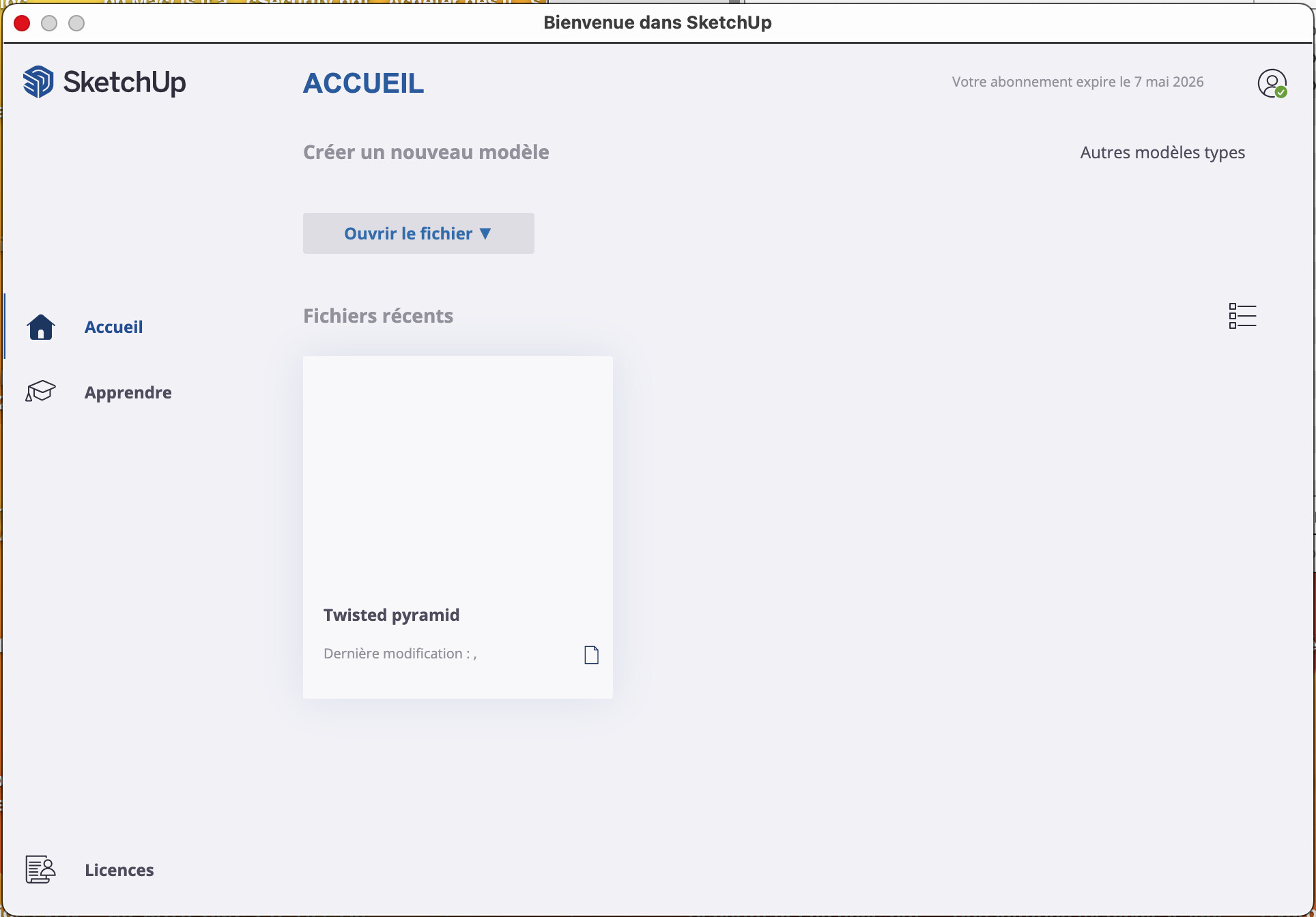
One thing that is odd, is that you have a recent file. Does that mean you did once get SketchUp 2026 to open, or was it that file you first tried to open with SketchUp 2026? Also, you don’t have any templates to choose from.

If you haven’t tried it yet, go into ~/Library/Application Support/ and rename or delete the SketchUp 2026 folder. See if you then get the templates back.

Oh man. The ‘bubble’ windows with gigantic round corners is killing me. Perhaps I’ll get used to it one day.

1 Like

My graphic cards are:

  • Intel HD Graphics 630

  • Radeon Pro 560

Either of those ought to work, and if you could get into SketchUp you could make sure the Radeon Pro 560 is the one SketchUp uses.

If you look into what I posted, you will see that I don’t have the same content as far as the Renderer is concerned.

Again, look at that:

“Preferences”: {
“CountOfNewRenderersOnProbation”: 0,
“LastUpdateCheck”: 0.0,
“PurgeOnSave”: 0,
“SnapsDisplayMode”: 2

Right, like the preferences haven’t been updated even once. Did you try the rename or delete of ~/Library/Application Support/ SketchUp 2026 folder?

Yes I did.

After that, I double click on the SketchUp App in my Application Folder and get that:

I click on Accepter (Accept) and I get that:

I click on Connexion (Connect) and I get that:

I close the browser page and I get that:

I click on Commencer à modéliser (Begin modelling) and I get that:

No improvements.

Notice that, before all this I already deleted SU completely and reinstalled it. However, there must have been some leftovers of the previous install since I was never asked if I wanted to migrate my extensions at installation when I did a new installation.

can you add it ?

looks like it’s supposed to be written after the first launch. and your first launch is faulty. but maybe adding it manually would still work ?

still haven’t made the switch. I’m hoping they’ll move another direction within a major version or two. not in a hurry


you’re crashing / freezing before the migration plugin has time to kick in. plugins load after the welcome screen.

Wild suggestion from the developers


Does your Sketchup.app have the templates? I looked in mine, and I see them ok, even for French.

In your Applications folder, SketchUp 2026 folder, right-click on SketchUp and Show Package Contents.

In there, go into Contents, Resources, fr, Templates. Are there a lot of SKPs in there?

Could anything be wrong with your country code at the moment?

Something seems wrong with language support in 2026. Could you try English?

I see 19 different templates.

I tried a right click on one template and choose Open with SketchUp 2026 to see if this could work.

Believe it or not, it works. I asked about SketchUp and got the version as 26.0.428.

I tried a few tools and got correct results.

I was able to start a new file but If I tried starting from a template, I got a blank page instead of the gallery of templates. Weird.

I can then use that new file to start SU a bit like it is a template.