maybe I should be reaching out to Twilight Render about this before I add all the details?
Probably so. If you share the .skp file with us maybe someone who uses Twilight Render can help you, though.
You’re still using SketchUp 2022?
Twilight Render has gone dark as of 2024.



[
Download full resolution images
Available until Aug 31, 2025
ROCKY MOUNT .skp
71 MB
(Attachment NEW LOGO for mail 2.tiff is missing)
Upload it to DropBox and share the link.
Hopefully someone who still uses Twilight Render will be along to look at your file. As @RLGL pointed out, Twilight Render closed up shop last year so finding a Twilight Render user might be a challenge now.
If you upgrade to SketchUp 2025, you can use realistic pbr materials that look better than Twilight. I think that Twinmotion still runs natively on Intel Macs and its thousands of times better than twilight, it’s also free if you make less than 1M per year.
Hi,
I’ve used Twilight Render quite a lot, although I didn’t do many renders recently. I had a look at your model and settings, did some tests, and derived the following recommendations:
- First of all, with the current status of your model, you won’t be able to create any decent renders at all, but I assume that you aware of this. Indeed, currently, there is only one Twilight material defined (i.e. the wall material that you want to be ‘reflective’). In order to have realistic renders, all (major) materials in your model must have been assigned to their corresponding Twilight material template. This is even more valid for this particular model with reflections: if a material (e.g. the floor) that should be reflected in the reflective material (i.e. the wall) is not properly defined, the reflections themselve will also be of ‘poor’ quality.
- You have applied render settings ‘8’ (Exterior Daylight). While this is ‘OK’ for this model, and faster than setting ‘9’ (Interior), you may run into render quality issues once you start adding lights to render your scenes. Therefore, as a global recommendation, by default, always use setting ‘9’ (even for exterior scenes). The overall render quality of ‘9’ seems to be better. Based on my (quick) tests with your model, I can confirm this seems to be valid for your reflection problem as well.
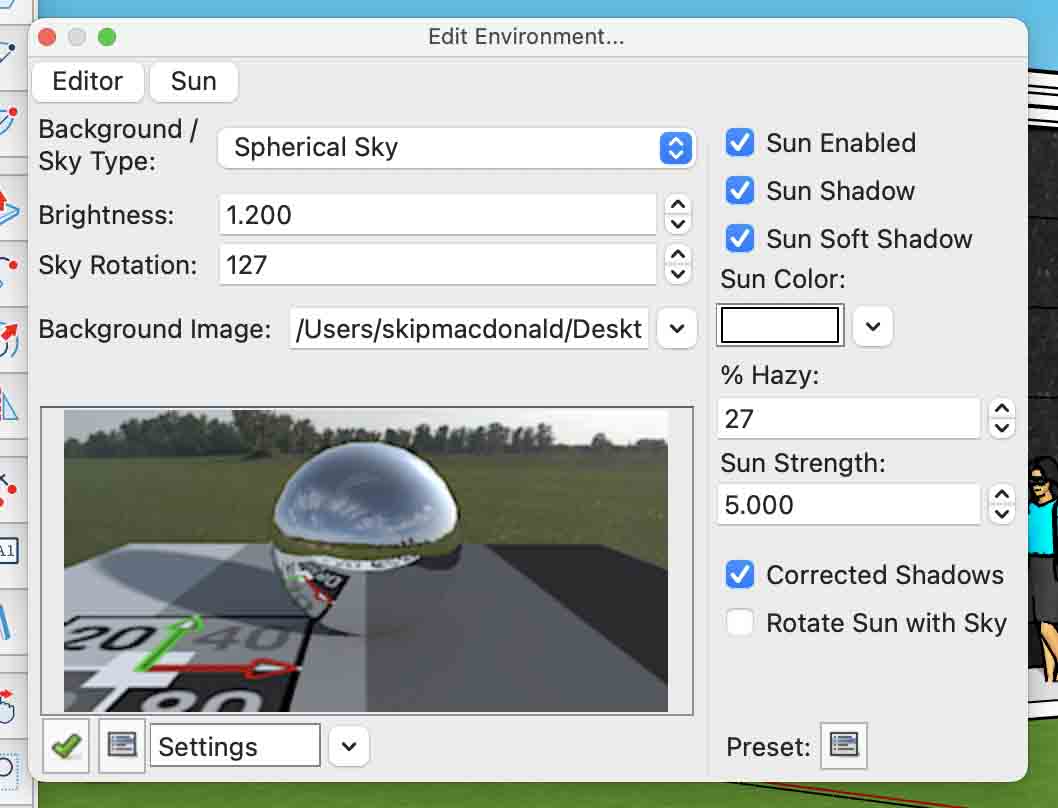
- Your scene illumination is overexposed. You mix a ‘spherical sky’ with the ‘Sketchup sun’. In general, it’s recommended to use only one of these global light sources (certainly if your spherical sky is an HDR sky). Most of the time, I use a spherical sky (for realistic clouds e.g.), and I don’t use the Sketchup sun (for rendering). In case you would like to mix both sources, apply appropriate (i.e. reduced) settings for the strength factors. Because of this overexposure, lots of (fine) details of your render are blown out and are hardly (or not at all) visible, including the reflections on the wall…
- In terms of Twilight material settings, you selected the 'Perfect Reflection’ template. This is fine (and ‘logical’) for your purpose. Eventually, you could also use the Deep Material editor, or make use of material libraries. This is however beyond the scope of this reply. By changing the IOR value, you increase/decrease the level of reflection (for the quick examples below, I settled on a value of 5.0 with 100% reflectivity).
- The Sketchup material for your walls has a ‘noisy’ texture. You applied this Sketchup material also to the bump channel of the Twilight template. This noisy bump map ‘scatters’ the light on the surface in all directions, which obviously decreases the ‘reflection effect’ that you want to apply to your wall. You could apply a flat color to the bump map (this ‘eliminates’ the bump effect), or apply the Sketchup material, but with a reduced size factor (e.g. 0.1 i.s.o. 1.0). By ‘playing’ with various settings for this bump map, you may tailor the result to your needs or preferences (I don’t know how reflective your material really needs to be).
- Below, you find 3 pictures with varying ‘bump settings’ (respectively: 1/ no bump (i.e. flat color), 2/ Sketchup material texture as bump map with bump size 0.1, and 3/ same map with size 1.0).
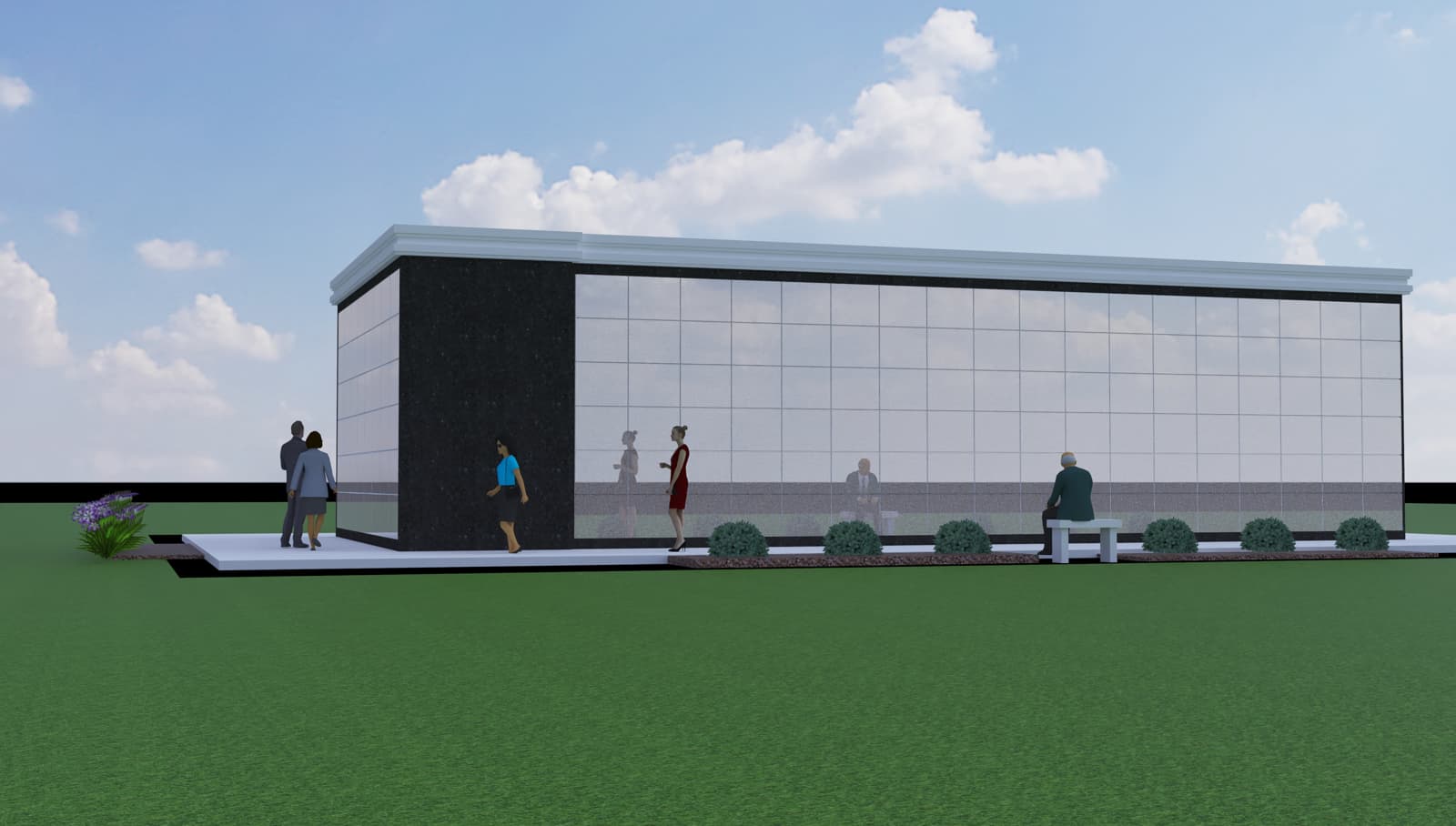

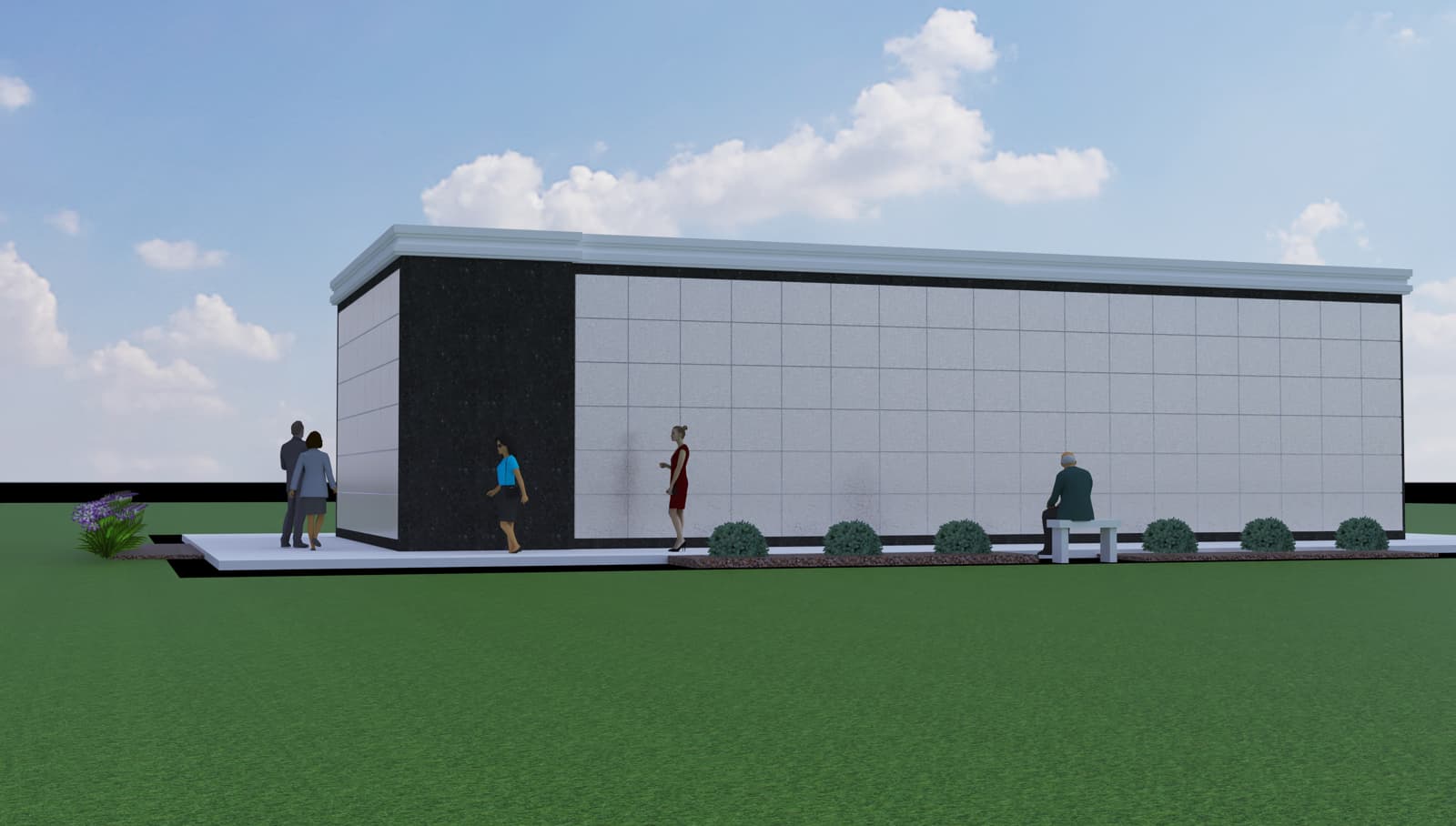
You’ll notice clearly the effect of the bump setting on the reflectivity (i.e. a decreasing reflection of the lady and the sitting man in front of the building). Your settings did correspond to the last values, which helps explaining your ‘problem’…
- One last factor why you didn’t notice the reflections in your render relates to the position of your camera in your scene. Indeed, in your scene, the sitting man reflected just behind the lady, and the reflection of the lady felt on the border of the reflective wall. This is shown in the figure below (without bump). This camera position, combined with your material bump settings (noisy texture with size 1.0) and your overexposed environment explains your problem…
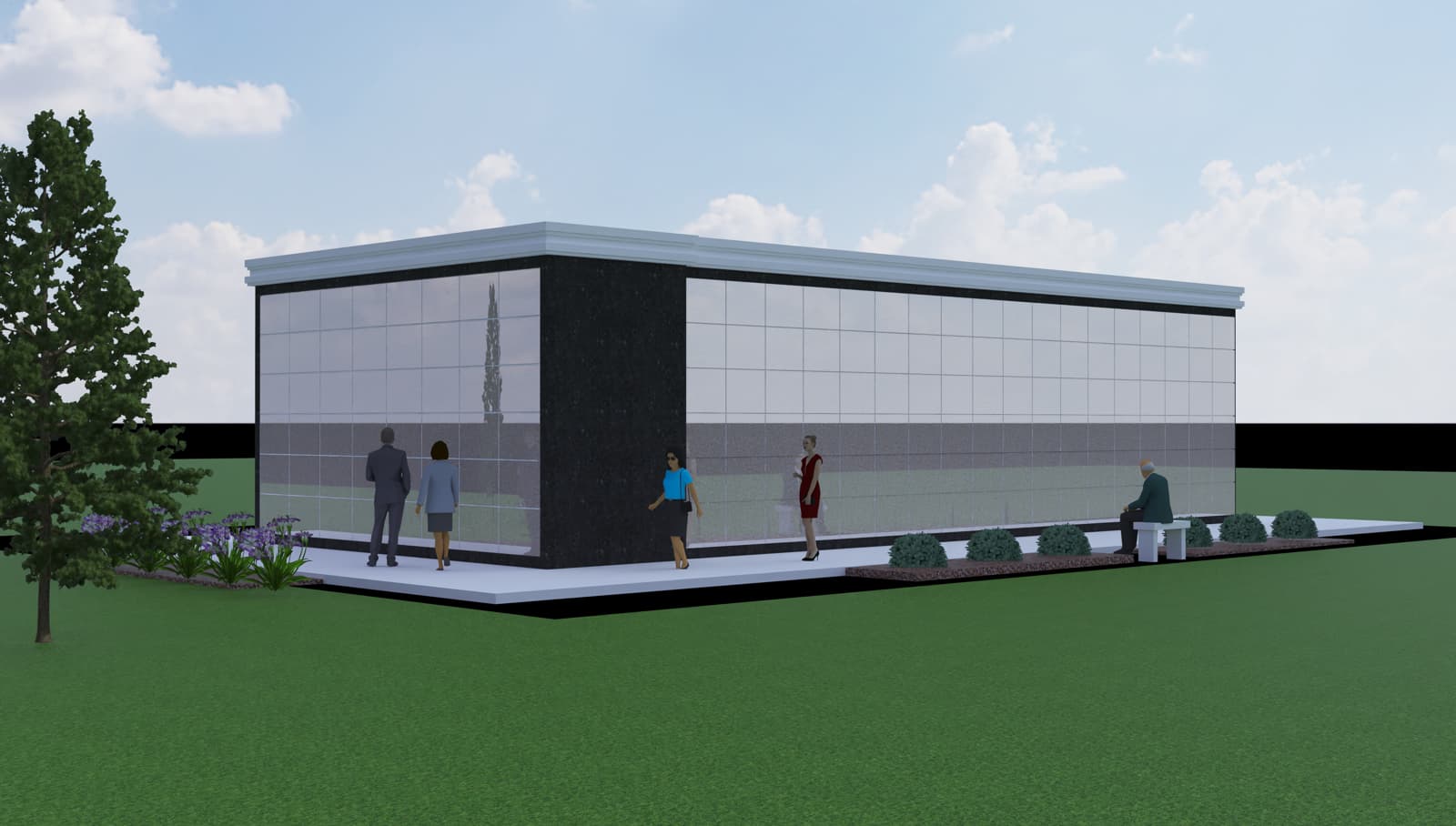
Please also notice that you should avoid the use of 2D camera-facing objects in scenes with reflections, because you’ll get deformed reflections (see e.g. the ‘small tree’ reflection in the facade of the building).
One small last tip: you may notice the darker borders around the wall panels. On your current render output they may not appear. These border lines can be activated in the Advanced section of the Material Editor.
wow, thanks! That’s really a lot to digest. First of all how do I change the amount of bump? Let’s get started with that.
So you say with the current status of my model, I won’t be able to create any decent renders. What do you mean by current status?
yes, you’re right. I’ll have only determine the texture of one of the materials. I did that on purpose cause that is the main one. I’m concerned with and that I’m trying to make that surface reflective. I will do the others after I finish this problem with reflectivity.
In the Twilight Material Editor, assign the Sketchup Material to the ‘Perfect Reflection’ template. I assume that you did this before, because it’s in your model already.
In the Editor, you’ll see a ‘Bump’ field, with a selection box. There are values: Sketchup, Color,
Texture and Procedural in this box.
- ‘Sketchup’ means that you apply the texture of the Sketchup material as bump map. In this case, there is also an input field, labeled ‘Size’ (with default value 1). Changing this value decreases or increases the bump effect. I assume that this value acts as a ‘multiplier’ (although I don’t know the internals of Twilight Render). With the setting ‘1’, the noisy texture of the Sketchup material almost ‘eliminates’ the reflection (due to light scattering). This is picture 3 in the list of pictures of my first post. A size value of 0.1 acts as a ‘dimmer’ for the bump effect, and gives the result of picture 2.
- ‘Color’ allows to select a color. The luminosity of this color defines a constant value for the bump effect. Because it’s a constant, it doesn’t matter that much what color you select, the surface will be assumed to be without bump. I normally select ‘black’ as color. This corresponds to the first picture in my previous post. Because it’s flat, it gives the most reflectivity (less scattering of the light).
- ‘Texture’ allows to define a bump map that is different from the texture of the Sketchup material.
- ‘Procedural’ is a special type of ‘maps’ based on mathematical formulas that create textures.
You may also try other Twilight Material templates, or create advanced, multi-layered material structures with the Deep Material editor, but that becomes quickly extremely complicated. Most of the time, one of the standard templates allows to tweak what you need.
Thanks so much! I can’t wait to try that! I really appreciate your help all this!

Hi,
Indeed, I’m not a Mac user. But despite some UI/navigation differences between Windows and Mac, I don’t understand that you ‘don’t see it’…

The image above is a copy of your own Mac screen (cf. the picture in your last post).
- The red box is the ‘Bump’ field, where you select one of the four values that I described in my previous message.
- The blue box is the ‘Size’ field that appears in case you select ‘Sketchup’, ‘Texture’ or ‘Procedural’ for the Bump field. Default is 1.000. But, as suggested, please reduce this value to limit the light scattering due to the noisy texture of your Sketchup material (used also as ‘bump map’).
- If you select ‘Color’ in the Bump listbox, you’ll get a ‘color selector’ i.s.o. the ‘Size’ field. With a flat color, you avoid the ‘bump’ effect.
- If you select ‘Texture’, you also have to specifiy the bitmap file that defines the texture.
- If you select ‘Procedural’, you also have to select one of the predefined procedural maps (from Twilight Render).
I hope you see it now 
Wow, that did it! COLOR was the main culprit, I believe!
The color seems to be less red than I wanted in the finished TR rendering, but I can fix that in Photoshop, although I wish I could fix it in TR. Tried altering the color in template material editor, but no change. Sometimes I find when TR doesn’t notice the changes I can reboot and fix the problem.
Gonna try Couple more questions, can your recommend a site for realistic people? I need some new ones. Also, is there a HDRI site with pine trees? None of mine have pines.
You HAVE MADE MY DAY!
I know I’m probably limping along with TW, and that’s there reason I”m using an old version of SU, I’m worried that soon I may not have options for rendering, since most of the rendering programs won’t work on Mac. Suggestions?

(Attachment NEW LOGO for mail 2.tif is missing)
well, we have vray, enscape, twinmotion… that’s not everything, but that does the job 
twinmotion is free (on low revenue) but it has the downside of being a separate software. you could have a look at enscape, not free, but integrated to SU like twilight render yet not as complex as vray.
I have used escape, but it no longer works with Mac

