Currently, there is no way.
Hi and thank you for your work! I am discovering your extensions and I think I will need some of them to speed up my work flow. I have tried the auto tag and it worked very well for a few days but then, when I open the extension and get the list “autoTag”, “Folder” and “Mapp”, I can only open “folder” and “Mapp”, nothing happens when I click on “auto Tag”. I am on the latest SketchUp. Is it something somebody has faced and is there something I can do to make it work? Martin
Hello, I don’t get you.
Could you please upload a screenshot and mark what functions do not work for you?
And what version of 5D+ Auto Tag you are using.


The latest version is not the version in the Extension Warehouse, it’s currently on my store at Lemon Squeezy, you can download from the link of the first post.
You also need to restart SketchUp after installed new version.
This is the latest version looks like, it had a “Check for Update button” to check if there is new version and can be automatically download the latest version and install it for you.

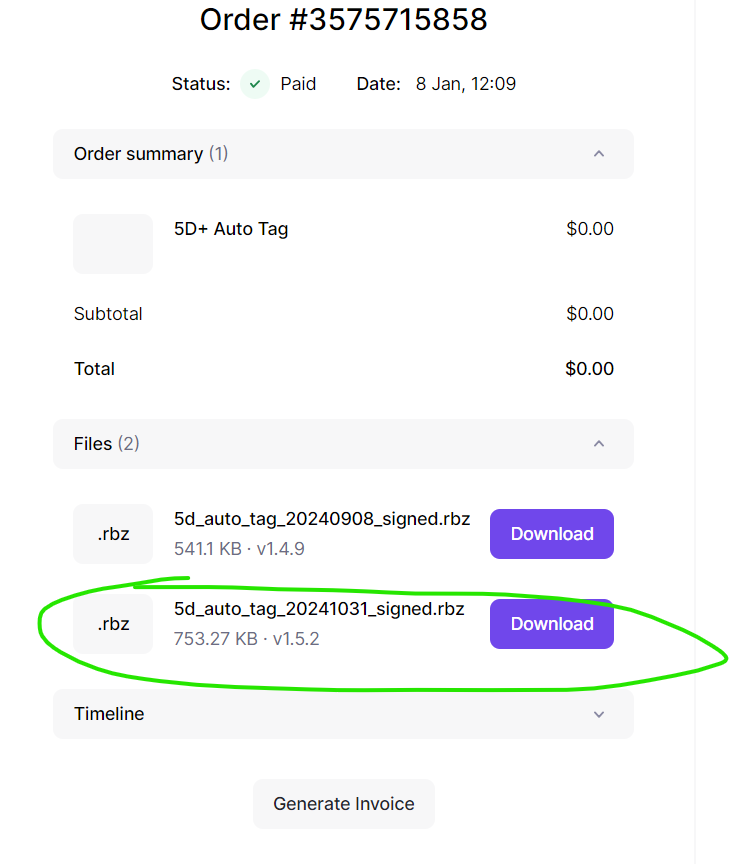
Have you restarted SketchUp yet? This is for the new code can be applied.

You must uninstall the old one first, install the new one, and very important you must restart SketchUp.
Now you can uninstall Auto Tag, restart SketchUp then re-open and check to make sure it is completetly uninstalled. Ater that, install the new one and Restart SketchchUp.
 the latest version is now on. But the initial problem remains the same, the main dialogue box doesn’t open. All the other lines in the menu are active.
Have you used 2 monitors before, and did the Auto Tag tray somehow remain in memory on the other monitor?
There you might have the thing! Today I work from home with different monitors, tomorrow I will be back in the office where I have used the extension. That might be the thing. Is there a way to deal with that? I mean removing from the monitor memory?
There is a ruby code that resets the tray positions, unfortunately, I don’t remember, wait until @Cyentruk comes back, he knows for sure
Great! Thank you! it worked in 2 clicks! thanks to all of you, both for the time and for the engagement in the community !
Yeah now I know exactly the dialog has been opened but it is currently in the position that is outside the of the curren screen, other space (screen).
Thanks @3DxJFD
If you are using 5D+ Plus, I have made a button called “Back Center” to fix the same issue.

