punpun
July 11, 2025, 5:08am
1
I am new to ruby. I want to manage individual plugins when installed, they are all in one plugin menu, so how do I code in those individual plugins? I hope everyone can help.
dezmo
July 11, 2025, 5:24am
2
Your question, at least to me, is unclear. Can you please explain more?
Perhaps studying the following Sketchup Ruby API chapters will help:
Sketchup::Menu — SketchUp Ruby API Documentation UI::Command — SketchUp Ruby API Documentation UI::Toolbar — SketchUp Ruby API Documentation
punpun
July 11, 2025, 5:32am
3
For example, I have 2 rbz files as shown
dezmo
July 11, 2025, 8:56am
4
… and further, this has been a long standing omission in the API. We have opened feature requests already for the ability to have better access to menus and submenus:
opened 11:25PM - 30 Jan 20 UTC
enhancement
Ruby API
SketchUp
### SketchUp Ruby API Feature Request
----
#### `Sketchup::Menu#get_submenu`… Getter Method
**Please implement a `Sketchup::Menu#get_submenu`** method so that authors can have separate extensions share the same submenu.
The method should likely return **`nil`** if the submenu does not yet exist.
The method might have a `:create` boolean named argument (defaulting to `false`) that will create the submenu if it does not yet exist.
----
#### `Sketchup::Menu#has_submenu?` Query Method
Returns boolean if the menu has a submenu named per the argument.
----
#### `Sketchup::Menu#has_item?` Query Method
Returns boolean if the menu has a menu item named per the argument or matching the integer ID given.
----
#### Getter Method Implementation
Currently, each call to [`Sketchup::Menu#add_submenu`](http://ruby.sketchup.com/Sketchup/Menu.html#add_submenu-instance_method) creates a duplicate submenu object. For example, at the console ...
```ruby
plugins_menu = UI.menu("Plugins")
submenu = plugins_menu.add_submenu("Test")
submenu.add_item("Hello World") {
UI.messagebox("Hi there!")
}
submenu = plugins_menu.add_submenu("Test")
submenu.add_item("Hello World 2") {
UI.messagebox("Hi there once again!")
}
```
... creates 2 submenus, both named "`Test`".
**QUESTION:** Should we consider **changing the behavior** of the `#add_submenu` method, so that it only creates a submenu of the string argument **if** it does not yet exist, and otherwise returns the **existing** submenu ?
If you prefer that `#add_submenu` is changed, then our usage would be more like ...
```ruby
main_menu = UI.menu("Plugins")
my_menu = main_menu.add_submenu("Author")
if my_menu
# add menu items or nested submenus
end
```
My thoughts on use for a **new** `#get_submenu` method are this ...
```ruby
main_menu = UI.menu("Plugins")
my_menu = main_menu.get_submenu("Author")
my_menu = main_menu.add_submenu("Author") if my_menu.nil?
```
**BUT**, if the **new** method also had a create argument, then we could simply do this ...
```ruby
main_menu = UI.menu("Plugins")
my_menu = main_menu.get_submenu("Author", create: true)
```
----
#### Boolean Query Methods
Along with a getter, it would be nifty if the [`Sketchup::Menu`](http://ruby.sketchup.com/Sketchup/Menu.html) class had existence boolean query methods **`#has_submenu?()`** and **`#has_item?()`**.
Example usage ...
```ruby
main_menu = UI.menu("Plugins")
if main_menu.has_submenu?("Author")
my_menu = main_menu.get_submenu("Author")
else
my_menu = main_menu.add_submenu("Author")
end
unless my_menu.has_item?(menu_text) # could also take an ID
my_menu.add_item(menu_text) { call_some_function() }
end
```
?
… and …
opened 09:24PM - 15 Mar 22 UTC
bug
Ruby API
SketchUp
logged
ui
Putting traces in my code, I found occurrences where `Menu#add_submenu` fails (i… .e. return `nil`), although the argument are valid.
The traces shows that `@su_menu.add_submenu(@menu_name)` returns `nil` with
```ruby
@menu_name = TopoShaper
@su_menu = #Sketchup::Menu:0x000001f46ca9a580
```
This happens rarely, a few users, and randomly, that is, not necessarily TopoShaper. Furthermore, sers getting the problem may have it working fine when reinstalling the plugins or Sketchup.
Could someone in the Trimble Extensibility team have a look at the `Menu#add_submenu` method and check under which conditions the method could return `nil`.
You can manage all your plugins under a single submenu by using a shared menu variable. For example:
module Curic
  def self.plugin_menu
    @plugin_menu ||= UI.menu('Plugins').add_submenu('Curic')
  end
end
Then, in each individual plugin, I add menu items like this:
measurepp_menu = Curic.plugin_menu.add_submenu('Measure++')
This way, all of your plugins will appear under one submenu called “Curic” in the Plugins (Extensions) menu.
This did not always work. Do you have a reference for when it was fixed? (I thought @tt_su was looking into it.)
Fredo uses a loader that loads all of his extensions so that the submenu reference stays valid.

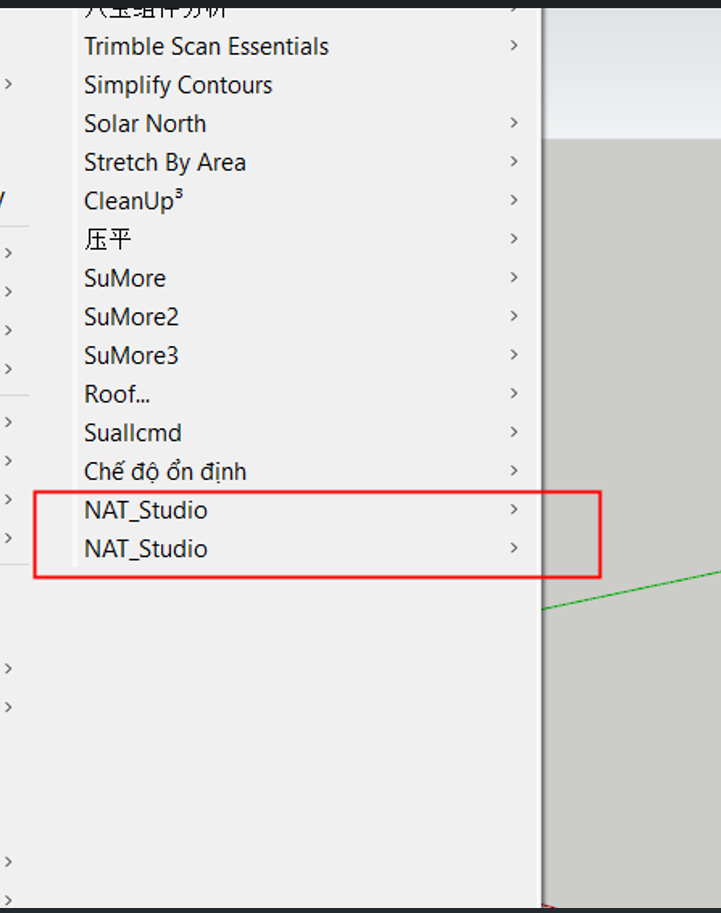
 , see here: