Sketch Shaper is a powerful online 3D asset extension for SketchUp, designed to streamline your interior and architectural modeling process.
Sketch Shaper is a powerful online 3D asset extension for SketchUp, designed to streamline your interior and architectural modeling process. With a clean interface and organized categories, it gives users instant access to a growing library of high-quality, pre-modeled components.
Key Features:
Cloud Asset Library: Browse and use 3D models instantly after installation — cloud loading or downloads required.
Organized Categories: Find assets easily with grouped sections like beds, chairs, tables, and lights.
One-Click Import: Quickly insert any model directly into your SketchUp scene with a single click.
Professional-Grade Models: Includes optimized, lightweight, and realistic models for interior design, architecture, and furniture layouts.
Fast Preview Panel: Visual thumbnails help you choose the right asset before importing.
Frequent Updates: Continuously growing asset library with new categories and designs added regularly.
Sketchup Version: This extension comparable with all SketchUp version including SketchUp 2025.
Whether you’re building a home interior, furnishing a room, or creating high-quality visualizations, SketchShaper helps you work faster, design smarter, and present better — all inside SketchUp
It looked promising, until I stumbled upon “Patreon members only”, which I still don’t use.
Hope you can implement another login method for non-patreon users
Are the models how poly or low poly, imo assets shouldn’t have a lot of details and big textures, or should be created to be compatible with V-Ray, enscape or any other rendering engine so it can be used as a proxy on the model but full details on the render, making it use less resources and faster rendering times.
Our goal is to provide models that balance visual quality and performance. Most Sketch Shaper assets are optimized for SketchUp workflows, we avoid unnecessarily heavy geometry and oversized textures whenever possible.
The library includes a mix of low-poly, medium-poly, and detailed models depending on the asset type and intended use. We focus on keeping models lightweight enough for smooth viewport performance while maintaining realistic appearance for presentations and rendering.
We’re also working toward improved compatibility with rendering engines such as V-Ray, Enscape, Lumion, and others. As the library grows, we’ll continue optimizing assets to support efficient rendering workflows and proxy-based pipelines where appropriat
Our assets are not scraped or repackaged from other websites. We create, optimize, and curate our library with a strong focus on quality, usability, and SketchUp performance.
When we describe a model as “light” or “performance-optimized,” we mean that it is designed to maintain visual quality while minimizing unnecessary geometry, excessive polygon counts, oversized textures, and other elements that can slow down SketchUp projects. The goal is to keep files responsive even in larger scenes.
We’d be happy to share a few sample models so you can evaluate the quality, file size, geometry, and overall performance for yourself.
that one was better. same weight, half the complexity. No weird geometry-filled sausage that makes up to 50% of the file’s geometry Upholstered Armchair.skp (1.5 MB)
you might think I’m a pain in the chair, the models are perfectly fine, and I might think you handpicked two “clean” ones
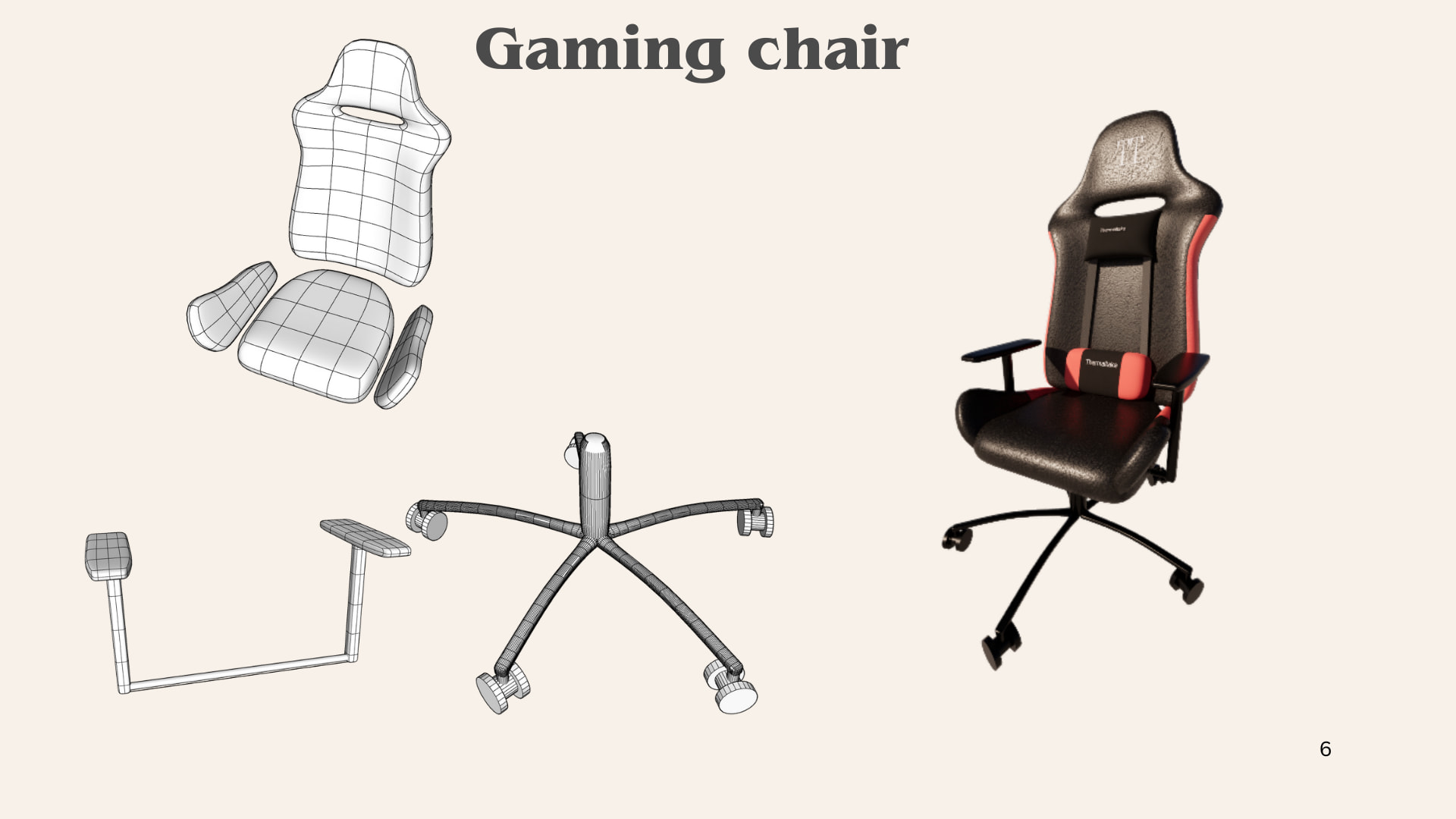
because looking at your gaming chair, I get cold sweats.
and zooming on your screenshots, I see multiple chairs that are 20+ MB and I’m sorry to say, no chair needs to be 20MB.
imo, 4MB is already on the high side.
no wonder why I see more and more fat files in tech support, if people add 20mb per chair…
if you want to make your own warehouse, please make it lean. if you make assets as big as the normal warehouse, there is no real advantage in paying you is there …?
@ateliernab has beat me to commenting. These are not ‘light’. they do not look optimized for SketchUp. They may be being monetized for SketchUp, but they are not optimized. Clearly made in other software and not even nicely cleaned up for SketchUp.
The base of the gaming chair probably has more geometry than the construction documents I am working on.
For a ‘light’ file textures should be no larger than 1024, better to be 512 in most cases, unless we are setting up for product or close up rendering in VRay - I often use 2048 and larger for some specialty work, but I switch those into the model only when I’m ready to render. But that would be a niche use case for close ups. If you are including normals, bumps, etc. then that file size expands quickly.
It feels like this is just another re-packaging of models and not a SketchUp specific tool.
@ateliernab@bmike
Thank you for your feedback and for taking the time to review our work.
We create all of our models directly in SketchUp 2023 and 2025. Our goal is always to keep the models as lightweight and performance friendly as possible. However, for certain products with complex shapes and details, reducing geometry too much would significantly affect the accuracy and visual quality of the model, so we try to find a balanced approach.
Most of our models are inspired by real products from brands and retailers such as IKEA, Wayfair, and Crate & Barrel. We recreate them specifically for the SketchUp ecosystem, as our entire workflow is focused on SketchUp users.
Regarding the articles on our website, you are correct that some of the content has been assisted by AI. Our primary focus is creating high-quality SketchUp models rather than producing blog content, so the articles have not always received the same level of attention. We appreciate you pointing this out and will continue improving that aspect of the site.
Since we work exclusively in SketchUp, there is very limited opportunity for us to create assets in other software and then adapt them for monetization. Our focus remains on delivering useful and efficient SketchUp models for the community.
We truly appreciate your feedback and support. We will continue working to improve both the quality and performance of our models and do our best to provide even better assets in the future.
Most of our models are inspired by real products from brands and retailers such as IKEA, Wayfair, and Crate & Barrel. We recreate them specifically for the SketchUp ecosystem, as our entire workflow is focused on SketchUp users.
Man, I did a Ferrari model using Sketchup and Substance Painter on an Asus PC (sporting an Nvidia rtx video card) while seating on an Ikea office chair.
Should I claim that I’m “Supported by Ikea, Asus, Nvidia, Trimble, Adobe and Ferrari”?
Not necessarily done in another software.
To be 100% fair, the game seating screenshot it’s clearly coming from Sub-D (in Sketchup).
Pretty basic stuff, if you know what you are doing (I do this kind of modeling on daily basis).
About using this kind of models in documentation documents, well.. they are clearly not meant for that. Nobody in their right mind should use this kind of sub-d models for documentation purposes. They are meant for hi-quality rendering/animation/VR and all sort of flashy visualization workflow.
When I sell this kind of models, if the “doc version” is required, I usually prepare that on a separate layer (or in a separate file).
That said, I’m not trying to defend or accuse anyone, just trying to be objective on this specific take.
I’m not even saying that those models are necessarily well done (I did a quick breakdown of one of the free-samples in another post).
Another clarification: I usually have a laugh when I hear the word “optimization” out of context.
There’s no an absolute concept of “optimization” in the world of 3d modeling.
That doesn’t make any sense by itself. Optimized for WHAT?
Performance?
Quality?
Documentation?
3d printing?
Rendering?
If rendering, which kind of rendering?
In which engine?
It’s a background/generic object?
Is that a closeup/hero object?
The render will need to be printed?
At which resolution?
Does it need to animate? Does it neeed to deform? Will it need displacement?
 Key Features: