Some of my threads for my extensions on this forum are quite long now and to be honest a bit unwieldy in my opinion. That is why I’ve decided to create this separate thread for this topic. I’ve recently had some interest from various parties and individuals with regards to SIP construction and SIP wall panels and how best to utilize the Medeek Wall and Medeek Truss extensions to model this type of construction.
Up until now most of my focus has been on light residential framing (conventional constuction) that conforms to typical North American standards. However, there is a lot of interest in alternate building methods it seems so I would invite anyone to chime in and maybe I can add in some additional features which make the Medeek extensions better suited for this type of construction method.
The US SIP Industry can benefit tremendously from SketchUp with the Medeek mkdBIM Extensions. SketchUp/Medeek extensions can be used from the initial design of the project, through SIP estimating, SIP Production, and on to SIP shipping.
I have been in the SIP industry since 1992 participating in all aspects of SIP construction. Over the past three months I have been learning SketchUp and the use of the Medeek mdkBIM extensions. The native mdkBIM extensions work very well for SIP applications with a few minor tweaks.
My future posts will describe how mdkBIM is being utilized along with modifications for consideration.
I do a small portion of my work using SIPs (in addition to timber frame / heavy timber). I’m moving more and more away from them when I can, preferring to use double stud conventional wall framing with cellulose / wood fiber / rock wool insulation and proper thermal breaks and careful membrane planning.
When I do work with SIPs I specify Foard Panel, having known and worked with the owner and his team from my time in Vermont, as well as my involvement with the Timber Framer’s Guild.
They have some good details and lots of information and they also have a deep knowledge of building science when it comes to how to specify / work with their product.
Wall details from a previous project mixing conventional and SIP construction + timber frame:
I have produced a number of projects that were SIP construction. Also a project that was a Hurcuwall panelized concrete prefab walls. I use the SIP settings in Medeek but the reality is I dont need to choose panel sizes or any of the particulars. I just need to know the wall thickness. The project will be Engineered by the SIP company and they will disregard anything I do. They use my dimensions for wall locations but do what they need to do as they are responsible. No different from a Truss company. They are responsible for the Engineering. I attempt to be accurate but what I do is if I get Factory drawings I will amend my Drawing set to support the SIP company or Truss drawings and refer the them in the notes as the last word. Love the details @bmike I dont see this level of details from Revit, Autocad or other users. SketchUp is innovative in the possibility of next level Construction Documentation. I strive to be cutting edge not 40 years in the past.
Thank you. I do 1 or 2 custom full construction document projects like this a year, most of my work only goes to end of schematic and then my clients usually handle the engineering and details in house or with their own local detailers / engineers.
Regarding SIPs - in some cases I hand just the shell over to the SIP manufacturer to produce shop drawings / do engineering. This works out ok for ‘simple’ projects - but both of those last 2 were not simple…
My hope is that the SIP manufactures see the efficiencies, and cost effectiveness that mdkBIM offers and switch from the hsbcad / AutoCAD typical way of doing things. Time will tell.
If this change occurs, a completely new user base will be created for the SketchUp / mdkBIM combination.
I think using the native Medeek wall with Wall Framing set to yes is the way to go.
Use this native Medeek wall configuration with the origin set as the exterior face of the OSB.
Using this option is better than changing the wall framing to “SIP”. However the consequences of a change like this can create a massive ripple effect throughout the extension tools.
Should the “YES” in the Wall Framing: option be changed to wood or studs from YES?
I dont see the need for high detail in the Sketchup model. Unless its the SIP company using Sketchup/Medeek. If I set the wall to SIP or just do a solid wall its almost the same. As a SIP wall you get the SIP sheathing and have options for additional sheathing and Gyp. As far as the Document set for a typical single family home I just have a plan view that looks the same as conventional framing. Any special connections I cover with details.
and have a basic connection detail like this that reflects the particular SIP manufacturer. Ive seen one that uses a cam lock method to join the panels. @bmike shows non typical applications. I would say the majority of applications would be as described and dont need the panel size specified. Although Medeek allows for panel creation it would be a guess on my part until I received the quote and engineering back from the SIP company. Plate heights should be the same as a conventional 8’ 9’ 10’ wall. The plan set could be either SIP or conventional framing with almost no changes. I do like what you can do with roofs and overhangs in SIP construction.
I always specify panel size (thickness) as for me thermal requirements typically require thicker panels than engineering requirements - and the panel thickness drives my FND, interior finish layer and timber frame layout.
Often, unless required like the projects shown above I will just note ‘final panel layout by SIP manufacturer’ - but in most cases I have a few areas where I need specific seams / panels the line up (usually only on residences, on barns and out buildings this is much easier!).
I have taken to specifying a 2x4 applied flat to the interior of the panel to be used as a service chase - this allows for interior finishes to be applied, as well as for electrical to be run without needed to carve into the panels. It also can be insulated should the owner want another layer of performance.
I agree. I wasnt referring to Panel thickness. I will get that from the manufacturer before starting the project using a “standard” wall from them 4”, 6”, 8” what ever, and with the Medeek wall set to SIP I can have the actual wall thickness correct including any special Gyp (fire wall) or special exterior sheathing. Exterior wall thickness is chosen for the particular climate at the start of the project.
I would say electrical is the draw back of SIPS. I try to get an accurate electrical plan, but changes always happen. Furring walls is a great idea but drives up the cost. My preference is thick walls (8’‘ or more) with alternating studs. Thats probably the best way to achieve high R values.
@ivanjones I agree with your comment. However, from reading Nathan’s posts and watching the videos regarding mdkBIM, the whole idea of BIM is to utilize the software from concept design through fabrication and construction. With this in mind, the detail is needed to accomplish the mdkBIM overarching goal.
I am certainly not arguing and do enjoy the conversation and exchange of ideas. In my endeavor as an Architect and Designer. I create a drawing set and send it out to suppliers such as SIP manufacturers or an Engineer for a required stamped drawing. It doesnt matter what I do. If I send it to three Engineers I get three different solutions (red lines) that I incorporate into my documents set. If i were a SIP Engineer my requirement might be different from what Medeek can do for me. As to true BIM I think there is a ways to go.
As a licensed Professional Engineer who does the SIP structural engineering you describe, I am hoping to bring the mdkBIM level of detail and sophistication to the SIP industry to help close the gap on BIM usage, at least for SIPs.
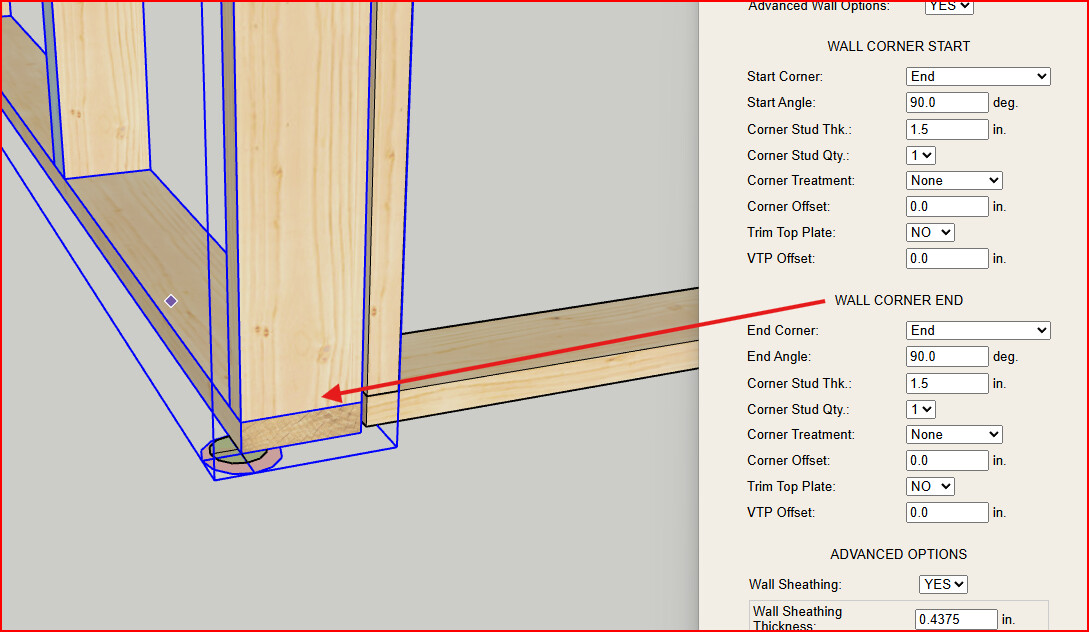
An Inset Outside Corner option and an Inset Inside Corner option will still be needed to offset the wall properly from the individual wall origin and end point locations.
Gable and shed walls will typically be the 'END" condition and the perpendicular walls will be the “Inset” conditions.
Top plates do not lap because SIP Screws are used to attach the corner from the long panel into the inset panel.
Note the wall_sheath and wall_gypsum tags are turned off for clarity.
The cap plate is the width of the wall from exterior OSB to the interior OSB. The cap plate sits on top of the wall top plate distributing axial load to both the interior and exterior OSB facers.
In the snippet above the Floor Extension Sill plate is used as the wall cap plate to maintain the parametric properties of the cap plate. With the sill plate option on and the framing set to a very wide spacing the detail above is created and have full parametric capability.
The cap plate is either a ripped 2x or ripped rim board (1-1/8" thick). A user defined width and thickness will be required since each manufacturer has their preferences on what material to use as the cap plate.
Do you want the auto-corner configuration turned off? I think this would then always leave the walls panels in an end condition for the start and end corners.
If the Auto configure is set to end, and assuming the start origin and end point are changed to the Exterior OSB sheathing, wouldn’t the auto end configure need to determine an inset end condition for both inside and outside corners?
Normally, I design so that outside face of stud aligns with the face of foundation below, but I have done one project – my own house – with real cement stucco where the outside face of sheathing had to align with the foundation below. That’s saying that this request has an even broader application than just doing SIPs. It sounds like you need more than that as well. Why don’t you guys do a Zoom meeting to brain storm?
But in most cases to get shear capacity out of SIPs both sheathing layers need to be able to push on the FND, or significant enough blocking / framing that is tied to the FND. Overhanging the FND isn’t possible when expecting them to provide capacity against wind / seismic.