I am attempting to generate new faces by adding crossing edges over existing faces. I am finding that inner loops which meet these crossing edges at a vertex are not easy to deal with. Some times they become empty loop appendages of the outer loop of an adjacent face rather than inner loops of the face that they are in. So I am trying to work out how Sketchup generates faces in the first place.
I have this code which creates a face with holes:
mod = Sketchup.active_model
ents = mod.entities
sel = mod.selection

outer_pts = [[0, 0, 1], [3, 0 , 1], [3, 7, 1], [0, 7, 1]]
face = ents.add_face(outer_pts)

hole1_pts = [[1, 1, 1], [2, 1, 1], [1, 2, 1]]
hole1_face = ents.add_face(hole1_pts)
hole1_face.erase!

hole2_pts = [1, 3, 1], [2, 4, 1], [1, 4, 1]
hole2_face = ents.add_face(hole2_pts)
hole2_face.erase!

hole3_pts = [[1, 5, 1], [1, 6, 1], [2, 4, 1]]
hole3_face = ents.add_face(hole3_pts)
hole3_face.erase!
Then I have this code which adds crossing lines in different orders:
a = [[2, 0, 1], [2, 1, 1]]
b = [[2, 1, 1], [2, 4, 1]]
c = [[2, 4, 1], [2, 7, 1]]

[a, b, c].each{|segment| ents.add_edges(segment)}
[a, c, b].each{|segment| ents.add_edges(segment)}

[b, c, a].each{|segment| ents.add_edges(segment)}
[b, a, c].each{|segment| ents.add_edges(segment)}

[c, b, a].each{|segment| ents.add_edges(segment)}
[c, a, b].each{|segment| ents.add_edges(segment)}
These are the results showing the order in which the edges where added and the right side face and its edges selected each time:
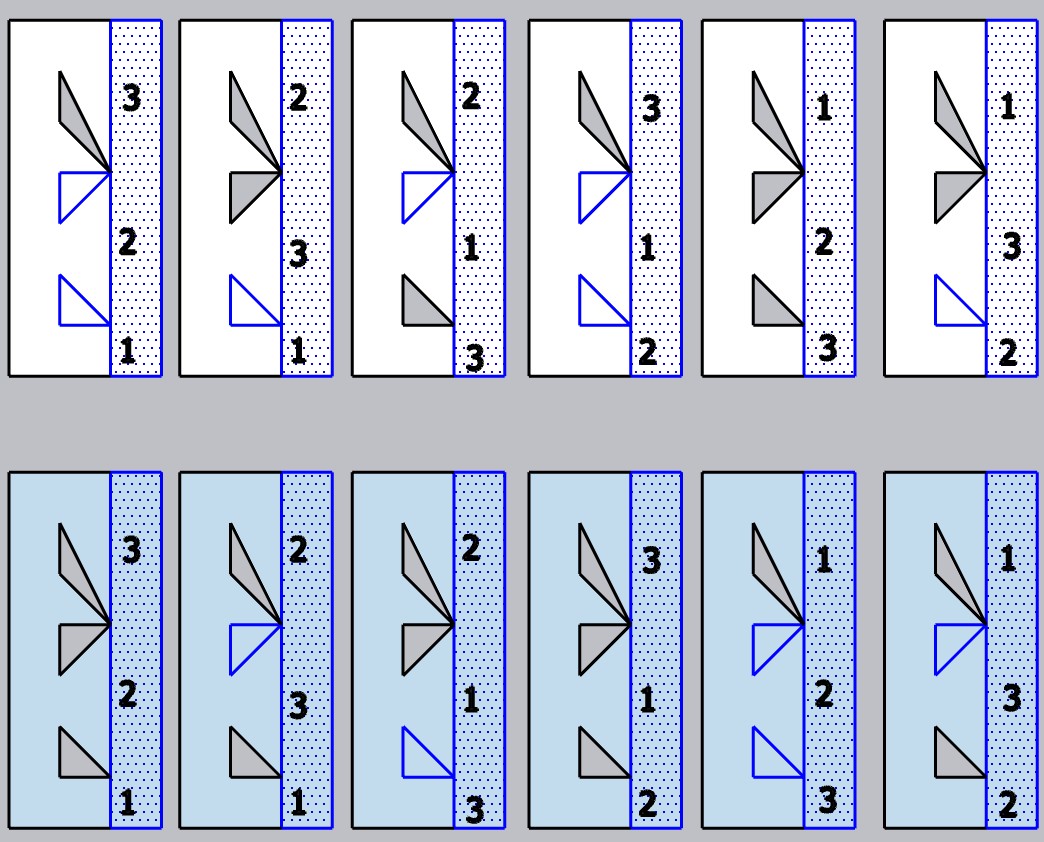
It might seem obvious, but what I conclude is that resulting organization of face geometry only depends on the location of the last or closing edge and not on the order in which the previous edges where added.
edit: actually that is not right. if so then version 3 and version 5 of the front face examples should end up with the same holes and they don’t…
The configuration I want is either the 5th version of the front face or the 1st version of the back face where all of the original inner loops are retained. So I tried to work out how the winding order of each faces edges might explain the results
I used this code to traverse the edges:
face = sel[0]
outerloop = face.outer_loop
face_edges = outerloop.edges

count = 0
sel.add(face_edges[count])
count += 1
For the first version these are the fist 6 edges:

Here the upper triangle is an inner loop of the left face. What I presume is that, for front faces, Sketchup starts with the first least angle clockwise edge from the closer and then adds the next least angle anticlockwise edges until it returns to the first edge. Just using that logic though, the fifth edge should be the third edge. So, evidently or possibly, when a node is encountered that connects with a loop, that loop gets traversed as well, as a special condition.
Is this winding scenario correct?
This makes me wonder why the upper triangle was not included as an appended loop to the right face like the middle triangle was.
This is how the left face outer loop is wound:

Here the first edge is again the least clockwise angle edge from the closer and it seems to march around in the anticlockwise direction collecting each subsequent least anticlockwise edge from there.
Two of the inner loops are passed over which kinda makes sense since they would not be found using the anticlockwise least angle method.
But why is just the top triangle retained as an inner loop of the right face?
I’m not sure if Sketchup evaluates faces separately or consecutively, In either case, one of the faces is crossing the outer loop of another face.
I know that, in general, I can recreate the holes by adding them back as faces and then erasing those faces. In this case the result can be not helpful however. Say I use this code to try recreate the middle triangle:
hole2_pts = [1, 3, 1], [2, 4, 1], [1, 4, 1]
hole2_face = ents.add_face(hole2_pts)
hole2_face.erase!
This is the result:

The hole is not created and it is another part of the face that ends up getting erased.
Will I end up having to erase every face, save its properties, and recreate every face in a situation like this?