[Plugin] FredoSection - Tools about Section Planes

FredoSection provides several tools dedicated to section planes:

It is published on Sketchucation and requires LibFredo6 v15.8a. It is available for Sketchup 2026 and above.

Here are the main features:

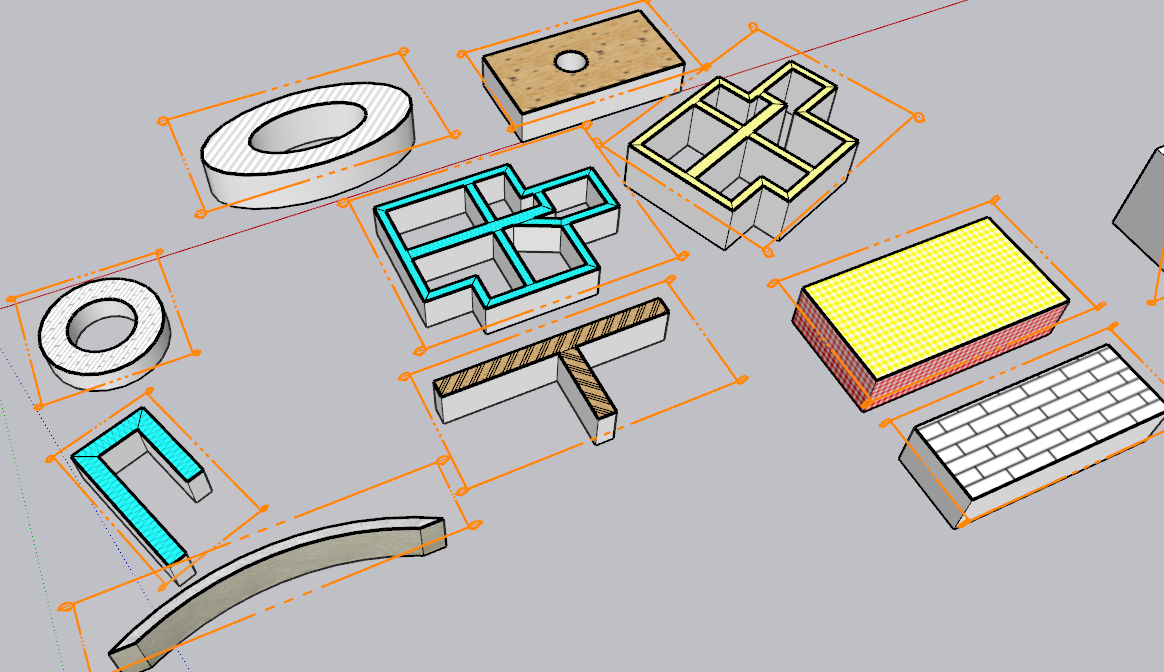
  • Generation of section cut faces with hatching patterns at scale for section planes which are active in scenes.
    b63f7c96-0923-4cf4-b54d-53ff11f516bd-image.png

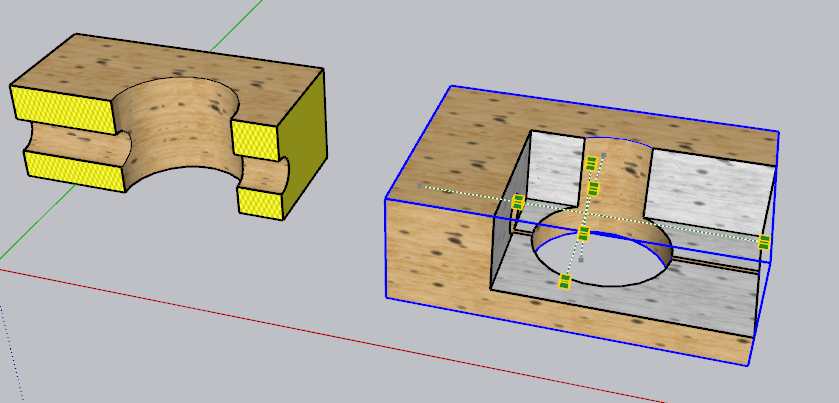
  • Section box: create a configurable set of section planes (inside box, outside box, custom section line) for a selection of geometry.
    4e38ed57-155c-451d-90e7-e08b99f0280a-image.png

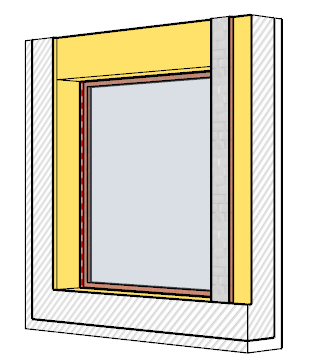
  • Door and window schedule: create a permanent companion model with selected views of doors and windows, which can then be mapped at scale in a Layout document. This will be released in a next version however.
    22970415-2c9b-40d6-8459-c4c57b9a8f8c-image.png

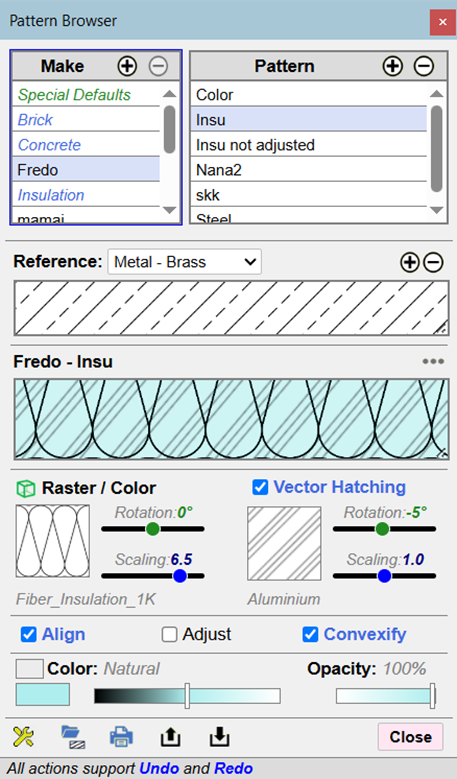
  • Pattern Manager: This tool is used to create / modify hatching patterns and assign them to containers and/or tags to decorate their cut faces created by the other tools above. FredoSection comes with a set of built-in patterns, but you can create your own.
    d62bc2a3-4b82-4d51-be19-e95f00bb1db9-image.png

FredoSection is mainly oriented to support a workflow Sketchup + Layout. It only works on Scenes. The hatching patterns are scaled by scene, so that they always appear at the same size when printed on paper. This requires that you assign a paper scale to each scene processed.

There are also a few videos:

Generation of Cut Faces - Overview

Pattern Editor - Overview

Pattern Modes - Overview

Section Box - Overview

Section Box - Modifying geometry

There is also a user manual for the Generation of cut faces, pattern editor, pattern modes and section box.

FredoSection - User Manual - English - v1.4 - Jan 2026.pdf (3.4 MB)

Finally, here is a video by The Sketchup Essentials on the cut faces functionality.

14 Likes

Wow! This is amazing! Since you managed to add hatch by tag, I just wonder if it would be possible to add hatch by attribute and saving different collections of those. This would be very handy for creating overview plans.

Anyway, thanks a lot!

I am not clear on what you mean. Do you have an example to illustrate your concept?

Let’s say in other Plan you want to have colors or hatches depending on fire protection quality and not materials. This would be only possible when working with attributes.

1 Like

something like Matsim

but for the section plugin then ?

I am not clear then.

I assume you create a set of patterns for each level of fire protection.

If each wall has a flag telling their level of fire protection, then assign them the corresponding pattern.

At best, FredoSection could hve a feature to match conditions to patterns: in your case, the value of the attribute ‘fire protection level’ to the pattern.

That’s what I could do, but in a more general way, so that it is customizable. I’ll think about it. But so far, I did not get feeback on FredoSection, and I am not sure the plugin is of interest for the community.

2 Likes

it is.

I’ve been toying with it, I’m training someone coming from archicad to sketchup this week, and I plan on including it.

2 Likes

this plug in is definitely of interest; we have team members trying it out and liking it. We will give you more feedback!

The plugin is an alternative for Curic Section and Skalp section. Knowing about the level of detail you add to your work, I think it’s very interesting.

The problem we have with these plugins is that the investment we need to have into any of them, implies reviewing files and templates. Diving deep into how this all works demands time. I haven’t had much of that right now. I hope I will have the chance to review it at some point, and give you structured feedback.

3 Likes

This is an excellent idea.

IFC management in sketchup allows for custom attributes and taking advantage of the work required for setting them up, would enable new workflows.

Integration of your plugin into tools that try to implement standard workflows into Sketchup, would also be interesting. @Cyentruk has been developing 5D+ and it relies in Curic Section. Bridging it with your own plugin would allow for an alternative method that would allow both workflows to merge seamlessly.

Some of us would benefit a lot from that.

1 Like

This easily can be done by toggling Color By Tag mode. The face of hatches will be painted hatch materials for displaying when Color By Tag is OFF, and assign tags have textures for displaying when Color By Tag is ON.

well, this is giving you one option to override, but we usually need many more and handling those through tags would be just too complicated.

For refurbishment projects you need black for existing, yellow for demolish and red for new elements. And so on.

I was just thinking about where it could be even more interesting.

1 Like

It’s not that easy. The idea here is to create a different section with different meaning, based on the same geometry but different attributes of that geometry.

Fire rating, sound or thermal insulation, even thickness, or material finishes could be interesting to have.

So, it seems to me that the idea is to improve from the section by tag/material that we have in Skalp or Curic, and leverage classification and DC custom attributes to extract sectrion hatch/colors.

3 Likes

That’s also the color system we use here.

We often separate our files. A file only contains existing/demolishing elements.
Use that file can be linked (using Trimble Connect or Fredo Xref) into the files with new elements or reuse elements when modeling.
Combine these files in LayOut, then the colors between objects are dependent.

That still doesn’t solve it. As sectioning is still based on either layer or tag. The objective here is to have other kind of section bases, to generate other kind of information.

Diffent files use different setup section hatches for tags. We only stack the viewports in LayOut. They will not affect each others.
Here is our files:
SKP Files

  1. combined_existing.skp (grids, dimensions, annotations, hatches) <= (model_existing.skp + model_geographic.skp + … (modeling only)
  2. combined_new.skp (grids, dimensions, annotations, hatches) <= model_new.skp + model_landscaping.skp + + model_geographic.skp + … (modeling only)

1 & 2 can xref (dynamic import) model_xxx.skp for reference

LAYOUT Files
drawing.layout <= combined_existing.skp + combined_new.skp (per viewport each files)

As you may understand, FredoSection generates cut faces by scene. The top group containing the cut faces of a scene if tagged and this tag is only visible for the scene.

This is how you can have different hatching patterns (or different scaling) for each scene and how this works well with Layout.

What I can propose is to have a general concept of pattern modes. Currently, there are 2 individual pattern modes:

  1. by Container: the pattern used is attached to the definition of the container
  2. by Tag: the pattern is taken from the tag of the container

You can combine these 2 individual pattern modes in order. This is why the choice for each Scene is defined as:

What could be done is the following:

1) Introduce a concept of Custom Pattern mode. This is created by the user as a mapping table between conditions and patterns. For instance, a custom pattern mode (say, call it History) could be defined with 3 conditions:

  • if container has attribute ‘Existing’, then use the pattern ‘Existing’
  • if container has attribute ‘Demolishing’, then use the pattern ‘Demolishing’
  • if container has attribute ‘New’, then use the pattern ‘New’

The way the condition is expressed can be simple, say, [Dictionary, Attribute] and string value (or regular expression). Advanced conditions could even be based on Ruby code.

  1. Each scene is assigned a sequence of individual pattern modes, in order. For instance:
  • History
  • Container
  • Tag

This means that if a container respects the History filter, then the pattern in History is taken. Otherwise, we use the container definition pattern, and if not defined, the pattern of its tag.

That’s not very complex to develop, and I guess it gives flexibility to have different scenes showing different information.

By the way, I was thinking of this approach for a related purpose, when your model is created from architectural elements coming from a plugin, like Medeek’s or FlexTools (or tagged from documentation (ex: 5D+) or with IFC tagging.

In these cases, we could imagine that I (or someone) produces:

  • a custom pattern mode with all conditions (say a Medeek pattern mode). With the help of the plugin developers we could find the conditions for identifying walls, floors and other architectural elements in the model (possibly with ruby code) and assign them patterns.
  • a set of patterns corresponding to this pattern mode (say a set of Medeek patterns). Note that these patterns can be customized at user level, so they just serve as an initial default.

This could be integrated with FredoSection and be shipped as part of the release.

SIDE POINT: Currently, FredoSection does not use inheritance of patterns from containers. I mean that subcontainers are rendered with the pattern attached to their own definition, not with the pattern of their parent in cascade if they have no pattern attached. I can provide an inheritance mode, even configurable. But I am not sure this is desirable.

2 Likes

I like the parent inheritance idea. It’s like css for models.

The deeper you assign a pattern mode, the more fine tuned the pattern becomes.

I wonder if custom pattern modes can be derived by leveraging the classifier tool in sketchup.

We are mostly using it to classify IFC models, but it can assume any kind of custom classification. It’s a powerful idea and I don’t it being used by many developers. Basically, if we would have an history classification, we could use that, for history scenes with specific patterns and you wouldn’t need to reinvent a classification system, you would leverage Sketchup’s.

eventually the classifier process could be streamlined, but it may be promising.

You did a great job on the extension. Your approach to assigning patterns to containers and tags is intuitive and refreshing.

Two features that I appreciate about Curic Section are the ability to control the line widths of cut-face area borders (by pattern) and the ability to merge cut-face borders of adjacent areas with matching patterns.

One wishlist feature (that I haven’t seen any section extension make a provision for yet) is providing a way to isolate only the cut face (toggle the rest of the model’s visibility without turning off the cut face). For example, I like your “Toggle visibility of Section Cuts” button, but a button to toggle the model’s visibility would be very helpful for those like me who stack viewports in LayOut. Currently, you can achieve this look with the hide command, but it isn’t ideal.

Overall, I love seeing any attention given to the ability to easily customize section fills. It is something I use in my daily workflow.

1 Like