Hi!
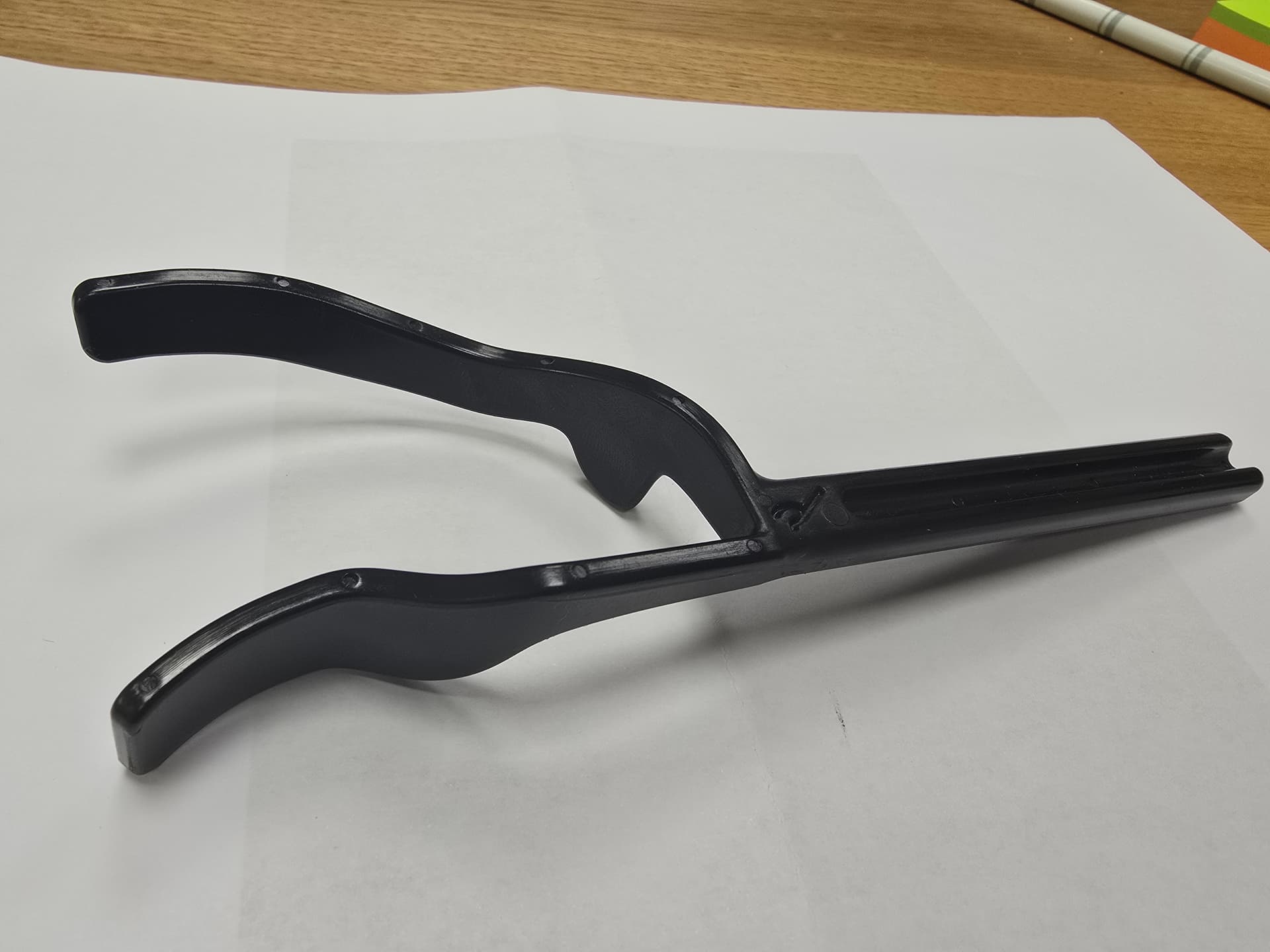
I bam new to this and run Sketchup Pro. Now, I have watched all tutorials that I can find and been trying this project for almost 2 weeks (lots of hours) but still do not know how to model this shape (please see photo). So I am close to give up.
I can draw the shape from top view with lines and arcs but fail when it comes to make the shape from the side. I have tried with solid tools and with intersect but can not get to grip with it.
I am planning to 3D-print the object. Can anyone give me a hand? Preferably a detailed instruction.
Kind regards to all!
Lars
Thank you, Mihai. It is so kind of you to give such a good and skilful answer to an unknown person like myself. I will go through it in slow pace and detail tonight.
Any chance I could get back to you if I still have problems?
Kind regards
Lars
Model.skp (9.9 MB)
Hi!
See model
I received tremendous help from Mihai which aided me in my construction. Now I have made the 2 arms and left to do is to attach a handle. I tried to watch how Mihai connected the arms with the handle but it was all to fast, Could he or someone else help out?
I assume it is the pen tool (about 1:34 into Mihais video). Is there a group which he opened up?
About 1:43 into the video you can see that he matched the thickness of the handle. Move tool? Did he open up a group?
I will 3D print this. Even if I have Solid Inspector I struggle with making it watertight after “messing around”. How does it look?
Brilliant, Mihai. Thank you! I have a couple of questions. mI can not work out what you are doing 2:50 and onwards where you seem to divide the curve. Why are you doing that and how do you do it?
The other thing is about 4:25 where you draw lines on the shape. Why do you do that?
Hope you can find time to answer. I am very grateful and have learned from your videos,
Don’t try to do the same steps second by second, but follow the idea as a whole.
Except for the part where you have to bend the two objects, and for that you can use the Shape Bender extension, the rest is just basic stuff from the native SketchUp tools. Line and Arc to create the 2D shape, PushPull to extrude it.
It adds geometry to the group/component to help the Shape Bender plugin generate better quality model (The additional geometry allows the model to better adapt to the curve). In the video you can see the two models created before and after adding the additional geometry.
OK, almost finished with my project. The pieces are solid so I can easily stick them together. Can you advise how to join these 2 objects? I would like the join to be smooth, not in a sharp 90 degree angle. Will also add a handle with similar smooth join.
Hi Mihai and thank you. Yes, I fully realize. Elegant work you did. I could not fully understand what quads is (guess you did the project in 4 different pieces) and what subdivision is.
I am so ashamed to ask but is there any chance you couldsend video of how you created this?
I created the model without registering a video, but it is advisable that at this point you learn well the use of the basic tools with which you can create that model.
The technique of using quads and subdivision requires much more training and specific extensions - Vertex Tools, SUbD, etc.


 not yet! You’ve worked hard and taken some steps, but you still have more to study and practice, I guess/hope you realize this.
 3D model:


