I just upgraded to sketchup pro from having been a web user for years. I am finding navigation rather rigid in its configurability
I was quite fond of the web navigation where the mouse vertical scroll provided a vertical rotation(+CTRL = Zoom) , and the mouse horizontal scroll provided a horizontal rotation (+Shift = Pan). Clicking the centre button provided Orbit - which i didnt really find myself needing so often as the scroll rotation is much more convenient to navigate by.
How do i set this up in Pro? I would think Pro would be able to provide this level of configuration and i must be missing how to achieve this. Help would be greatly appreciated!
What mouse do you have? The scrolling wheel usually rotates either forward or backwards not sideways. From sketchup there not much you can do to set the mouse behavior up, the scrolling wheel button will orbit around the model, if you hold shift it will pan, the only configuration you can change from sketchup is invert the direction of the scrolling wheel.
There are some mouse models that have more than 3 buttons that have their own software where you can change the settings, assign shortcuts to other buttons or gestures like on the Logitech option plus software.
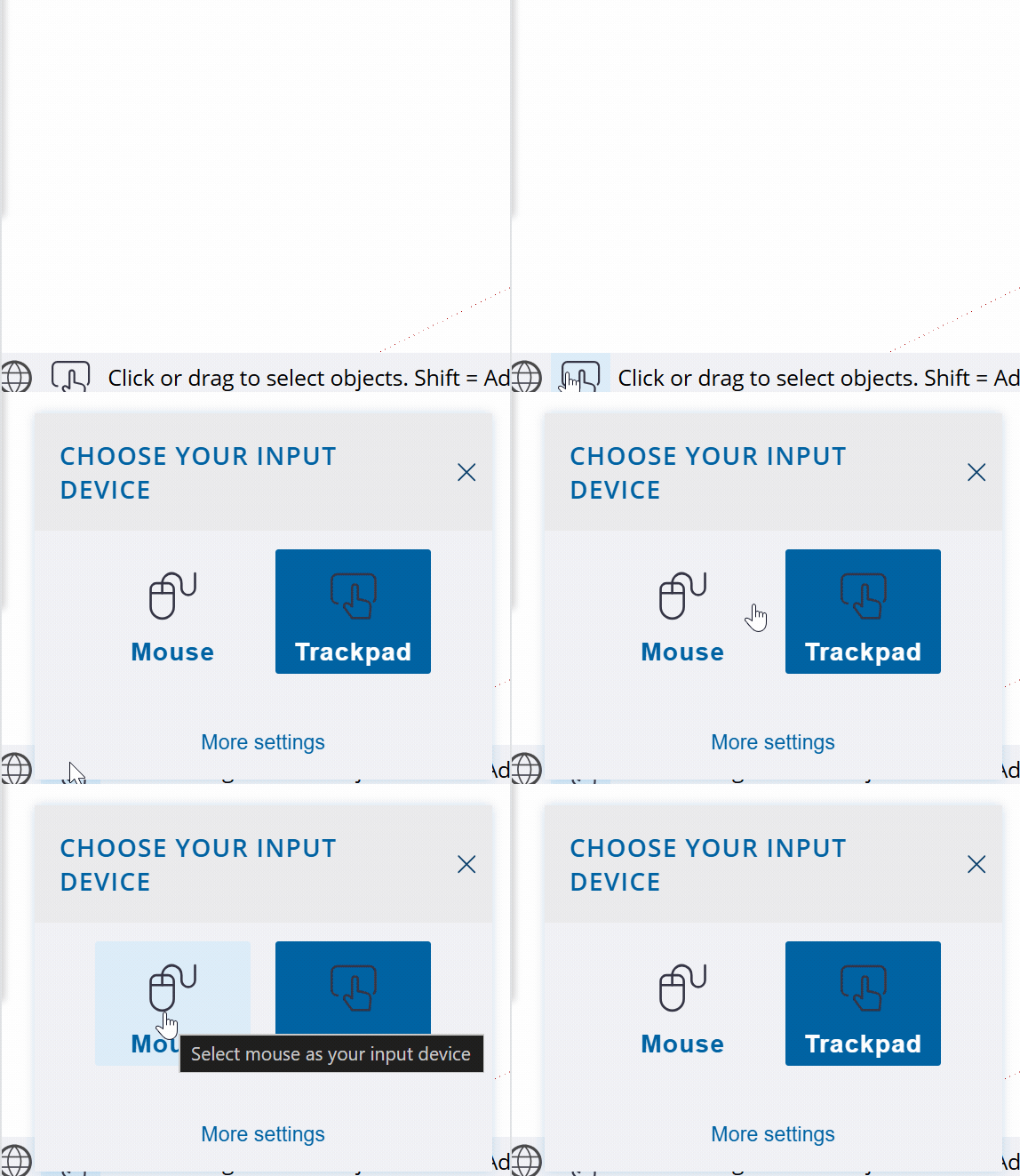
Well, it looks like you’ve selected the Trackpad as your input device in the web version so far.
This is basically a “wrong” choice if you have a mouse; if you select the mouse, both mouse wheels will activate the zoom function, regardless of the state of the modifier keys. Just like in the desktop version.
However, as you just found out, the “wrong” choice can even have advantages, like this extra tilting / spinning capabilities of the wheels.
The desktop version hasn’t integrated the Trackpad as input device option (yet?), so you have to make satisfaction with the “limits” of the middle mouse button with Ctrl/Shift buttons orbit/pan functions.
Edit:
If you are serious about using Sketchup for work, I highly recommend one of these input devices: https://3dconnexion.com/uk/spacemouse/#compare
These will dramatically increase your efficiency.
In addition, I have an experimental extension: ViewDice that utilize the mouse wheel(s) for similar functions as you mentioned above. (Due to Ruby API - and my - limitations, both wheels acts same.)
Development of the extension is suspended for a while…
I have a MX Master LogiTech Mouse, and a horizontal scroll along with a vertical scroll is pretty standard fare on any mouse these days that has any reason to be held by a design professional. I am surprised to hear that I have ‘upgraded’ to Pro and downgraded my functionality.
Yes. I am using the trackpad settings … and its by no means ‘wrong’ The fact that the developers at shetchup havent incorporated this basic level of configuration in an application that is premised on navigation in a 3 dimensional space is alarming. Especially since they are already offering this in the web version!?
I dont mean to be pedantic about this, but I’m sure some of you can appreciate how the additional scroll functionality vastly improves workflow! In the Pro application I am unable to Pan now without changing my left click mouse setting to Pan mode and thereby negating my ability to Pan whilst simultaneously drawing a line for example.
You don’t have to do that, left click opens the contextual menu, as I said on my first reply, if you hold shift the orbit function will change to pan.
You can downgrade to the go subscription and keep using the web version with a couple more features than the free version if it bothers you so much having to use sketchup like 90% of every other 3D software.
then when you start drawing the line and released the left button, hold the middle button to Orbit (+ Shift to Pan) and when you release the middle button you can continue in a Line tool (or any Tool), which is automatically resumed.
Thanks for the tip, and also the snarky comment. You must be one of the developers
As I mentioned in my reply, I am not trying to be pedantic, but a horizontal scroll is pretty basic stuff, and it should be incorporated into the software if it hasn’t been already, regardless of what other software may or may not do.
If you do work for SketchUp, please do let me know how a downgrade is initiated?
thanks, this was helpful. but a horizontal scroll would still be appreciated, it does also add the benefit of not having to move my mouse to navigate but just the scroll itself.
I’ve mapped mine to zoom in/out.
because yeah, with a master MX, you can remap stuff. for example, you could map the pan tool on one of your thumbs key. they’re fairly common these days on mice.
it’s very easy to spot who’s working for sketchup on this forum. it’s written next to their name / pseudo. anyone else doesn’t.
start your line. zoom out. move your cursor. zoom in. click.
no it’s not pretty standard. quite the contrary.
The way go works was added as a crutch for people using a trackpad, bless them. poor things.
I guess I’m not a professional then… but I came to SketchUp in the @ last days… so I didn’t ‘learn’ on the web, but with pro, etc.
I also have a ‘professional’ 3dConnexion CADMouse that has 3 buttons plus the scroll wheel, a radial menu button as well as a couple others … I have the scroll wheel only for zooming in and out, and the ‘extra’ middle button for my orbit. Plus it has some cool extra features available via software - so I have some macros and other stuff programmed to the additional buttons. I also have one of their ‘SpaceMouse’ for really speeding up my moving through my model.
And since you are taking swipes at people - how could a knowledgeable professional like you not have these 2 devices already installed? Tsk tsk tsk….
I can’t speak for the developers, because I am not one, and @francisquitof is certainly not a developer, nor a ‘Sage’ just a user who tries to help, like most of us here.
When you master orbit and orbit + shift you’ll see there is a logic to it… your commands aren’t broken moving through 3d space, so you can quickly move your model to see the underside and reference a line or push pull, etc… but there are more ways than one to move around the illusion of 3d space on your 2d screen - so hopefully you find what works for you. You can try reprogramming that fancy mouse of yours to do what you want, and you can adjust the shortcuts that SketchUp uses.
And maybe stop bashing on ‘the developers’ for stuff that has been around a long time.
I think you’re missing my point, but that’s ok. I am simply saying the sideways scroll is highly advantageous and that I am surprised that by upgrading i have lost that feature. I didnt mean to take a swipe at your friend Francois, but I dont appreciate comments which tell me I should go elsewhere if I’m not happy with my purchase (i consider it a swipe at what I believe is a genuine grievance given the same functionality is available in other interfaces).
@francisquitof is not my friend, I don’t know them at all. I actually don’t see their posts as I have them hidden - so I didn’t see that they told you to go elsewhere.
Make a new post and make it a Feature Request. The SketchUp team checks in here often… and if enough people vote or comment on the usefulness of your idea they may consider adding it to to a future release. But the FR category is long and filled with thousands of individual ‘good ideas’.
It would be a bit weird altering the software for your particular mouse though, but maybe I am just blind to how many people use that for modeling.
 ViewDice
 The fact that the developers at shetchup havent incorporated this basic level of configuration in an application that is premised on navigation in a 3 dimensional space is alarming. Especially since they are already offering this in the web version!?

