Fusion 360 vs Sketchup

Hi All,

I’m at a bit of a crossroads with SketchUp and wanted to share my experience.

I’ve been using SketchUp extensively for around six years and have been paying for the Pro version the entire time. I mainly use it for construction and steelwork, usually exporting models into AutoCAD for detailing and creating construction drawings.

However, over the past year, I’ve been doing more 3D printing work, and while SketchUp has served me well, I’m beginning to feel that Fusion 360 might be a better fit due to its parametric modelling capabilities.

I have an engineering background and hold a master’s degree, with plans to become chartered this year. So it’s not about understanding engineering principles—it’s about feeling like SketchUp can often be a bit of a minefield. I frequently find myself wasting time trying to work out the best way to model something or which plugin I need to make it work.

I’ve resisted switching for a long time because I’m a committed SketchUp user and wasn’t keen on learning new software. However, I decided to try a YouTube 30-day Fusion course—and by day two, modelling a glass bottle, it already felt like a breath of fresh air.

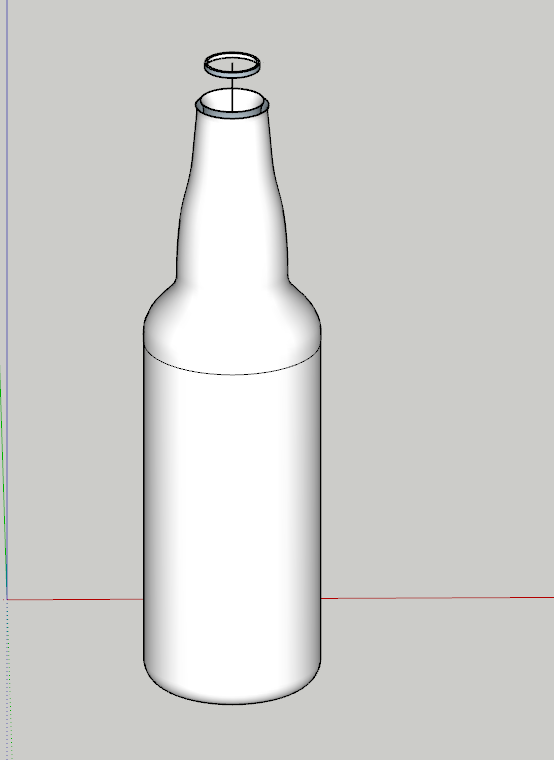
Here’s an example of what I produced in 10 minutes following the tutorial:

I then attempted to model the same thing in SketchUp, giving myself 20 minutes. Despite being reasonably experienced with SketchUp (not reached wizardry yet) and having produced many construction models with it, I quickly became stuck. I downloaded the Fredo spline tool, created the curve, offset it, and used Follow Me around a circle—but the results were frustrating.

It often feels like SketchUp requires you to fully master its quirks before you can get anything decent out of it, whereas Fusion seem to just work—especially for parametric modelling has a benefit, chamfers, bevels, and adjustments. SketchUp’s lack of native features for these tasks and issues with having to scale it up and then back down to just get a bevel edge can be a real pain.

I’m happy for anyone to show me how they would approach this model in SketchUp, but for now i think im gong to give Fusion a proper try, particularly for 3D printing.

It’s a bit of a long one, but I thought I’d share my experience and see what others think.
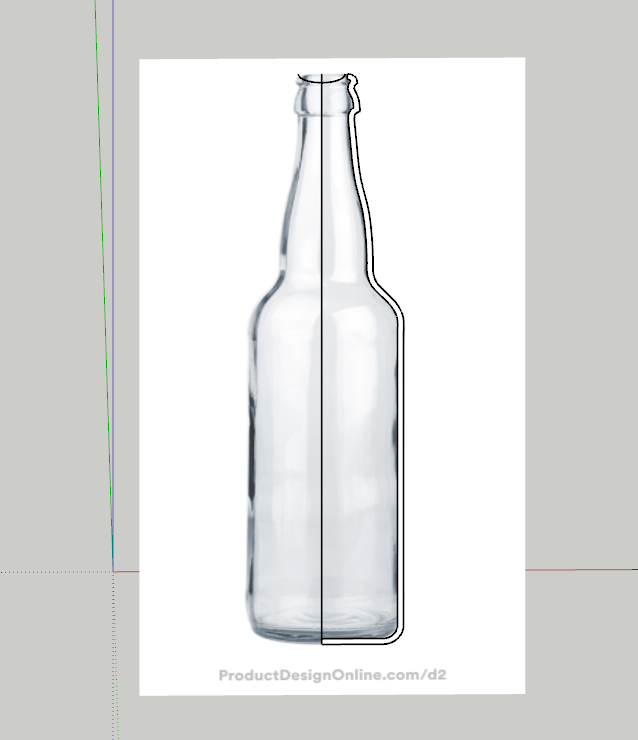


Sketchup was made for bigger things. Your 2d bottle has very small lines.

Make it 10 or 100 times bigger, then follow me. And make it back to it actual size.

Basically, when su was made in 2000, 3d printing wasn’t a thing.
And later, it was primary an architecture software.
Pretty much everyone using su for 3d print uses a similar trick : we open a file in metre. And in it we model as if if was millimetre. So if your bottle is 30mm wide, it’s now 30m

The slicers don’t care about units, it’s all the same to them.

—-

Fusion was made for a smaller scale in the first place. It was made for design and engineering. So off course, at the scale you’re working, it behaves better.

In the end, the best tool is the one you know ans possess. The all have tricks, limits and bugs. I can do stuff in SU that someone else can do in blender or 360. The end result matters.

So yeah, if you feel more comfortable doing some modelling in fusion and other in SU, that’s quite fine (and normal). They can complement each other :wink:

1 Like

Thanks for the reply, Yes it defiantly works when scaling up.

For the issues you mentioned is there anything the team at SU can do to fix this? especially making the bevel and chamfer tools native etc?

~ 1 min in SketchUp

4 Likes

Yes I know how to do it but it takes a little longer than 1 min to get the desired results.

1 Like

Yes, that’s right, it would probably take about 3-4 minutes to create at the exact dimensions.
But to reduce this time and create a multitude of shapes in a very short time, it’s possible to use something to generate them.

003793922f0464b13b1b8c9a74951d19

1 Like

Is this blender again?

It is Blender with an extension.

If ‘blender again’ it’s similar with ‘Fusion 360 again’… then yes!

1 Like

Why the sarcasm? When I said ‘again,’ I only meant that I thought you’d shown another example of the threads in Blender the other day. I wasn’t being sarcastic—just pointing back to something I thought you’d shared before. :thinking:

I need to look into whether Fusion 360 has the ability to add extensions that generate models for you. Considering that you seem to be looking for something that will reduce your work time, extensions that would do this would be useful.
I gave examples from a very well-known program that has such extensions available, that generate frequently used objects, and its interface is very well-known and easily recognizable.

1 Like

I retired from Architecture a little over a year ago and have been diving into 3d printing for woodworking items (and knitting item for my wife). My CAD experience ended with years of Revit, a bit of Sketchup and Architecture Desktop before that.

For the 3D printing I first toyed with Fusion (free version) and several other apps but found for the price Solidworks Maker to be much better… though a bit of a learning curve.

1 Like

I have tried Fusion 360 and I mean I have really given it a chance, but for some reason I just can’t. It isn’t a matter of CAD knowledge, I’ve been using CAD since my father taught me AutoCAD 14 with a “digitizer” (like a mouse, but with a pad you would program commands into). Heck, even the parametric stuff like Solidworks and PTC Creo, I get it. Yet F360 remained a CAD system that just didn’t make any f-ing sense to me. The sketch → model concept is just too much for this ol’ noggin I guess.

1 Like

Nice website. what sort of software do you use for this type of work? im very interested in the scanning - modelling world.

I’m a big proponent of the “budget friendly” pieces of software and not only because its easy on the wallet. I’ve found that when you use less costly tools/software you end up learning more and that aligns with my goals.

For photogrammetry I use Reality Scan 2.0, which is free.

For gaussian splatting I use Postshot mostly, but I’m tinkering with others. Postshot is also free.

For Point Cloud Management I use CloudCompare (yup, you guessed it: free!).

Scanning is a lot of fun you just need to use “controls” to make sure the scanned subject matter has a high level of precision. So, control points that you’re able to easily define in the datasets (images or LiDAR) or defining distances that you measured in the field. Once you have those, creating a 3D model from the scanned data is relatively straight forward.

Feel free to ask about specifics, I’ll gladly share the knowledge I have upon request.

2 Likes

I’d say use both.
It really depends on the task at hands.
True, Sketchup isn’t parametric and, if you ask me, yes every other action you want to do is better covered with an extension. But Sketchup is designed for that: being tweaked.
Also indeed sketchup was optimized for architecture and working on tiny objects require a puzzling, counter-intuitive, but easy work around: changing the units.

When doing 3d printing both have their edge:
If you have a precise idea of what you want to achieve and specially if you have a defined geometrically sound process that you know you will follow no matter what, then Fusion is your thing. It’s gonna be a delight, and modifications will be a treat.
Now if (like me most of the time) you’re not sure where you are going to land when you start modeling this bottle. You figure out half way that it will not be symmetrical, and also that it needs wings and a beak… And your client agree, loves it and also want you to fit a moo box in the base. Then Sketchup gives you the flexibility you will need.

Do you have to choose one of the 2?
And have you tried steelwork modeling in fusion? Does it work for you?

2 Likes

FWIW, I have had no problems making precise models for 3D printing using SketchUp. Use the tools that work for you.

1 Like

Me neither (after i stopped modeling in mm), the limitation of SU in my view is not precision, but parametric adjustments.
But indeed, use what works for you.

1 Like

I briefly used Fusion360 about 10 years ago. I had a set of plans for a Murphy Bed/Desk combination I wanted to build. I also had access to a maker space at a local community college that used Fusion360 to produce the driver files for their 5 x 9 CNC machine. Since I wanted to use this maker space to cut the pieces and various holes, it seemed reasonable to use what their people could most easily help me with.

My recollection was that the learning curve wasn’t bad, although Fusion360’s modeling paradigm is very different from Sketchup - and the differences got in the way of my using Fusion360 quickly. I do recall that I gave up on animating my model to show the “Murphy” nature of this piece of furniture - while I’d already easily done it in Sketchup!

I haven’t had a reason to do anything since in Fusion360 - but I’m typing on the Murphy Bed/Desk that resulted from my Fusion360 modeling and use of their CNC machine right now!

1 Like

Thanks. It appears only one of those (CloudCompare) has a Mac version.

That’s what I do with MatchPhoto; First model basic overall form based on measurements with a laser distancer, and then fill in the rest from MatchPhoto. If the over all dimension is dead to nuts accurate, everything else in between is just a matter of interpolation and can’t be that far off.

Plus one on that. I keep relying on SketchUp AND PowerCADD. @mihai.s keeps showing SketchUP AND Blender. J. J. Zanetta and @Danimaupin rely on SketchUp for iPad AND Procreate. I find it empowering not to be limited by just one program.

3 Likes