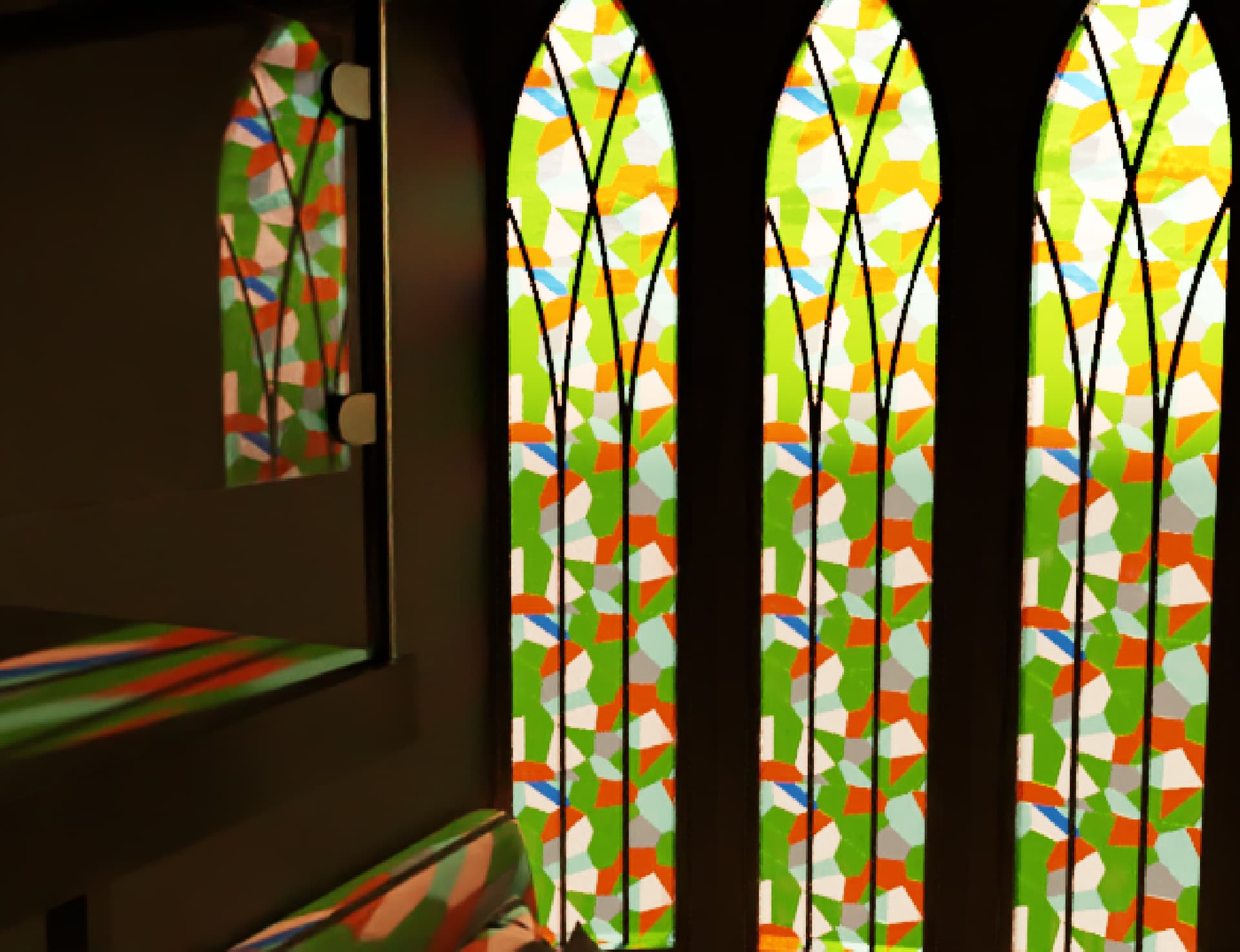
Asking about post production after vray rendering

Hello, I’m new to this forum—sorry if I’m posting in the wrong section.
I’d like to ask for some advice on improving my rendering above. I’m currently using SketchUp 2023 with V-Ray Cosmos, and I do post-production with adobe photoshop following this YouTube guide: https://youtu.be/wtdD68irsr8?si=CfZtlfIzDDy0PZ2M

Some of the questions I have in mind:

  1. When I try editing with the Camera Raw filter, there’s the “curve” option that can enhance colors—but whenever I use it, my colors just end up looking worse. Any tips on how to learn this, especially for interior rendering? Is the concept of using curves the same for exteriors or even non-architectural designs?

  2. I usually rely on spotlights and rectangle lights for my lighting setup. Is that enough? I also struggle with making the room look “warmer”—it usually turns out too yellow and ruins the image. Any suggestions?

  3. I’ve noticed that when designing for clients with a lower budget, I can’t really add things like wallpaper or other nice details to plain white walls. Do you have any ideas on how to make a low-budget design look less bland?

1 Like

Much (not all) of what this tutorial will ask you to do you can do in V-ray itself- this video is 7 years old and is super out of date for V-ray

  1. I

  2. If you are using actual color temperatures in your bulbs they should look correct - but you can also have v-ray do an automatic white balance or use a white balance adjustment in the frame buffer.

  3. Pictures and prints? Tall lamps , hanging pendant lights?

Can you share the .SKP file of your image above and I’ll make a few suggestions?

You should start by considering the lighting setup. Basically, your scene has too much light. No way can such illumination be achieved with the few recessed spotlights in the ceiling. Your hidden rectangle lights create an unrealistic atmosphere. The visible lights would leave the ceiling very dark.

1 Like

Share your file (to google drive, dropbox, etc if too large to post here) and I can re-light it and share the steps to improve.

Interior Rendering Bedroom With Mezannine.zip (12.3 MB)

Hello guys thanks for replying. this is the sketchup file that im using.
@Elmtec-Adam Thanks! Yeah im adjusting the color temperature but feels like the real life color temperature is not the same with the render result? so i decide to use color temperature by trial and error whats looks better.

@Anssi Hi, thanks for replying. Yeah i upload my sketchup file and there is some spot light and big rectangle light on camera position. Any suggestion related to my light position/type?

@eric-s uploaded! can you open? thank you! looking forward to it.

Also, if you have suggestion about this thread i create. Maybe i put wrong tag or something? Because maybe i want to ask for more in the future. I just dont wanna bother the mod if im doing something wrong!

1 Like

ok

So I’m starting off my taking a look at the existing lighting

I’ve disabled the sun and sky and looked at just the internal lighting.

First off I can see that the LED Spotlight models from chaos cosmos have got their own lighting and luminaires, this is very yellow and you’ve then placed spotlights on top of these - so the space now has double lighting.

So I’ve disabled the lights

I’ve replaced the spotlights with LED IES lights using IES files from here

LUG - LUGSTAR PREMIUM LED - Downlight Luminaires

I’ve then dimmed the lights that are under the mezzanine , as they overlit the lower levels as they were too bright.

I’ve left the artifiical lights now where they look roughly like this - the IES lights help to create more interesting shapes and shadows on the wall too

So you also mention things looking rather yellow - some of that will have been caused by those extra lights, but also there is this huge stained glass window with various green and orange panels - you could perhaps adjust the colours slightly to move them a little away from the more yellow shades of orange and green. I’ve done that a little here

the model isn’t geolocated, so I don’t know it’s position or if it is orientated correctly - but with those windows being in this room but behind the camera we definitely want to see them - it seems like such a waste of the building to ignore them altogether.. Whether it is reflected in the glass of the stairs or being highlighted on a wall

more to come - just a bit busy

3 Likes

Wow.. cant wait to see more! Oh.. for quick check of the light you use material override first? i kinda forget about that.. thanks for reminding me. Do you think my big rectangle light is unnecessary? Do i need just focus light on every possible lighting item position on the room only?

ahh i see.. you put IES light under the ceiling lamp? i thought IES light only for lamp on the wall. Thats indeed make interseting shapes. So you not using any spotlight and change it all to ies light?

1 Like

Lighting your scene with material override on with a mid gray allows you to better visualize the overall effect of the placed lights without the visual influence of the materials which may themselves be very light or dark - also very useful for setting white balance and exposure early on.

The rectangle light may still be useful as a little bit of fill light - but I think in the file it was too bright and was flattening the image by knocking out any shadows and making the walls and ceiling very uniform.

I’ve been keeping it on for render and introducing a little of it in lightmix just to help overall scene lightness at the end - treating it like a camera flash.

I swapped them all to IES - just because it was easier to replace them all in a couple of clicks.Y ou can make them unique afterwards if you want to adjust brightness of groups etc.

1 Like

for the lighting color temperature. Are you adjusting same as real life color temperature?

1 Like

@Elmtec-Adam thanks to you i just realise about the cosmos lightgen to easier setup sun and sky light. Kinda like this a bit of improvement of mine. The scenery from window really help make image to live. Hope i can do the same for room without window! Im still waiting for your image if you are not busy! I want to learn what else i need to improve from here.

1 Like

Getting the lighting and render settings dialed in first is most important…but there are some post-render corrections that will help. Adding an Exposure Adjustment Layer allows you to bring down your overexposed ‘highlight burn’ areas. And White Balance cools the image off so it’s not so yellow.

thanks for the tip! i will try using white balance. i already try to reduce the highlight burn but i get my image “dimmed” and completely lose my “warm” color. Do you think my latest image still too yellow? Im wondering how i get the “warm” vibe but not too yellow for my render.

You mean the one posted 11 hours ago? Color is subjective. Do I think it’s too yellow? Yes. But if that’s the design to be yellow and the client will like it then, no. It’s a matter of storytelling. We’re commenting on the technical aspects of a single interior render - we’re not taking into account any larger design narrative. Seeing those big arched stained glass windows first, from the outside, would provide context as to why we’re seeing these really bold patterns and colors cast into this room.

Another recommendation is to set the Exposure and White Balance to ‘Auto’ in your Camera Settings. You can see here I didn’t need to do anything other than reduce Highlight Burn in the Frame Buffer. I also enabled Ambient Occlusion as and added an emissive material to your can lights well:

1 Like

If you want more scientific tools for the color balance there are things you can do, but…

In real world photography you can use a neutral gray card to set white balance for a shoot. I have one called a WhiBal card that looks like this:


I use Lightroom for post processing, where you take the eye dropper tool in the color palette, and click on the gray card to set the white balance.

Lightroom uses the Camera RAW engine that’s also in Photoshop’s Camera RAW filter, though there seems to be tiny differences, it looks like this:

To accomplish the same thing in SketchUp I made my own test card, which anyone can make. It looks like this.

(I made mine a double Faceme component, but that’s partly broken in recent versions. Wherever I put it in a scene, it faces the camera)

The bottom line, though, is it matters where you put the card. Put it in the sunlight streaming trough the windows and you get one balance. Put it in the shadows, you get a different one, so you circle back to what @eric-s is saying about judgement and aesthetic effect you’re trying to achieve.

1 Like

Thank you so much! i will try to trial around your tips!

I see. Apprecaite your thought! i dont have basic as designer/architecture as i mainly do design for fun and do little help of my project. so im not really sure if my view of design is good enough. So i really appreciate that you guys giving your thought about this. I learn something like warm temperature (around 3000K Temperature) color for bedroom but i also see many bedroom render dont contain the warm color i learn about. Is that not really common? or im just interpret it wrong about the warm color thing.

wow.. this sounds really expert! might to try that somedays xD


1st image

2nd image

3rd image (trying to uncheck sunlight and dome light so only consider room lighting and setting up auto white balance)

Though its not perfect i think im learning a lot here. Pretty happy on knowledge and result i achieve for my current render. If you guys still have any suggestion feel free to tell me! And if you guys have time to render with your own version i really appreciate!

sorry for the delay

was busy, then was ill for a few days and ended up with a backlog, so was busy again

Following on from where you are - going for artificial lighting only

Beyond the tips and tricks others have given you - I’ve made a few changes - the wood looked strange to me, the scale of it seem too large and was kind of distracting. I did try adjusting the scale, but found it was easier and quicker to get a better result by swapping to another material from cosmos.

I’ve also rotated it so the wood grain runs vertically, this looked better on this tall furniture.

The materials in the room are very white - mostly too white.

Rule of thumb - White should look like light or mid grey in the colour picker and black should look like a charcoal grey. This prevents errors in the lighting and reduces contrast. I’ve done this across the model, from the desk to the marble floor to the wall paint.

I’ve also made the white walls a little warmer in tone to match the bedding.

I also had a little more creative adjustment of the scheme - to my eye it really does feel like there needs to be something hanging or on the papered wall.

So in this example I’ve grabbed a vaguely ok light fighting to help fill that double height space.

I’ve also tried to fill out some of the white space with the poster and the additional wallpaper around the desk.

I looked at a couple of rugs on the entrance area - I could imagine the acoustics in this room to be poor as it is visibly mostly hard surfaces - this would help to soften the sound, the hardness of the other materials and also remove some of that visible whiteness from the overall shot.

In terms of additional settings - I’ve turned on depth of filed in the render settings and added a little bit of foreground blur.

I’ve also enabled the volumetric environment to fill the room with a little light fog - this also helps to give lighting shape in the photos.

In the frame buffer

Filmic tonemapper and change it to AMPAS (or Hable if you prefer!) - don’t need to touch anything else.

This is SUPER important, you should always turn it on.

This will help eliminate get rid of a certain set of colour and brightness errors that I see all the time.

I’ve also turned on the lens effects to add some a little bloom and glare around lights

Exposure and whitebalance I’ve set to my taste.

5 Likes

Wow. !hat a difference. Rendering is design as it requires so many little decisions that add up to something greater than the sum of it’s parts. Nice work.

2 Likes

oh wow! i hope you already healthy now! thank you so much. Your render result really thought me that i dont really need bright all over the image to make cool results.

For the white wall i only use what cosmos give me. So maybe i need to manually reduce the whiteness to match into mid grey? How are you usually adjusting this? from color temperature or setting up RGB? (i usually search on the internet the color rgb and i add manually into sketchup/vray)