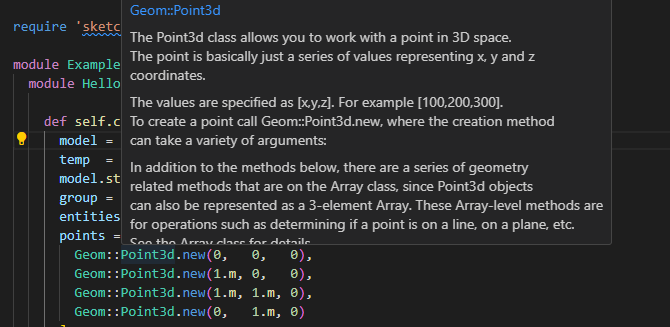
@slbaumgartnerCan you please show me a screenshot of your vscode showing IntelliSense?, for example, as you hover over any Sketchup classes or methods, would it show you a snippet/popup of the actual definition?
I can’t code without a debugger especially when I am trying to learn the API. Otherwise, I will end up with 100s of puts. I will stay with the old Ruby extension for now. So far I can debug and step through the code. It is not perfect, but better than puts…
Right now I am doing a reinstall of macOS in an attempt to fix an unrelated problem. It will be some time before I am ready and able to attempt a screenshot! Till then…
FYI, the asynchronicity of SketchUp’s Ruby Console has increased with the release of SU24 and Ruby 3.2.
IO text output in the console often arrives out of order from execution, especially if UI::HtmlDialog object callbacks are involved. Sometimes the IO output is delayed.
It is a little better (not much) to define an array and push text into it, then after the test inspect the array.
I’ve gotten into the habit of defining myself an emit(text) method that I use in place of puts. In this method I can switch it off & on will a local @debug variable. And I can have it puts to the console or just append to an array.
Any time I have tried VSCode, the Intellisense just gets in my way. So, I myself don’t use an IDE.
I just use the Notepad++ editor and normally have a browser open on the other display with the API and Ruby documentation. But then I’ve been coding Ruby in SketchUp for 16 years (computers for 40 years) and have a weird memory for “nitty” details.
I’m back again. So far the reinstall seems to be preventing the other issue (what appeared to be a memory leak in a background process that would cause it to grow to over 4GB in a few days). So I returned to getting debugging to work in VSCode.
I disabled the LSP extension and reinstalled the older Peng Lv one.
As requested, here’s a screenshot showing that solargraph is working with intellisense. The cursor was hovering over active_model in the line just below the intellisense popup.
I think there are several key things to get it all working:
install the solargraph gem
install the sketchup-ruby-api gem
run yard gems sketchup-ruby-api
create a .solargraph.yml file in the base folder of your code project. It needs to include the path to your project root in the require_paths: section.
This is awesome… very good news indeed. Thank you for your effort.
I believe I have solargraph gem installed already but not sketchup-ruby-api gem. Would you please post the command to install sketchup-ruby-api gem?, I think I am missing it…, sorry new to Ruby and gems…


 Thank you all for your help